Retail CRM for Black Friday 2026: a Q4 checklist for stores
Black Friday falls on November 27, 2026. A week-by-week plan for the customer base, stock, supplier orders, the till, seasonal staff and the daily report, with what each step looks like in a retail CRM.
Updated 30 October 2026: NRF 2026 holiday forecast, checklist dates from November 2
Four weeks before Black Friday a store still has time to fix the data that decides how the weekend goes: who its regular customers are, how many units of each top seller sit in each location, which supplier orders still arrive in time and who may do what at the till. This checklist goes through these jobs in order, with dates for 2026 and the part of a retail CRM that covers each one.
How to prepare a retail CRM for Black Friday 2026
To prepare a retail CRM for Black Friday 2026 (November 27), clean the customer base and build groups for your offers, set minimum stock for top sellers in every store, place supplier orders while lead times allow, give seasonal staff their own roles, test a sale and a return at the till and agree on one daily report.
- By November 6: customer base merged, groups built, minimum stock set, supplier orders placed
- By November 20: roles for seasonal staff, test sale and return, newsletters scheduled per group
- November 26–30: daily report every morning, same-day reaction to stock alerts
- December: follow-ups to first-time buyers before the last weekend before Christmas
Holiday season 2026 in numbers
The National Retail Federation expects another season above one trillion dollars, and last year's Thanksgiving weekend set a shopper record. The figures below come from NRF's 2026 holiday forecast and its 2025 Thanksgiving weekend survey.
| Metric, U.S. | Figure |
|---|---|
| NRF forecast for November–December 2026 retail sales | $1.013 trillion, growth of 4.2% over 2025 |
| Holiday sales in 2025 | $972 billion, up 3.1% over 2024 |
| Seasonal hires expected in 2026 | 325,000 to 375,000 |
| Shoppers from Thanksgiving Day through Cyber Monday 2025 | 202.9 million, a record (197 million in 2024) |
| In-store and online shoppers over that weekend | 129.5 million in-store (up 3%), 134.9 million online (up 9%) |
| Black Friday 2025 shoppers | 80.3 million in-store, 85.7 million online |
| Cyber Monday 2025 online shoppers | 75.9 million, of them 46.9 million on mobile |
Sources: NRF, NRF Forecasts 2026 Holiday Sales Growth as Consumers Remain Resilient, 15.10.2026; NRF, Thanksgiving Holiday Weekend Draws a Record 203 Million Shoppers, 02.12.2025. NRF defines the holiday season as November 1 through December 31.
Two conclusions for a store's data. First, 129.5 million in-store plus 134.9 million online shoppers add up to 264.4 million against 202.9 million people in total, so at least 61.5 million shoppers used both channels over one weekend (our calculation from NRF data): the same buyer reaches you at the till and online. Second, the hiring forecast means many stores run the peak with people who joined weeks earlier, so access rights and a simple till matter as much as stock.
Key dates for Q4 2026
Thanksgiving falls on Thursday, November 26, 2026 in the U.S. federal holiday schedule, which puts Black Friday on November 27 and Cyber Monday on November 30.
| Date (2026) | Event | What should be ready in the CRM |
|---|---|---|
| November 1 | Start of the holiday season as NRF counts it | Customer base merged, groups built |
| November 26 | Thanksgiving Day | Newsletters scheduled per group, roles checked |
| November 27 | Black Friday | Stock alerts on, daily report live |
| November 30 | Cyber Monday | Offers to customers who bought in-store on the weekend |
| December 19 | Last Saturday before Christmas | Reminders to last season's gift buyers sent earlier in the week |
| December 25 | Christmas Day | Follow-up plan for first-time buyers ready |
One customer base for the till and the website
A retail CRM keeps one record per buyer with contacts, purchase history and groups. In CRMiUS the cashier picks the customer at checkout, so the sale lands in that record, and the customer module holds contacts, groups, notes and the statement in one card. Orders from an online store reach the same base through the REST API and webhooks listed on the integrations page; CRM for online stores shows the webshop side.
What to do in the first week of November:
- Export customer lists from the till, the online store and the email tool into one table.
- Merge duplicates by phone number and email address, then import the result from CSV.
- Agree with cashiers that a new customer is always added with a phone number or email, so every next purchase lands on the same card.
Customer groups and offers
Customer groups are lists of buyers sorted by what they bought and when, prepared before the sale so that each group gets its own offer. In CRMiUS groups are set on the customer record, and CRMiUS MailFlow sends newsletters to exactly the group you choose. At the till, the cart has a voucher field for the code from that newsletter.
- Regular customers
- Early access or a personal voucher a few days before the public sale.
- Last season's gift buyers
- A reminder built on what they bought in Q4 2025, sent well before December 19.
- Customers who went quiet
- A come-back offer tied to the categories they bought before.
- Online-only buyers
- An invitation to pick up in store or visit the nearest location.
- 01Purchase orderSent to the supplier for top sellers before the deadline
- 02Goods receiptUnits arrive at the central warehouse
- 03Transfer to the storeEach store gets its share; both stock levels update
- 04Sale at the tillCustomer and voucher on the receipt, store stock goes down
- 05Customer record and groupThe purchase joins the history and decides the next offer
- 06Daily reportSales by item and payments read every morning
- Minimum stock reachedThe item raises an alert and returns to step 01 as a new purchase order
Stock in every store
In the warehouse module every store is a warehouse, so the product list shows how many units sit in each store and in the central warehouse. A transfer document moves goods to a store and updates both stock levels. Three settings matter most before the peak:
- minimum and maximum stock per item with an alert for your top sellers;
- serial numbers and expiry dates for the goods that need them;
- an inventory count in early November, so the season starts from real numbers.
Supplier orders for holiday demand
Holiday purchasing is the plan of which items to reorder, from which supplier and by what date. The most reliable basis is your own sales and supplier history from Q4 2025. The procurement module takes an order from purchase request through quotations to the purchase order and the goods receipt, with vendor invoices attached to the order. One practical rule for the season: enter each supplier's “order by” date as a task with an owner and a due date in the task module, so the reminder arrives while the supplier can still deliver.
The till and seasonal staff
At the CRMiUS POS the cashier picks products by category or search, adds the customer and a voucher, and the till calculates tax per line, discount and change. The sale appears in sales reports and in the customer's record at once.
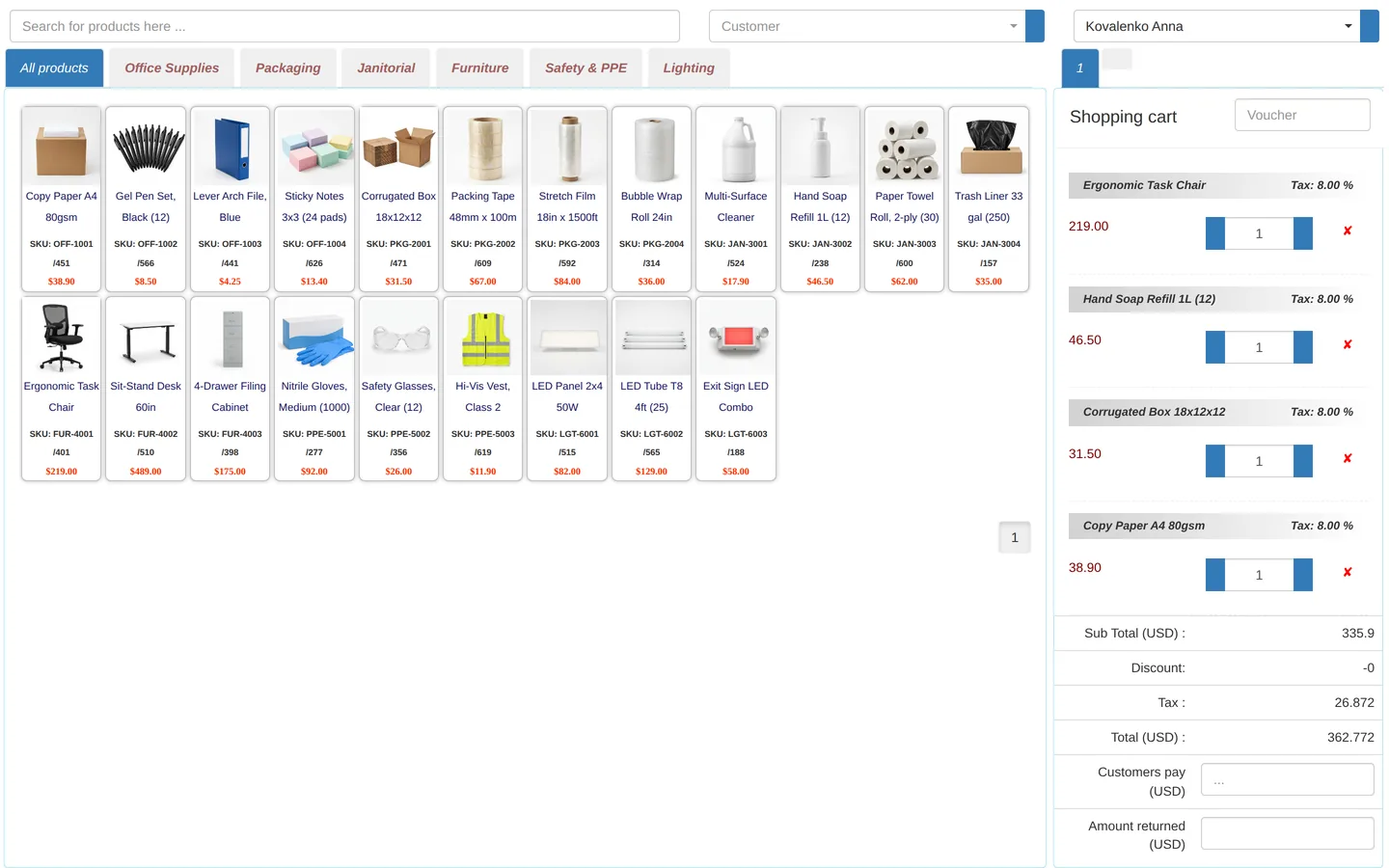
Before seasonal staff start, give each person a role through roles and access rights: a cashier works at the till, a store manager sees one location, a buyer sees purchasing. Run one test sale and one test return per store and check that the stock and the customer card change. If phone calls pile up at the peak, the AI voice assistant PilotAI can answer calls to your number and save each caller as a lead with a summary.
The daily report for the season
A daily Q4 report is a short set of numbers the team reads every morning to decide on stock, staff and offers for that day. In CRM reports and dashboards it can be built from records that already exist:
- items report: quantity and amount sold per product;
- stock of top sellers by store against the minimum;
- payments received by payment mode;
- customers report: invoice totals per customer;
- open purchase orders still to arrive.
Every table exports to Excel, CSV or PDF. Dashboards with widgets come with the Advanced plan.
A week-by-week checklist from November 2, 2026
The dates are our recommended deadlines, counted back from Black Friday on November 27; adjust them to your supplier lead times.
- By November 6Customer lists from the till, the online store and the email tool merged and imported; four customer groups built; minimum and maximum stock set for top sellers in every store; holiday purchase orders placed, each “order by” date entered as a task.
- By November 13Inventory count done in every store; transfers to stores planned; newsletters per group written and scheduled for Thanksgiving week.
- By November 20Roles for seasonal staff set; a test sale and a test return run in every store, with stock and the customer card checked; the daily report agreed.
- November 26–30The daily report read every morning; stock alerts handled the same day; offers sent on Cyber Monday to customers who bought in-store over the weekend.
- December 1–24Follow-ups to first-time buyers; reminders to last season's gift buyers before December 19; returns tracked against the sale.
Starting later than that? Keep three things for the last week: merged customers, minimum stock for top sellers and a role for every new person at the till. Moving a store from spreadsheets to a CRM in general is covered in CRM implementation: where to start.
Price: CRMiUS costs $100 a month on Basic and $150 on Advanced (Pro); Corporate is priced individually and includes POS terminal support. 10% off with annual payment, individual terms from 10 users, 14-day free trial with full access and no bank card. Compare plans or see the full CRM modules list.
FAQ
What is a retail CRM?
A retail CRM is a system for shops and store chains that keeps the customer base together with sales, stock and purchasing. In CRMiUS a sale at the POS lands in the customer's record and takes the goods off that store's stock, and items at minimum stock go to purchasing.
When is Black Friday 2026?
Black Friday 2026 is on Friday, November 27, the day after Thanksgiving, which falls on Thursday, November 26, 2026 according to the U.S. federal holiday schedule. Cyber Monday is on November 30, 2026.
What does NRF forecast for the 2026 holiday season?
On October 15, 2026 the National Retail Federation forecast November and December retail sales of $1.013 trillion, growth of 4.2% over 2025, and 325,000 to 375,000 seasonal hires. NRF counts the holiday season from November 1 to December 31.
How early should a store prepare its CRM for Black Friday?
We recommend starting four to six weeks ahead: the customer base and groups first, then minimum stock and supplier orders, then roles for seasonal staff and a test sale and return. The exact timing depends on your supplier lead times and the size of your base.
Does CRMiUS have a POS for stores?
Yes. The CRMiUS POS module records each sale with the customer and a voucher, calculates tax, discount and change, and reduces the stock of that store. POS terminal support is part of the Corporate plan.
How much does CRMiUS cost for a store?
Basic is $100 a month, Advanced (Pro) $150 a month and Corporate is priced individually; chains with POS terminals take Corporate. Every plan starts with a 14-day free trial, annual payment gives 10% off, and teams of 10 or more users get individual terms.
Enter Black Friday with one customer base and real stock numbers: import customers and stock into CRMiUS, build your groups and run a test sale during the free 14-day trial.