CRM for large companies: every department in one system
Sales, procurement, warehouse, finance, projects and support share one database, and roles decide who sees what. Corporate plan with custom modules and a personal manager; 14 days free to test.
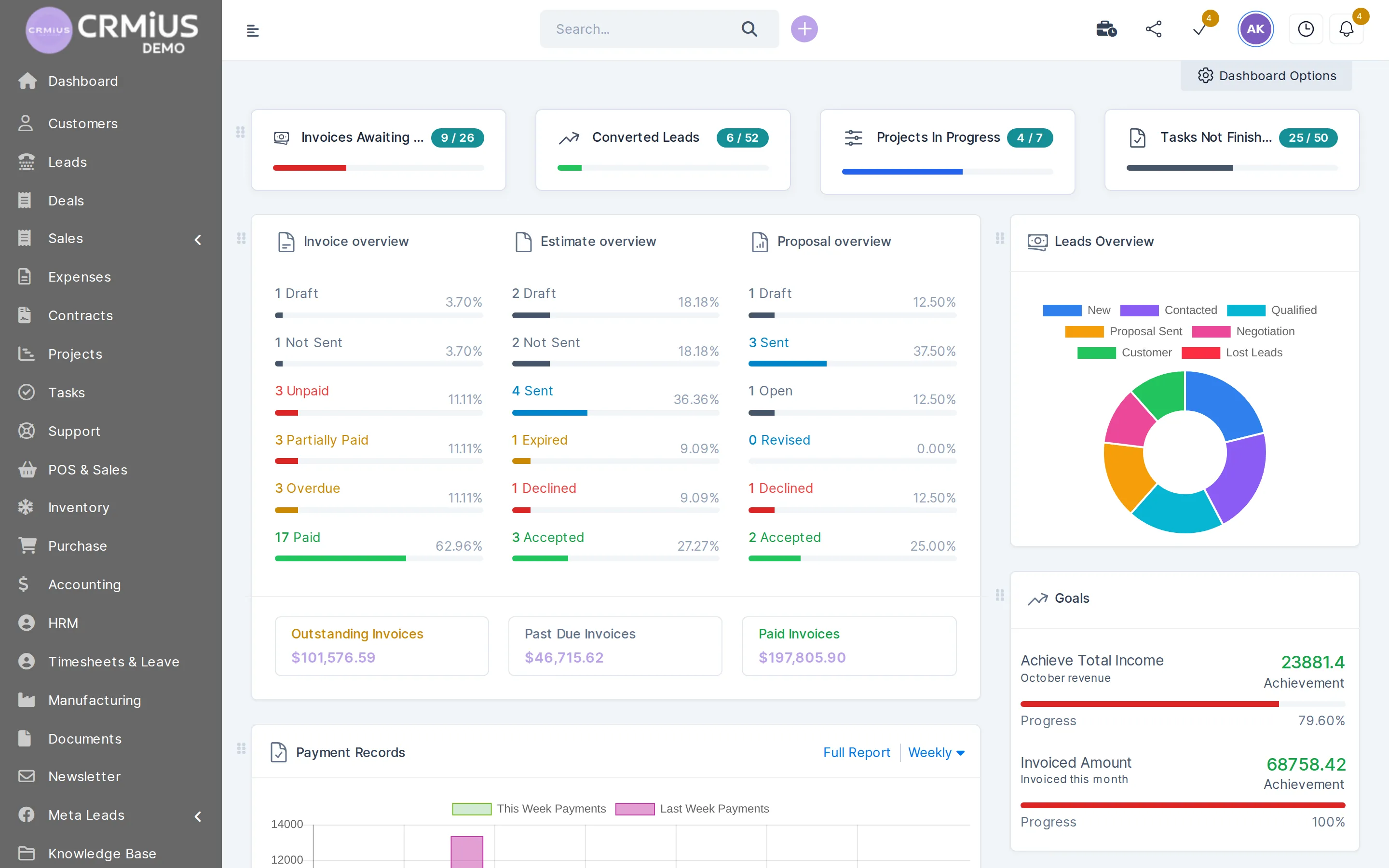
What is a CRM for large companies?
A CRM for large companies connects many departments and branches to one customer and product database, with access rights that differ by role. In CRMiUS each team works in its own modules — sales, procurement, warehouse, finance, projects, support — and the Corporate plan adds module and interface customization, a personal manager and priority support.
- Roles per module: view own or all records, create, edit, delete — set for a role and adjusted per employee
- Several warehouses, each with its own stock, and transfers between them
- REST API and webhooks to connect your ERP, accounting or BI (integrations)
- Corporate is priced individually; individual terms from 10 users, 10% off for annual payment
- 14-day trial with full access, no bank card needed
Corporate — priced individually. Tell us how many users and which departments will work in CRMiUS, and we prepare the terms. Basic ($100/month) and Advanced ($150/month) are on the pricing page.
How departments share one database
Every department works with the same customer card, product and employee. A purchase order from procurement arrives as a goods receipt in the warehouse, the delivery note takes stock from that warehouse, the invoice lands in finance, and a ticket from the same customer in support shows the whole history.
Management gets one set of figures: reports and dashboards count sales, payments, expenses and timesheets across departments, so nobody has to merge spreadsheets at month end.
What a large company gets in CRMiUS
Departments and positions
The HR module keeps departments, job positions, staff profiles, contracts, attendance and leave.
Roles for every module
View own, view all, create, edit, delete — set for a role and adjusted for one person. See roles and access.
Branches and warehouses
Stock by warehouse, transfers between warehouses, min/max alerts, serial numbers, expiry dates, inventory counts.
Central procurement
Purchase requests, vendor quotations, purchase orders and vendor invoices in one chain.
Finance and accounting
Invoices and recurring billing, multi-currency and taxes, chart of accounts, bank reconciliation, P&L and balance sheet.
Documents and approvals
Folders, versions, sharing and approvals; contracts are signed online with e-signature (document management).
Automation
Recurring invoices and tasks are created on schedule, and CRMiUS Automation rules update tasks (process automation).
Integration and audit trail
REST API and webhooks for ERP, accounting and BI; the activity log records important actions.
Roles and access
Who sees what: a role in CRMiUS
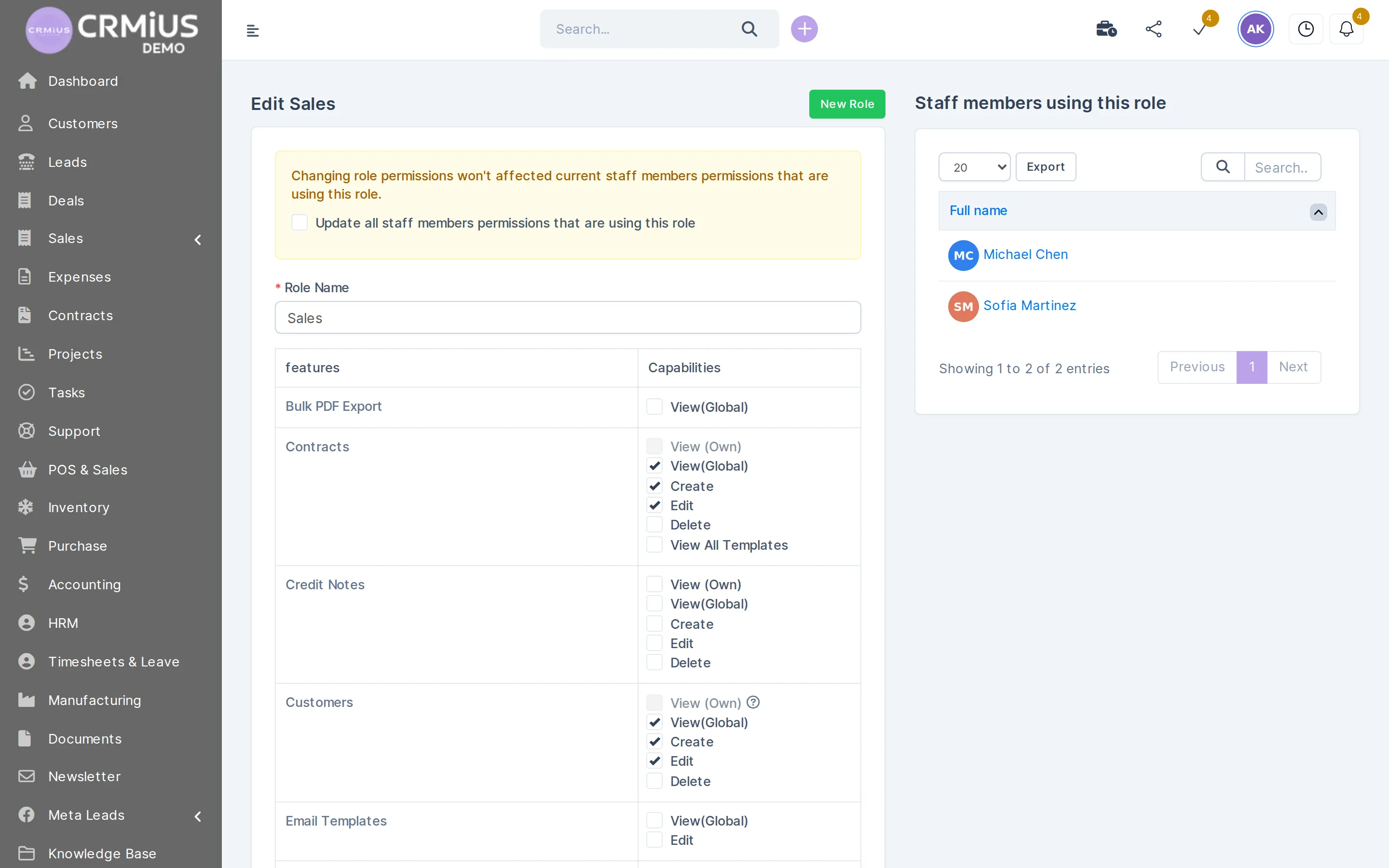
The role editor from the demo company: permissions are set per module, and the list on the right shows the staff who use the role.
- View (Own) or View (Global) for each module
- Create, edit and delete granted separately
- One role for a whole team, with per-person adjustments
- A change can be applied to all staff on the role at once
Corporate plan: what it adds for a large team
Corporate includes everything in Advanced and adds:
- Module and interface customization — modules, fields and screens adjusted to your processes;
- a personal manager on the CRMiUS side;
- priority technical support (support 24/7 is on every plan);
- POS terminal support for companies with stores (CRM for retail).
As an additional service, we configure modules and the interface for you and train your teams. Individual terms start from 10 users, annual payment is 10% cheaper; you can pay by card, bank transfer or electronic payment systems.
Plans side by side
Prices in USD per month. Corporate is quoted individually. Every plan has a 14-day free trial.
How to evaluate a CRM for a large company

Test any enterprise CRM against the same list. Here is how CRMiUS answers each point:
- Access rights: per module and per record owner, plus an activity log.
- Departments and branches: one database, several warehouses, support departments for tickets.
- Money: multi-currency, taxes, PDF documents with your branding, Stripe and PayPal for online payment.
- Customization: custom fields on most records; modules and interface on Corporate.
- Integrations: Google Workspace, Telegram, Slack, Facebook Lead Ads, REST API and webhooks.
- Data migration: customers, contacts and products come in from CSV.
- Security: SSL, regular backups, role-based permissions, the Shield security toolset.
- A test on your processes: 14 days with full access, or the live demo right now.
The full checklist is in our article how to choose a CRM system.
How a rollout usually goes
Timing depends on the number of departments, the volume of data and the integrations; we agree it after discovery.
- 01
Discovery
We list departments, branches, roles and the systems CRMiUS has to connect to. More on the first steps: CRM implementation, where to start.
- 02
Configuration
Modules, roles, custom fields and workflows are set up; customers, contacts and products are imported from CSV.
- 03
Pilot
One department or branch works in CRMiUS during the 14-day trial; its feedback goes into the settings.
- 04
Training
Each department learns its own modules; the personal manager stays your contact.
- 05
Rollout
The other teams join, and the API and webhooks connect ERP, accounting or BI.
Typical setups for a large company
Distribution with branches
Several warehouses, central procurement and regional sales teams, each seeing its own customers.
Manufacturer
Bills of materials, work orders and routings in the manufacturing module, working together with purchase and warehouse.
Projects and services
Projects with milestones, Gantt and timesheets; billing fixed, hourly or by task hours.
Large support desk
Tickets by department and priority, email piped into tickets, a knowledge base and a customer portal.
Modules a large company switches on first
- Roles and access rightsWho sees and edits which records.
- Procurement managementRequests, quotations and purchase orders.
- Warehouse and inventory managementStock across several warehouses.
- Finance and invoicingInvoices, payments, P&L.
- Reports and dashboardsDashboards for management.
- IntegrationsAPI, webhooks and ready connectors.
Questions and answers
Is CRMiUS suitable for a large company?
Yes, when you need sales, procurement, warehouse, finance, projects and support in one database with access by role. The Corporate plan adds module and interface customization, a personal manager and priority support. Check it on your own processes during the 14-day trial.
What is the difference between an enterprise CRM and a CRM for small business?
Scope and control. A large company needs roles per module, several departments, branches and warehouses, integration with other systems and customization. For small teams there is Basic at $100 a month (CRM for small business); large companies get Corporate.
Can CRMiUS work alongside our ERP?
Yes. CRMiUS has accounting, warehouse, purchase, manufacturing and HR modules, so part of the ERP work can live in it. If your ERP stays, the REST API and webhooks connect the two; what runs where is decided during discovery. Where one ends and the other begins: CRM vs ERP.
How do access rights work across departments?
Each role gets permissions per module: view own records, view all, create, edit, delete. A role is assigned to many employees, permissions can be adjusted for one person, and the activity log records important actions.
Can we customize modules and the interface?
Yes, module and interface customization is part of the Corporate plan. Custom fields on most records are available on every plan.
How much does a CRM for a large company cost?
Corporate is priced individually, and teams from 10 users get individual terms; annual payment is 10% cheaper. For reference, Basic costs $100 and Advanced $150 a month (pricing).
How long does implementation take?
It depends on the number of departments, data volume and integrations. Usually one department or branch starts as a pilot, then the other teams join; the timeline is agreed after discovery.
How is our data protected?
SSL, regular backups, role-based permissions for every employee and an activity log; the CRMiUS Shield module adds security tools. Send hosting and compliance questions to sales@crmius.com before the pilot.
Start 14-day free trial
- 14 days free, no card
- from $100 / month
- 30+ connected modules
- 5 interface languages