Warehouse management system for small business, inside your CRM
Stock for every warehouse in real time: goods come in and go out with documents created from purchase orders and invoices. From $100 a month, 14 days free.
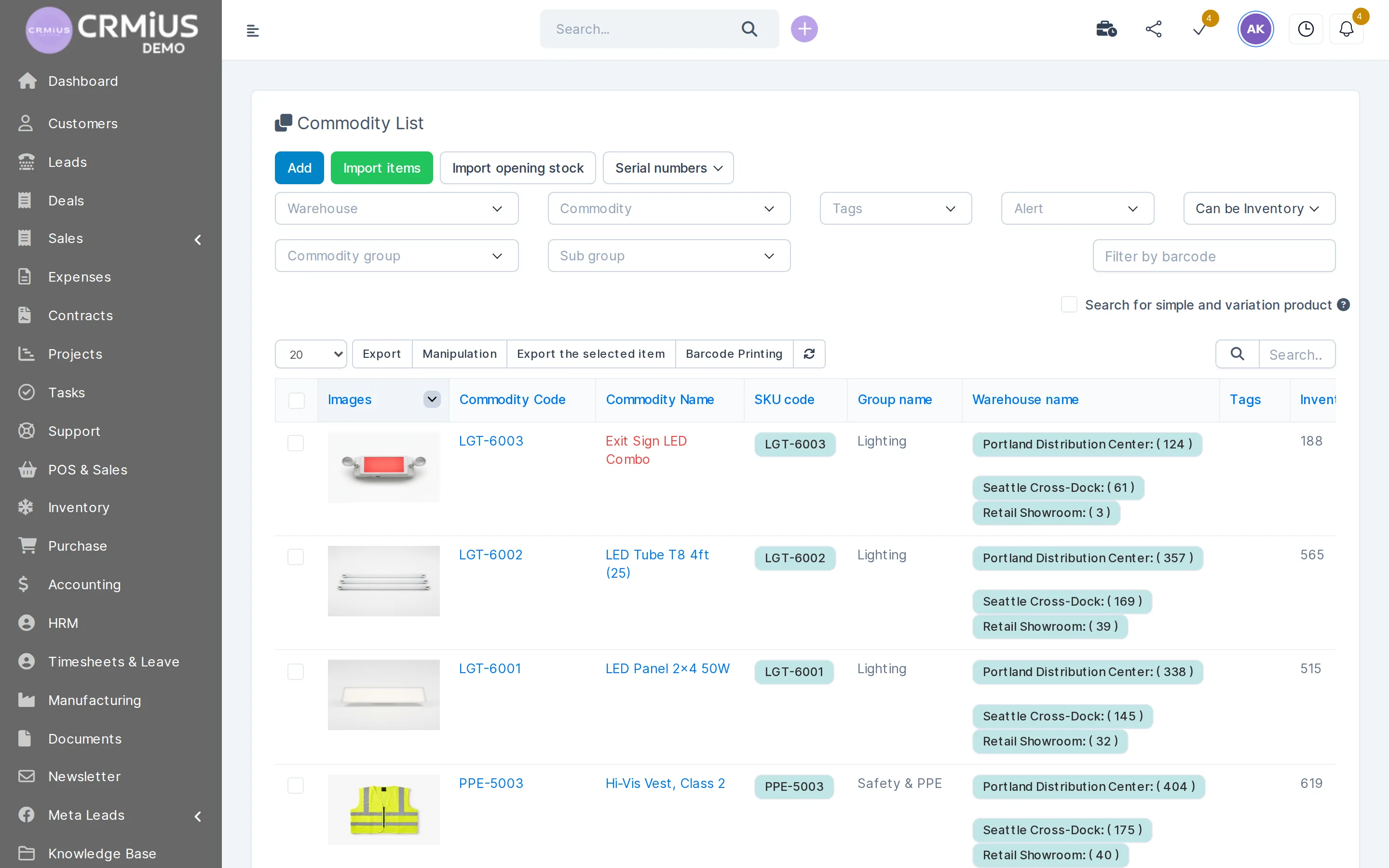
What the CRMiUS warehouse management system does
A warehouse management system records what is in stock, in which warehouse, and how it moves. In CRMiUS it is a CRM module: stock per item and warehouse changes only through documents — receipts, delivery notes, transfers, inventory counts. Invoices create delivery notes and received purchase orders create receipts, so sales, purchasing and the warehouse share one set of numbers.
- Several warehouses, each with its own balance, and transfers between them
- Goods receipts and delivery notes with a movement history for every item
- Minimum and maximum stock per item with a reorder alert
- Serial numbers and expiry dates on the items that need them
- Inventory counts that post the difference as a document
Price: plans from $100 a month (Basic), Advanced $150, Corporate priced individually; 10% off with annual payment. Which modules you need, warehouse included, and which plan covers them, we clarify in the demo. 14-day free trial, no bank card. Compare plans
How stock moves through CRMiUS
Every arrow below is a document someone can open later. Quantities change only at the receipt and the delivery note; the reorder alert closes the loop back to purchasing.
Inventory in real time
Every movement is a document you can open
Balances on the screen are the sum of receipts, shipments and transfers, so a number always has an explanation.
- Goods receipt notes from suppliers with cost and quantity
- Delivery notes generated from customer invoices
- Transfers between warehouses with sender and receiver
- Inventory counts that post the difference as a correction
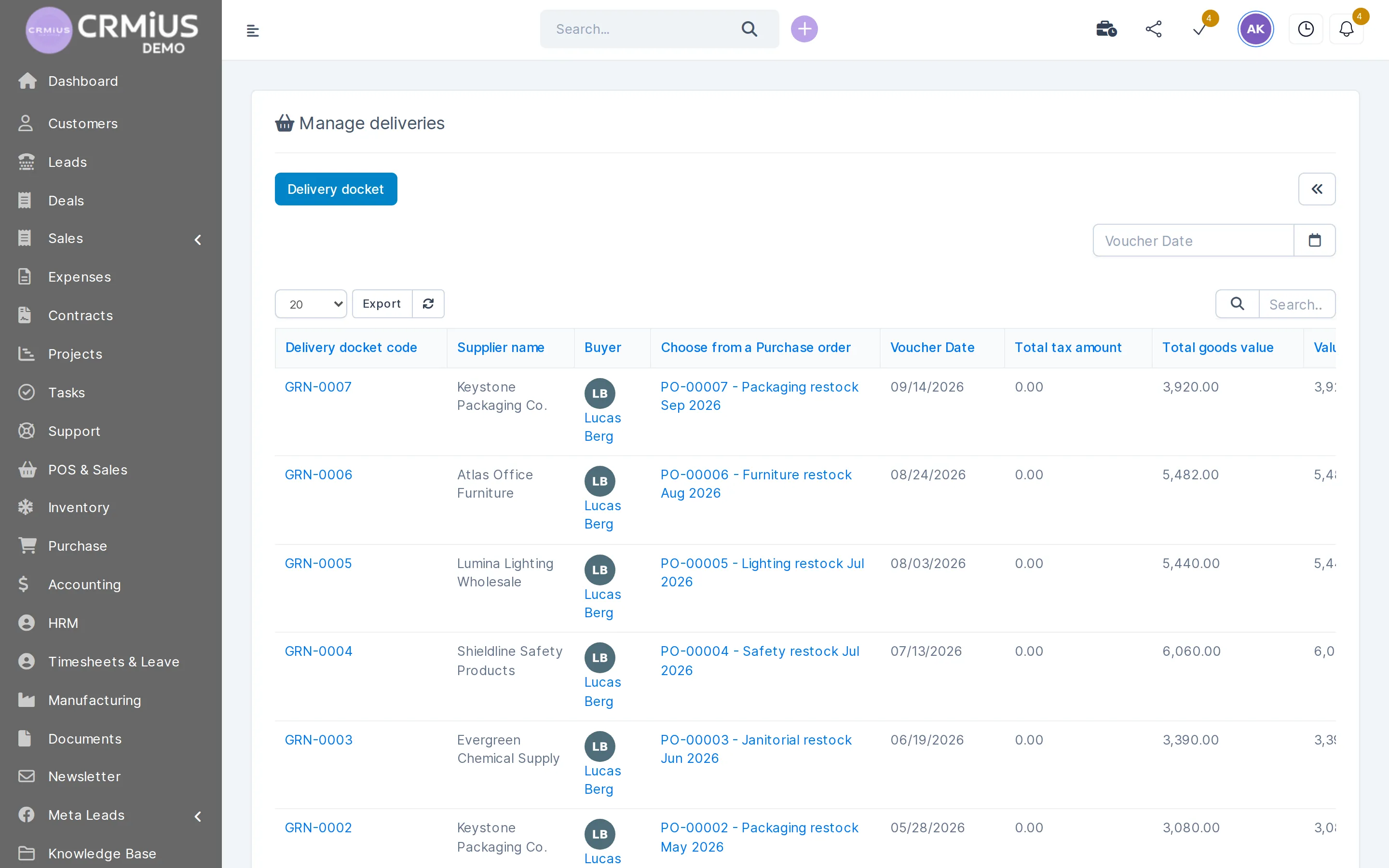
What your team does in the warehouse module
Keep one item catalogue
Products and services share one list with SKU, units, prices and taxes, used by sales, purchasing and the warehouse.
Run several warehouses
Each warehouse holds its own balance; a transfer moves stock between them with a document on both sides.
Receive goods
Record a goods receipt against a purchase order or as a standalone delivery from a supplier.
Ship to customers
Create the delivery note from the invoice so stock leaves the warehouse when the sale happens.
Control minimum and maximum levels
Set thresholds per item and get an alert before a shortage or when stock piles up.
Track serial numbers and expiry dates
Record them on receipt and see which unit went to which customer.
Count stock
Run an inventory count, compare it with the system balance and post the difference.
Read movement reports
Stock on hand, movements by period and item history for planning purchases.
Warehouse management for a small business: the five operations

Small-business warehouse work comes down to five operations. Here is where each one lives in CRMiUS.
- Receiving. A goods receipt against the purchase order adds quantity and cost to the chosen warehouse.
- Storage. Each warehouse has its own balance; transfers move goods between locations with a document.
- Shipping. The delivery note comes from the customer invoice, so stock leaves when the sale is made.
- Inventory. A count compares the shelf with the system and posts the difference.
- Replenishment. Min/max thresholds per item trigger a reorder alert for the buyer.
A CRM with a warehouse, or a separate WMS?
A CRM with a built-in warehouse suits a trading business whose warehouse serves sales: wholesale, shops, an online store, small production. A large distribution centre with bin-level addressing and handheld scanners is usually run in a specialised WMS. If your process is closer to that, show it to us in a demo and we will tell you plainly which part CRMiUS covers.
Getting started: we set up your warehouses, import the item catalogue and opening stock from a file and set the reorder thresholds. Module configuration and team training are available as CRMiUS services.
Spreadsheet, separate stock app or CRMiUS
| Spreadsheet | Separate stock app | CRMiUS | |
|---|---|---|---|
| Stock after a sale | changed by hand | synced with the CRM or accounting | goes down with the delivery note from the invoice |
| Several warehouses | separate sheets | depends on the app | own balance per warehouse, transfers by document |
| Customers, deals, invoices | another file | another system | the same system |
| Reorder alert | formulas and manual checks | depends on the app | min/max per item |
| Serial numbers, expiry dates | manual columns | depends on the app | recorded on receipt |
Works together with
Warehouse data is shared with the modules that create and consume stock.
- Procurement managementPurchase orders become goods receipts.
- Finance and invoicingInvoices create delivery notes.
- Logistics and inventoryStock, transfers and deliveries for logistics.
- Sales and leads managementManagers see availability while quoting.
- Reports and dashboardsStock and movement reports by warehouse.
- For retailStock per store, POS sells from the store balance.
Who uses it
Wholesale distributors
Several warehouses, large catalogues, transfers between locations and supplier orders from procurement management. See CRM for wholesale distribution.
Retail chains and shops
Stock per store with the POS module selling from the store's balance — see CRM for retail.
Online stores
The invoice for a web order creates the delivery note and the parcel leaves with a document — see CRM for online business.
Small production
Raw materials received, finished goods stored and shipped; the manufacturing module (bills of materials, work orders) runs on top of warehouse and purchasing. See CRM for manufacturing.
Questions and answers
What is a warehouse management system?
A warehouse management system (WMS) records what is in stock, where it is stored and how it moves in and out. In CRMiUS the WMS is a module of the CRM, so receipts, sales and purchases update the same balances.
Can CRMiUS manage several warehouses?
Yes. Each warehouse has its own balance, and transfers move goods between them with a document on both sides.
Does CRMiUS track serial numbers and expiry dates?
Yes. Serial numbers and expiry dates are recorded on receipt and stay attached to the item through delivery.
How does stock change when we sell?
A delivery note created from the customer invoice takes the items out of the selected warehouse, so stock follows actual sales.
How much does a warehouse management system for a small business cost in CRMiUS?
Plans start at $100 per month (Basic); Advanced is $150, Corporate is priced individually. Annual payment gives 10% off, and from 10 users terms are individual. Which modules you need, warehouse included, and which plan covers them, we clarify in the demo.
How can I try the warehouse module?
Open the live demo without sign-up: a fictional distributor with warehouses, purchase orders and receipts, reset every 6 hours. Or start the 14-day free trial with full access and no bank card.
Modules
- Contact and customer management (CRM)→
- Finance and invoicing→
- Project management→
- Marketing and newsletters→
- Reports and dashboards→
- Roles and access rights→
- Task management→
- Customer support→
- IP telephony→
- E-signature for contracts→
- Sales and leads management→
- Logistics and inventory→
- Document management→
- Procurement management→
- HR management→
Start 14-day free trial
- 14 days free, no card
- from $100 / month
- 30+ connected modules
- 5 interface languages