HR management system in your CRM: staff, contracts, leave
Employee records, contracts, shifts, attendance and leave requests live in the same CRMiUS account as your sales, projects and finance. HR sees who works, who is on leave and which contract ends next month.
What is an HR management system in a CRM?
An HR management system in a CRM keeps staff records, employment contracts, attendance and leave in the same database as customers, projects and invoices. In CRMiUS the HR module holds the employee card, departments, positions and contracts, and the Timesheets & Leave module records attendance, shifts and leave requests that a manager approves online.
- Employee card with HR code, personal and bank details, documents and work status
- Departments, job positions, workplaces and contract types set up once for the company
- Staff contracts with start and end dates, status, wages and allowances
- Month attendance grid, check-in and check-out, shifts and holidays
- Leave requests with an approval route: direct manager, head of department or a named person
Price: CRMiUS plans start at $100 a month (Basic), Advanced is $150, Corporate is priced individually; 10% off for annual payment and individual terms from 10 users. Which plan covers the HR modules for your company, we confirm in the demo. 14 days free with full access, no bank card. Compare plans
What HR does in CRMiUS
Personnel records, time and leave in one module set
Eight jobs that otherwise sit in spreadsheets, a shared folder and a chat with the manager.
Keep the employee card
HR code, date of birth, ID document, address, bank account and tax code, work status, plus files such as a CV, diplomas and a photo. Staff can be imported from Excel.
Build the company structure
Departments, job positions and workplaces; the same structure filters attendance, leave and payroll.
Run employment contracts
Contract types, contract code, start and end dates, status draft, valid or invalid, signing date, wages and allowances. Contract files can also go through document approval.
See contracts before they lapse
The HR dashboard lists overdue contracts and contracts about to expire, next to total staff, new hires and leavers this month.
Record attendance
A month grid per employee with day codes for work, leave, lateness, early leaving, holidays, sick days and business trips; check-in and check-out; export to Excel.
Plan shifts
Shift types with start, end and lunch times, a shift schedule by employee or department, company holidays.
Approve leave online
An employee applies for leave with type, dates, reason and an attachment; the request goes to the approver set in the approval process, and the calendar view shows who is away.
Prepare payroll tables
A payroll template with your own columns and formulas (base pay, allowances, hours, overtime, deductions), a monthly table by department or position, and payslips locked and downloaded as files.
From hire to payslip: one employee in CRMiUS
Each box is a screen in the HR or the Timesheets & Leave module. The chip shows who acts; the dark panel is what the HR dashboard keeps in view the whole time.
- HR01Employee cardHR code, documents, department, position and a CRM role
- HR02ContractType, dates, wages and allowances; status valid
- Manager03Shift and scheduleShift type assigned to the person or the whole department
- Employee04Attendance and leaveCheck-in and check-out, a leave request with dates and reason
- Manager05ApprovalDirect manager or head of department approves; the grid updates
- HR06Month close and payrollAttendance closed, payroll table built from the template, payslip locked
- Total staff
- New staff this month
- Leavers this month
- Overdue contracts
- Contracts about to expire
- Birthdays this month
Staff and access
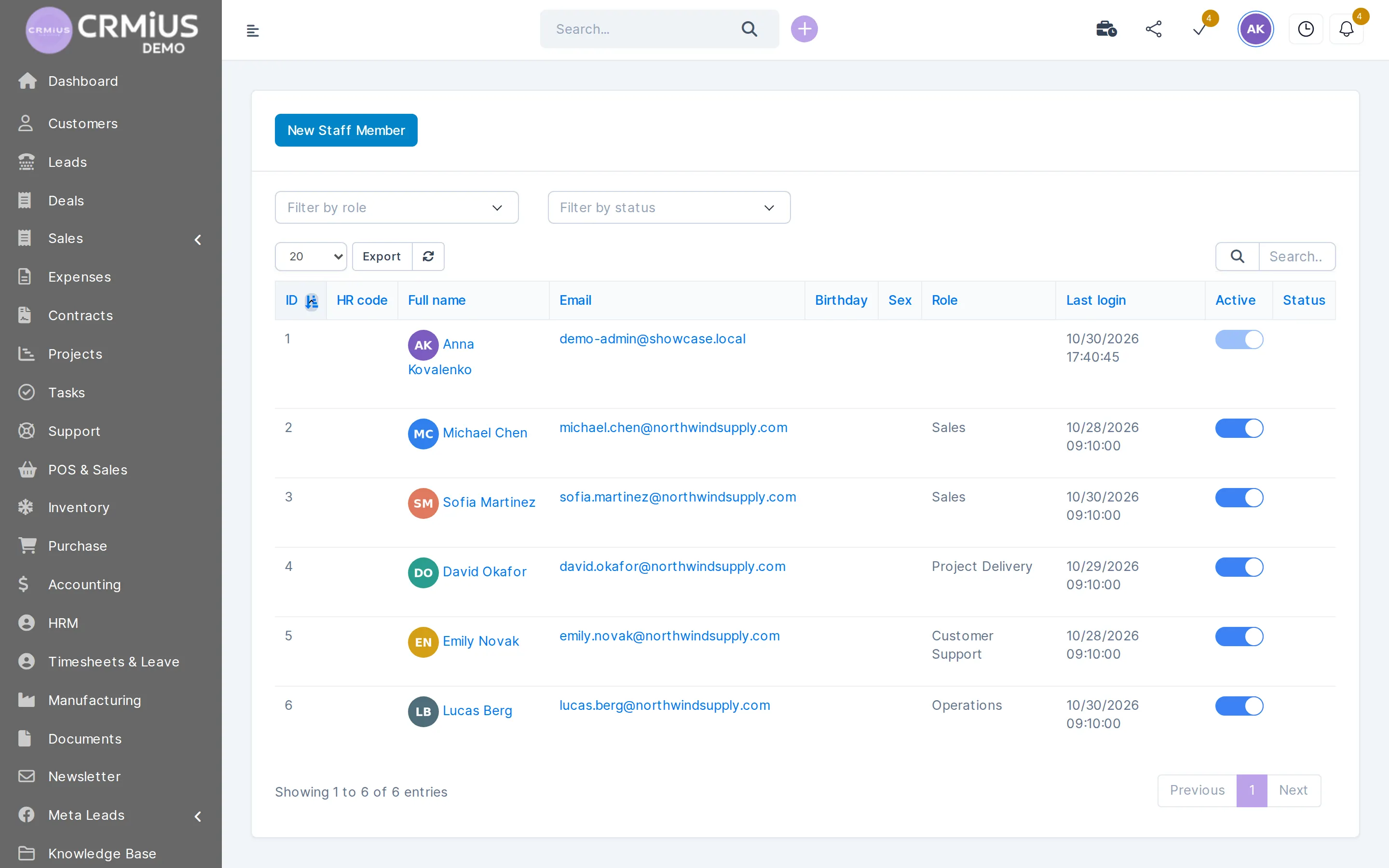
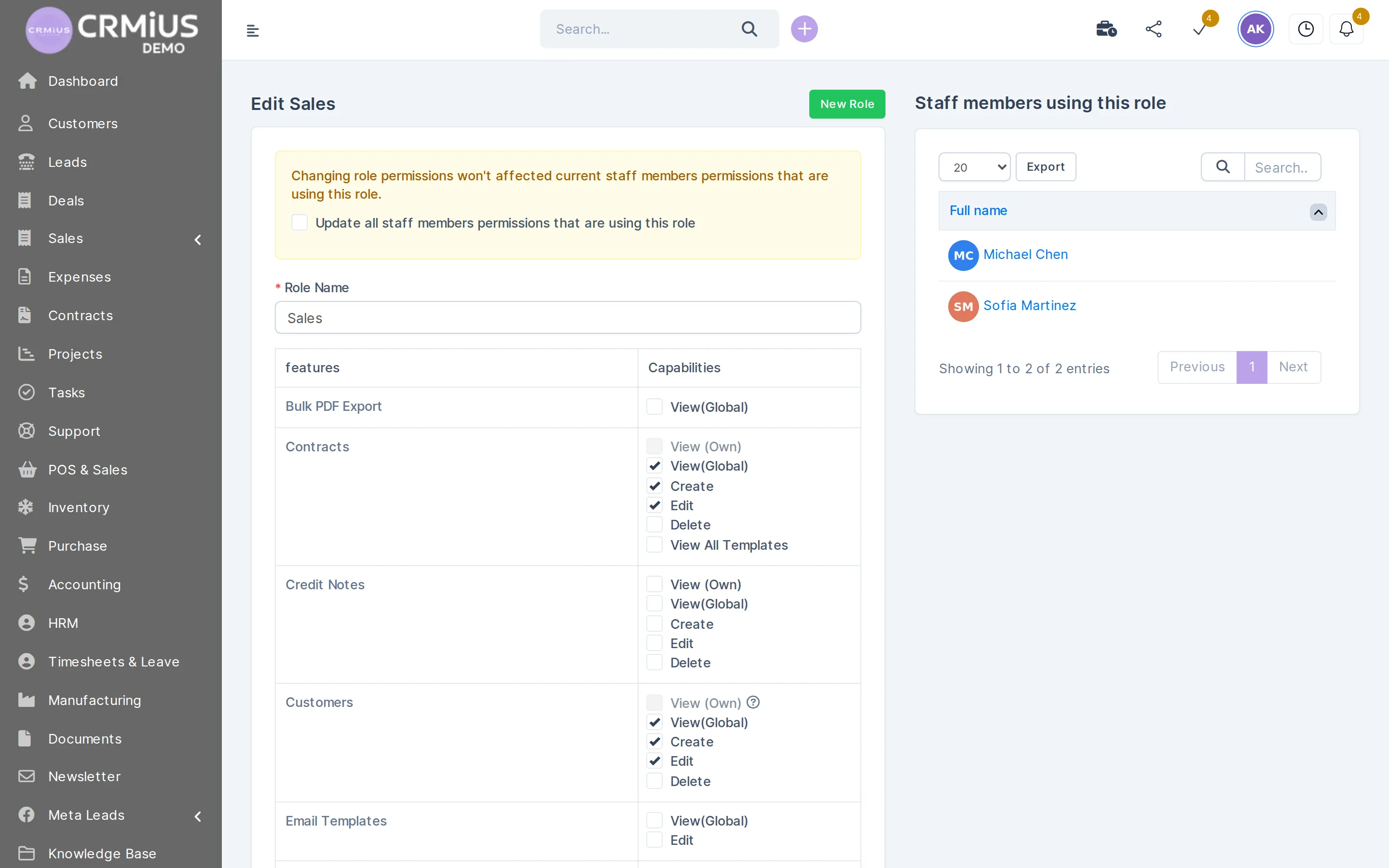
Every employee is a CRM user with a role
The staff list in HR is the same list of people who log in to the CRM. A role decides what each person sees in sales, finance, stock and HR.
- Filter staff by role and by work status
- One role for a whole team, adjusted per person when needed
- HR data stays with HR: payroll and HR settings open to administrators only
- Export the staff list in one click
Attendance, shifts and leave without a separate app

Attendance in CRMiUS is a month grid: one row per employee, one cell per day, filled with codes for worked hours, annual leave, lateness, early leaving, holidays, sick days and business trips. Hours can come from check-in and check-out or be entered and imported, and the administrator can limit check-in to the office IP addresses.
- Leave types: annual, sick leave, maternity leave, business trip and your own types
- Annual leave days per year and the days that remain for each employee
- Approval process per request type: direct manager, head of department, a named person, or chosen when approving
- Requests for additional work hours, approved the same way
- Workplaces and routes for staff who visit client sites
Staff tasks and project hours stay in task management and project timesheets, so a manager sees both the attendance and the work done in those hours.
How we launch HR in CRMiUS
The order below is the one we follow on a typical setup. The timing depends on the number of employees, departments and how much history you move, and we name it after the demo.
- 01
Demo and trial
We show the HR and Timesheets & Leave modules on the demo; you get 14 days of full access without a bank card.
- 02
Company structure
Departments, job positions, workplaces, contract types, shift types and holidays.
- 03
Staff and contracts
Staff imported from Excel, current contracts entered with dates, wages and allowances.
- 04
Leave rules and approvals
Leave types, annual leave days, who approves which requests, IP limits for check-in.
- 05
First month close
Attendance closed, payroll template built with your formulas, team training as an additional service.
Spreadsheets, a separate HR app or HR inside CRMiUS
| Spreadsheets and chat | Separate HR app + CRM | CRMiUS | |
|---|---|---|---|
| Staff list | a file per HR person | in the HR app, users again in the CRM | one list: HR card and CRM user |
| Leave request | a message to the manager | workflow in the HR app | request, approval route, calendar view |
| Contract end dates | a reminder set by hand | depends on the product | overdue and expiring lists on the HR dashboard |
| Hours vs work done | two separate files | two systems to compare | attendance grid next to task and project timesheets |
| Payroll table | formulas in a spreadsheet | depends on the product | template with your columns and formulas, locked payslip |
Who uses HR in CRMiUS
Sales and service teams
Staff records and leave next to the pipeline; a payroll column can take sales turnover or commission. Start with CRM for small business.
Shift-based teams
Shops, warehouses and support desks plan shifts by department and see lateness and early leaving in the attendance report.
Field and project staff
Workplaces and routes for client visits, project hours in timesheets, leave approved by the project lead.
Companies with several departments
Heads of departments approve their own people; HR sees staff changes by month, seniority and position. See CRM for large companies.
Price and what you need to start
Bring the list of employees with departments and positions, the current contracts with their dates, and your leave rules. The rest is set up during the trial.
- Basic $100 a month, Advanced $150, Corporate priced individually
- 10% off for annual payment, individual terms from 10 users
- Module configuration and team training as additional services; technical support 24/7 on every plan
HR runs on the same account as finance and invoicing and roles and access rights. See all modules on the modules page or compare plans.
Works together with
HR data connects to the modules where people do their work.
- Roles and access rightsEach employee logs in with a role that decides access to sales, finance and HR.
- Project managementProject timesheets show the work behind the hours in the attendance grid.
- Task managementTasks, checklists and timers per employee.
- Document managementContract files, policies and onboarding documents with approval and versions.
- E-signature for contractsDocuments signed online with an electronic signature.
- Process AutomationRule-based automation for reminders and repeat tasks.
Questions and answers
What is an HR management system?
It is software that keeps employee records, contracts, working time and leave in one place. In CRMiUS it is a module set inside the CRM: HR for staff cards, departments, positions and contracts, and Timesheets & Leave for attendance, shifts and leave approvals.
Does the CRM HR module handle leave requests?
Yes. An employee applies for leave with the type, dates, reason and an attachment. The request goes to the approver from the approval process (direct manager, head of department or a named person), and the calendar view shows who is away.
Can CRMiUS track attendance and shifts?
Yes. Attendance is a month grid with day codes, filled by check-in and check-out or entered and imported. Shift types, a shift schedule by employee or department and company holidays are set in the same module, and the grid exports to Excel.
Does it calculate payroll?
The HR module builds payroll tables from a template: you define the columns and formulas (base pay, allowances, hours, overtime, deductions), build the table for a month by department or position and lock the payslips. Taxes and contributions follow the formulas you enter; filing with the tax office stays with your accountant.
Can I import employees from Excel?
Yes. Staff are imported from an Excel file with department, position and status codes; attendance can also be imported. During setup we help with the file as part of the configuration service.
Who sees salary and personal data?
Access is set by roles. Payroll and HR settings open to administrators; other staff see what their role allows. See roles and access rights.
How much does an HR module in a CRM cost?
CRMiUS plans start at $100 a month (Basic), Advanced is $150 and Corporate is priced individually, with 10% off for annual payment. Which plan covers HR for your company, we confirm in the demo; the 14-day trial is free and needs no bank card. Pricing
Can I try it before buying?
Yes. Open the live demo without sign-up, or start a 14-day free trial with full access. A demo call with our team shows HR on your own structure.
Modules
- Contact and customer management (CRM)→
- Finance and invoicing→
- Warehouse and inventory management→
- Project management→
- Marketing and newsletters→
- Reports and dashboards→
- Roles and access rights→
- Task management→
- Customer support→
- IP telephony→
- E-signature for contracts→
- Sales and leads management→
- Logistics and inventory→
- Document management→
- Procurement management→
Start 14-day free trial
- 14 days free, no card
- from $100 / month
- 30+ connected modules
- 5 interface languages