CRM system modules: 30+ connected modules in one CRM
Sales, finance, warehouse, projects, support and HR modules work with one database. Switch on what your team needs today. Plans from $100 a month, 14 days free.
- 01
Contact and customer management (CRM)
Customer cards with contacts, history, reminders, files, statements and a client portal.
- 02
Finance and invoicing
Estimates, invoices, recurring billing, Stripe and PayPal payments, expenses, P&L and balance sheet.
- 03
Warehouse and inventory management
Stock by warehouse, receipts and delivery notes, transfers, min/max alerts, serial numbers.
- 04
Project management
Milestones, Gantt chart, tasks, timesheets, files, discussions and project billing.
- 05
Marketing and newsletters
Newsletters (MailFlow), Facebook Lead Ads, GMB Importer, lead sources, surveys, goals, conversion reports.
- 06
Reports and dashboards
Sales, payments, lead conversion, expenses, timesheets and accounting reports, dashboards and goals.
- 07
Roles and access rights
Roles with view, create, edit and delete per module, own or all records, per-person changes, activity log.
- 08
Task management
Kanban, checklists, timers, recurring tasks and reminders, linked to clients and projects.
- 09
Customer support
Tickets from email and portal, departments, priorities, ready replies, knowledge base.
- 10
IP telephony
IP telephony connection, calls from the card, call log with notes, call-back reminders.
- 11
E-signature for contracts
Contracts, proposals and estimates signed online; signer, date and IP saved; expiry and renewals tracked.
- 12
Sales and leads management
Web forms, Facebook Lead Ads, import, kanban pipeline, reminders, proposals, conversion to customer.
- 13
Logistics and inventory
Requests, quotes, delivery notes with status, stock by warehouse, transfers and claims.
- 14
Document management
Folders, versions, approval requests, e-signature, sharing with expiry and due-date reminders.
- 15
Procurement management
Purchase requests, vendor quotes, purchase orders, goods receipt and vendor bills.
- 16
HR management
Staff records, contracts, shifts, attendance, leave approvals and payroll tables in the CRM.
What modules does a CRM system have?
A CRM system is built from modules, each covering one area of work: leads and sales, customers, invoicing and payments, projects and tasks, customer support and reports. Business CRMs add operations modules for the warehouse, purchasing, accounting, HR and manufacturing. CRMiUS has more than 30 such modules on one database, so a won deal becomes an invoice and the report sees both.
- Core CRM: leads, customers, proposals and invoices, contracts, projects, tasks, helpdesk, reports
- Operations: warehouse, purchasing, manufacturing, point of sale, accounting, HR, document management
- Team and control: roles and permissions, automation, internal chat, wiki, REST API and webhooks
- Modules are switched on per company; roles decide which employee sees which module
Price: Basic $100 a month, Advanced (Pro) $150, Corporate priced individually; 10% off with annual payment, individual terms from 10 users. 14-day free trial on every plan, full access, no bank card. Compare plans
How CRMiUS modules share one database
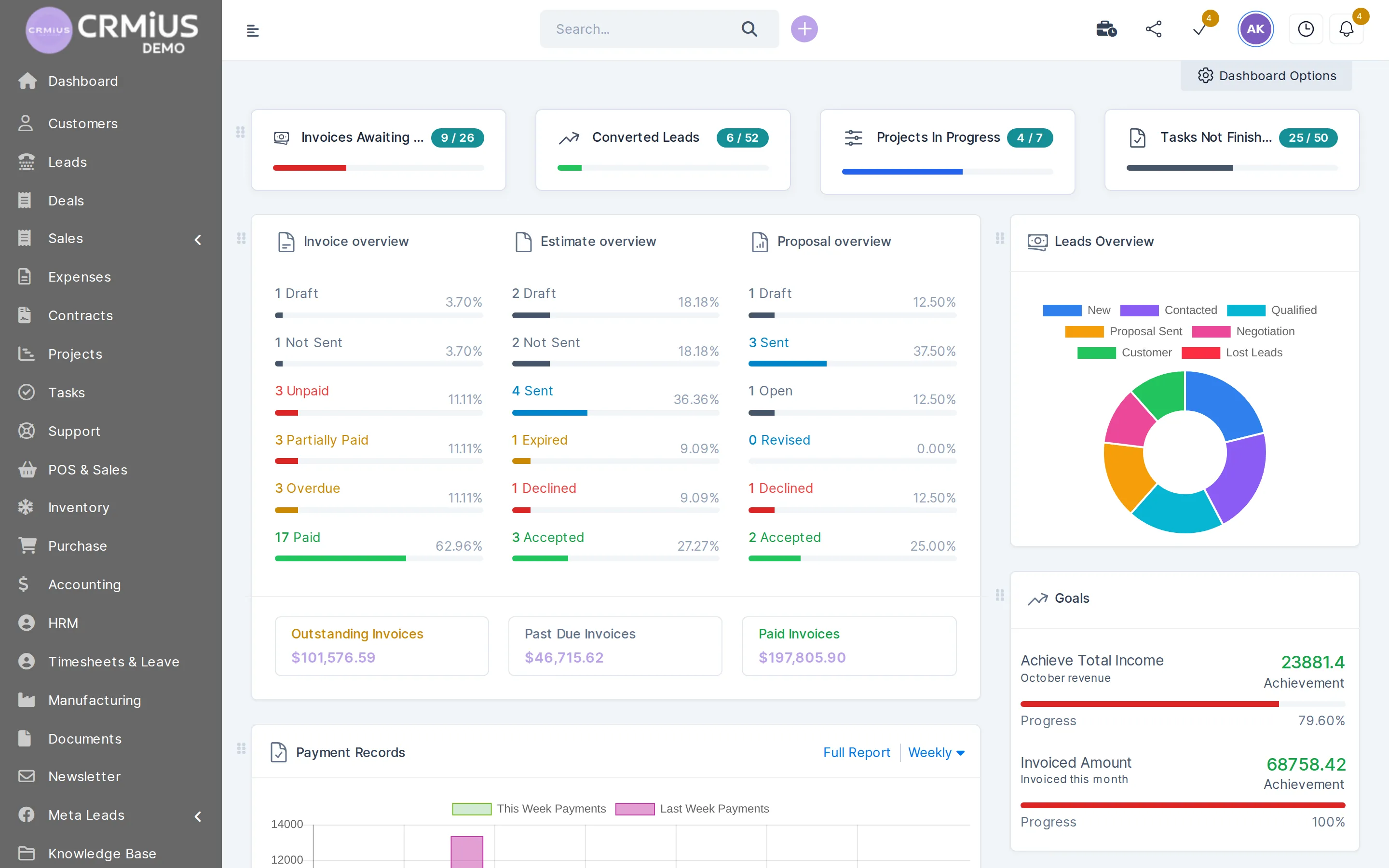
One customer order passes through six modules. Each module opens the same record and adds its part, so the order is entered once.
A modular CRM saves the hand-off between programs: the sales manager sees stock, the warehouse sees the invoice, the accountant sees the payment. You switch on only the modules your processes use and add the next ones later, on the same data.
All CRMiUS modules by group
The full list of modules installed in CRMiUS. Linked names open a page with screens, workflow and FAQ for that module.
Sales and customers
- Leads and sales pipeline — kanban board by status, lead sources, web-to-lead forms, reminders, conversion to customer
- Customers and contacts — companies with several contacts, groups, files, statements, customer portal
- Deals — deal records for the sales team
- Contracts and e-signature — the customer signs online, renewals with reminders
- Goals — sales and team goals tracked in the CRM
- GMB Importer — finds businesses on Google by category and location and imports them as leads
- AI voice assistant (PilotAI) — calls and follows up leads
Marketing
- Marketing and analytics — lead sources, segments, Facebook Lead Ads, email templates
- MailFlow — newsletters and email campaigns to customers and leads
- Surveys — questionnaires for customers
- PublishX — blog and content publishing inside the CRM
Money
- Finance module — proposals, estimates, invoices, recurring invoices, credit notes, Stripe and PayPal payments, payment reminders
- Expenses — categories, recurring expenses, billing an expense to the customer
- Accounting and bookkeeping — chart of accounts, journal entries, bank reconciliation, P&L and balance sheet
- Point of sale (POS, omni sales) — sales at the till and across sales channels
Warehouse, purchasing and production
- Warehouse management — stock per warehouse, goods receipts, delivery notes, min/max alerts, serial numbers, expiry dates
- Inventory and logistics — transfers between warehouses, deliveries with status, inventory counts
- Procurement — purchase requests, supplier quotations, purchase orders, vendor invoices
- Manufacturing — bills of materials, work orders and routings; works with Procurement and Warehouse
Projects and team
- Project management — milestones, Gantt chart, files, discussions, fixed or hourly project billing
- Tasks and schedule — kanban, checklists, timers, recurring tasks
- Timesheets — time logged on tasks and projects
- HR management — staff profiles, departments, positions, contracts, attendance and leave
- Calendar — staff calendar with tasks and reminders
- Internal chat — messages and mentions between employees
- Whiteboard and mind map — planning boards for the team
- Wiki — internal knowledge base for staff
- IdeaHub — ideas and challenges collected from the team
Service and communication
- Customer support (helpdesk) — tickets from email and the portal, departments, priorities, predefined replies
- Knowledge base — answers for customers next to the ticket system
- Telephony — call logging and IP telephony connection
- Mailbox — email inside the CRM
- Telegram chat — Telegram conversations in the CRM
Documents
- Document management — folders, versions, sharing and approvals
- File sharing — files shared with staff and customers
Control and platform
- Reports and dashboards — sales, invoices, payments, expenses vs income, lead conversion, timesheets
- Roles and access rights — permissions per module and action, activity log
- Automation — built-in automatic actions and CRMiUS Automation rules for tasks
- Shield — security toolset for the CRM
- ImportS — data import from CSV files
- REST API and webhooks — connection to your other systems
- Menu setup and theme style — menu order and the look of the interface
To pick your set, read How to choose a CRM system; the demo shows the modules on a working account.
Which plan includes which module
The rows below are the plan list from the pricing page. Other modules from the list above (warehouse, purchasing, accounting, HR, manufacturing and more) are switched on for your company as you need them; we agree the set during the demo.
| Module | Basic · $100/mo | Advanced (Pro) · $150/mo | Corporate · individually |
|---|---|---|---|
| Contacts and customers | ✓ | ✓ | ✓ |
| Tasks and projects | ✓ | ✓ | ✓ |
| Google Workspace integration | ✓ | ✓ | ✓ |
| Key reports | ✓ | ✓ | ✓ |
| Finance module | — | ✓ | ✓ |
| Time tracking | — | ✓ | ✓ |
| Customer support (helpdesk) | — | ✓ | ✓ |
| Analytics and dashboards | — | ✓ | ✓ |
| POS terminal support | — | — | ✓ |
| Module and interface customization | — | — | ✓ |
| Personal manager | — | — | ✓ |
| Technical support 24/7 | ✓ | ✓ | ✓ |
| 14-day free trial | ✓ | ✓ | ✓ |
One record, several modules
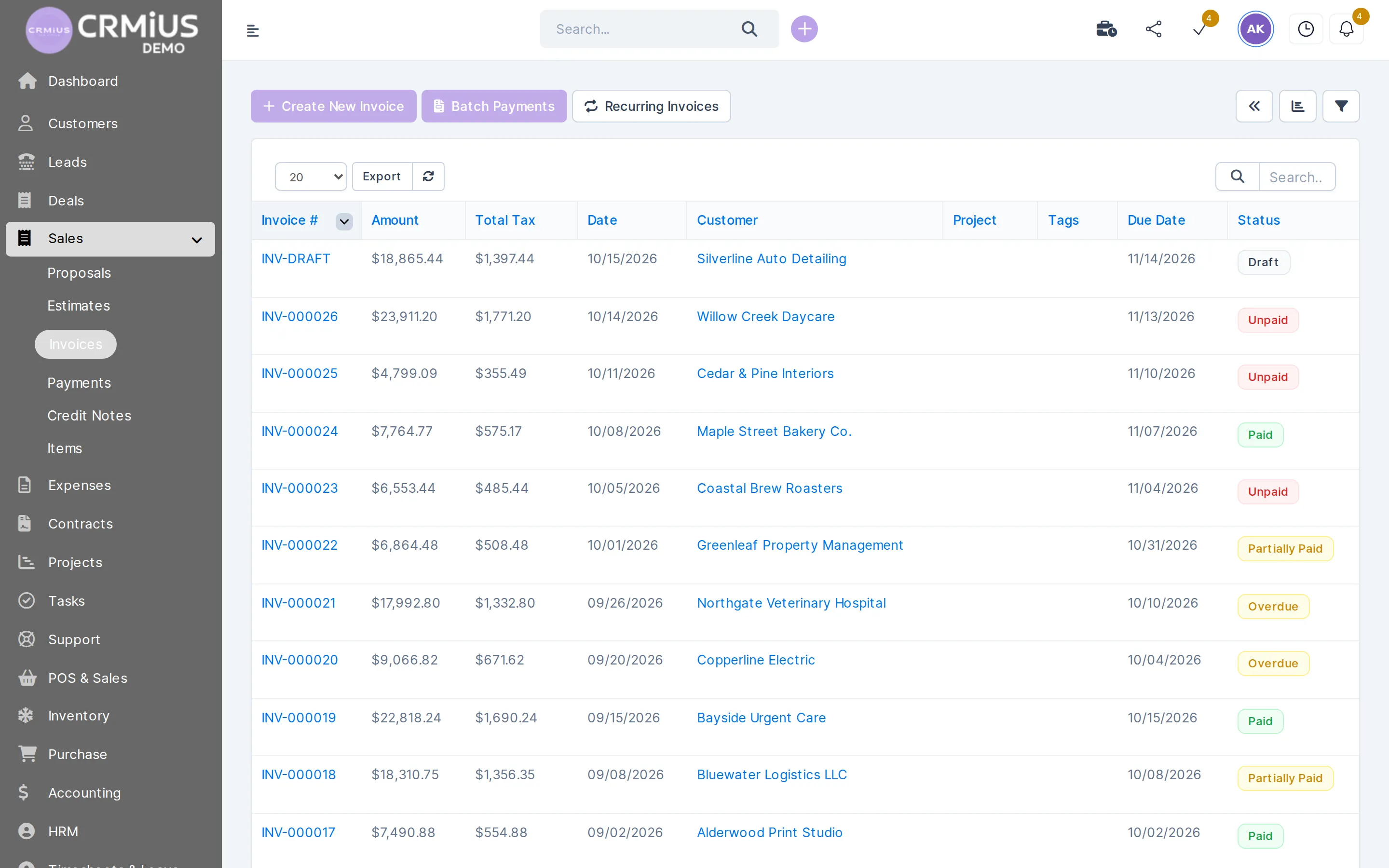
An invoice that four modules work on
The invoice screen is where the modules meet: the sales team issues it, the warehouse ships from it, finance records the payment.
- Customer and contacts come from the customer card
- Items and prices come from the shared catalogue
- The delivery note is created from the invoice
- Stripe or PayPal payment closes it, reports count it
Which module set fits your business
Typical starting sets. Your set is agreed in the demo and can grow later.
Trading and distribution
Leads, customers, sales documents, warehouse, procurement and finance: from the order to the shipment and the payment.
Retail and shops
Point of sale, warehouse and customers: till sales take goods off the store stock.
Services and agencies
Proposals, projects, tasks, timesheets and project billing (fixed, hourly or task hours).
Support teams
Helpdesk tickets, knowledge base and customer portal; see CRM for support services.
Small and medium business
Start with Basic: contacts, tasks and projects, key reports; see CRM for small business.
Large companies
Roles and access rights, document management, accounting and automation; see CRM for large companies.
How to choose CRM modules
- Write down where data is typed twice. For example a deal copied into an invoice, or stock counted in a separate sheet. Each such place is a module to switch on.
- Start with the plan core. Basic covers contacts, tasks and projects, Google Workspace and key reports; Advanced (Pro) adds finance, time tracking, helpdesk and dashboards.
- Check the modules on real screens. Open the live demo of a sample distribution company without sign-up, or start the 14-day trial with full access.
- Configure and train the team. Our specialists set up fields, stages, roles and templates; configuration and team training are available as services.
Modules can be added later without moving data: the new module works with the customers, items and documents already in the CRM.
Questions and answers
What modules does a CRM system have?
The usual set is leads and sales, customers and contacts, quotes and invoices, tasks and projects, customer support and reports. Business CRMs like CRMiUS add warehouse, purchasing, accounting, HR, manufacturing and document management modules.
How many modules does CRMiUS have?
More than 30. The full list is grouped on this page: sales, marketing, money, warehouse and purchasing, projects and team, service, documents, control and platform.
What is a modular CRM?
A CRM where each area of work is a separate module that you switch on when you need it. In CRMiUS all modules share one database, so a module added later works with the data you already have.
Which modules are in the Basic plan?
Basic ($100 a month) covers contact management, tasks and projects, Google Workspace integration and key reports. Advanced (Pro, $150) adds the finance module, time tracking, helpdesk and analytics with dashboards. Corporate adds POS terminal support, module and interface customization and a personal manager.
Can I add modules later?
Yes. Modules are switched on for your company as you need them, and the new module works with the customers, items and documents already in the CRM.
Does CRMiUS have ERP modules such as warehouse and accounting?
Yes. Warehouse, procurement, manufacturing, point of sale and accounting with P&L and balance sheet are installed in CRMiUS next to the CRM modules. See warehouse management and procurement. Where one ends and the other begins: CRM vs ERP.
Can modules be customized?
Yes. Module and interface customization is part of the Corporate plan. Custom fields on most records are available in the platform itself.
Can I try the modules before paying?
Yes. Every plan has a 14-day free trial with full access and no bank card. The live demo opens a sample company without sign-up; its data resets every 6 hours.
Choose your set of modules with us
Book a demo and we will show the modules your processes need on a working CRM, or start the 14-day free trial: full access, no bank card.
- 14 days free, no card
- from $100 / month
- 30+ connected modules
- 5 interface languages