CRM reporting: sales, leads, money and time in one place
Invoices, payments, leads and logged hours already live in the CRM, so reports and dashboards are built from them. Filter by period or employee and export to Excel or PDF. From $100 a month, 14 days free.
What CRM reporting is
CRM reporting means building reports from the records your team already keeps in the CRM: leads, invoices, payments, expenses and timesheets. The numbers come straight from those records, so they stay current and match between departments. In CRMiUS you open a report, choose the period, status or employee, and export the table to Excel, CSV or PDF.
- Seven sales reports: invoices, items, payments received, credit notes, proposals, estimates, customers
- Lead conversion by source, by week and month, and by employee
- Expenses by category and expenses against income
- Timesheets overview by period, customer and project
- Dashboard widgets and goals with progress; accounting statements with the accounting module
Price: key reports are in Basic at $100 a month. Analytics and dashboards come with Advanced at $150; Corporate is priced individually. 10% off with annual payment, individual terms from 10 users. 14-day free trial, no bank card. Compare plans
Where the numbers in a report come from
Reports in CRMiUS need no separate data entry. They read the same records the team creates during the working day.
Sales reports: invoices, payments, estimates and customers
The sales report screen lists seven table reports and three charts. Pick one, set the period (this month, this year, last year, the last 3, 6 or 12 months, or your own dates), filter by status or sales agent, and the table shows totals for the page. The Export button saves it to Excel, CSV or PDF or sends it to print.
- Invoices report: amount, tax, discount, applied credits and open amount per invoice
- Items report: quantity and amount sold per product or service
- Payments received and credit notes for the period
- Proposals and estimates by status
- Customers report: invoice totals per customer
- Charts: total income by month, payment modes, total value by customer groups

The invoices and payments behind these reports are created in the finance module; leads and their sources come from lead management.
What a manager learns from CRMiUS reports
Where the money is
Outstanding, past due and paid invoice totals on the dashboard; payments received by period and payment mode.
Whether the business earns
Expenses against income by month; profit and loss, balance sheet and cash flow with the accounting module.
Which channels bring customers
Lead conversion by source, the week's conversions, monthly figures and a report by employee.
How offers convert
Estimates and proposals by status: draft, sent, accepted, declined, expired.
How the team spends time
Timesheets overview: logged time this and last week and month, by customer and project.
What is in stock
Stock summary, inventory valuation and inventory analytics in the warehouse module.
What purchasing costs
Purchase order and purchase invoice reports, purchase statistics by cost and by number of orders.
Whether goals are met
Goals for income, invoiced amount, converted leads, new customers, contracts or estimate conversion, with progress.
Expenses against income and accounting statements
The expenses report shows every expense category by month with a total for the year; billable expenses can be excluded with one checkbox. The Expenses vs Income chart puts both side by side for each month. It is calculated in the base currency, so it suits companies that receive payments and pay expenses in one currency.

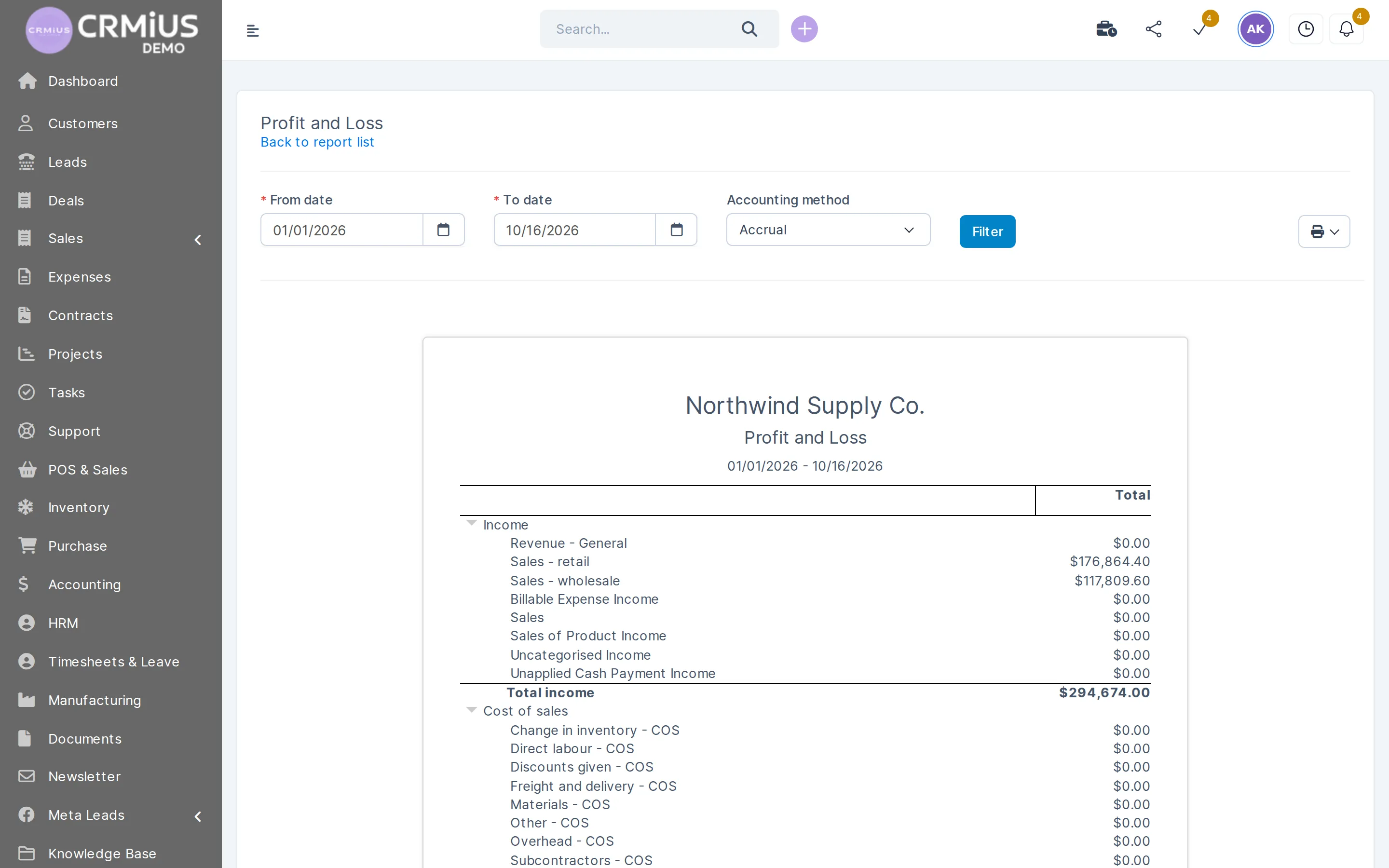
With the accounting module the reports become accounting statements: profit and loss (also compared with last year, year to date and for the trailing 12 months), balance sheet, statement of cash flows, general ledger, journal, trial balance and budget overview.
Profit and loss
Accounting statements for any dates
The accounting module adds a report list of its own: profit and loss, balance sheet, cash flows, ledger and trial balance.
- From and to dates on every statement
- Accounting method selector
- Income and cost of sales by account
- Print button on the statement
Dashboards and goals for each employee
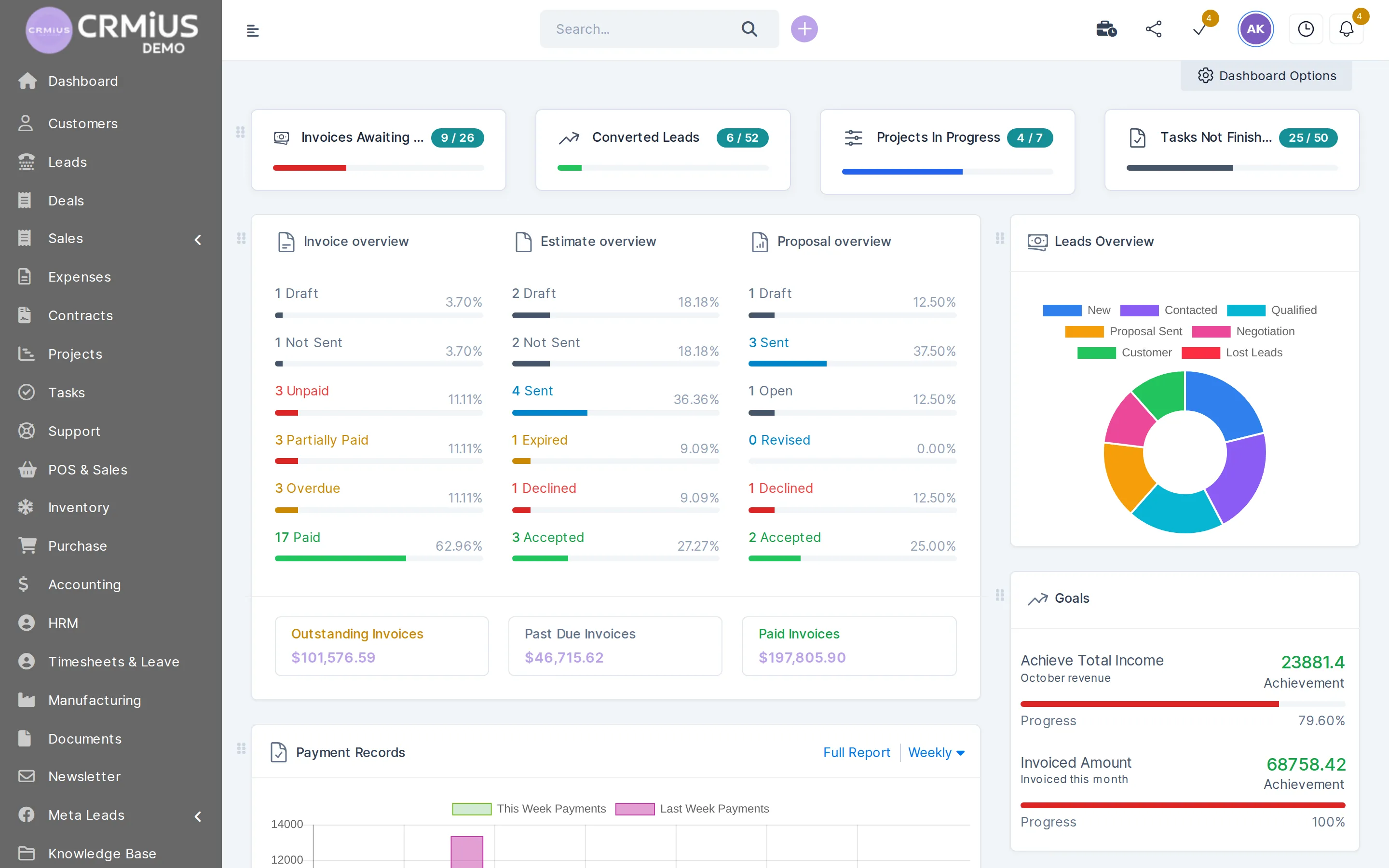
The dashboard opens after login. Quick statistics show invoices awaiting payment, converted leads, projects in progress and unfinished tasks. Below them: invoice, estimate and proposal overviews by status, the leads chart, payments this week against last week, goals, tickets and the latest activity.
Each employee picks widgets in Dashboard Options, drags them into place and can reset the layout. Access to reports and data follows the employee's role and permissions.
Goals
A goal has a type, a target, start and end dates and, if needed, a staff member. Types: total income, invoiced amount, converted leads, new customers, contracts by type and estimate conversion. Progress is shown in percent, and staff can be notified when a goal is achieved or missed.
Customer statements and visit notes
For each customer the CRM builds a statement for any period: opening balance, invoiced amount, payments and balance due, with every invoice and payment listed. Print it, save it as PDF or email it to the customer from the same screen. In the customer portal the client sees their own invoices, estimates, proposals, contracts and projects.
Meetings and visits are recorded as notes or tasks on the customer card, so the contact history sits next to the sales figures. More in customer management.
Reports in spreadsheets or in CRMiUS
| Spreadsheets | CRMiUS | |
|---|---|---|
| Source of numbers | copied by hand from invoices, bank and email | read from invoices, payments, leads and timesheets |
| How current | as of the last manual update | updates as records are entered |
| One version | several copies of one file | one database for every department |
| Who sees what | anyone with the file link | access by role |
| For the meeting | formatting by hand | export to Excel, CSV, PDF or print |
Reports read data from
Each module feeds its own reports and the dashboard.
- Finance and invoicingInvoices, payments, credit notes and expenses.
- Sales and leads managementLeads, sources and conversion.
- Project managementProjects and timesheets.
- Warehouse and inventory managementStock summary and inventory valuation.
- Procurement managementPurchase orders and purchase invoices.
- Roles and access rightsWho can see which reports.
Who uses CRMiUS reports
Owner or director
Unpaid and overdue invoices on the dashboard, income against expenses by month, goals with deadlines.
Head of sales
Lead conversion by source and by manager, estimates and proposals by status.
Accountant
Payments by mode, credit notes, expenses by category; P&L and balance sheet with the accounting module.
Project manager
Timesheets by customer and project before the project is invoiced.
Open the reports in the live demo
The live demo without sign-up opens as the admin of a fictional company with invoices, payments, leads and expenses: open Reports and try the filters and export. The demo resets every 6 hours. Or start the 14-day free trial with full access and no bank card.
Questions and answers
What is CRM reporting?
Reports built from CRM records: leads, invoices, payments, expenses, timesheets. The numbers come from the same database the team works in, so they are current and match between departments.
Which reports does CRMiUS have?
- Sales: invoices, items, payments received, credit notes, proposals, estimates, customers; charts of income, payment modes and customer groups
- Leads: conversion by source, week, month and employee
- Expenses by category and expenses vs income
- Timesheets overview
- With add-on modules: accounting statements, stock and purchase reports
Can reports be exported to Excel or PDF?
Yes. Report tables export to Excel, CSV or PDF or go straight to print. A customer statement can be printed, saved as PDF or emailed to the customer.
Can each employee have their own dashboard?
Yes. In Dashboard Options each employee chooses widgets and arranges them; the layout can be reset. Access to data follows the employee's role.
How do sales goals work?
You set a goal type (income, invoiced amount, converted leads, new customers, contracts, estimate conversion), a target, dates and optionally a staff member. The dashboard shows progress in percent, and staff can be notified when the goal is achieved or missed.
Which plan includes reports and dashboards?
Key reports are in Basic at $100 a month; analytics and dashboards come with Advanced at $150. Annual payment gives 10% off, and every plan starts with a 14-day free trial without a bank card. See plans.
Modules
- Contact and customer management (CRM)→
- Finance and invoicing→
- Warehouse and inventory management→
- Project management→
- Marketing and newsletters→
- Roles and access rights→
- Task management→
- Customer support→
- IP telephony→
- E-signature for contracts→
- Sales and leads management→
- Logistics and inventory→
- Document management→
- Procurement management→
- HR management→
Start 14-day free trial
- 14 days free, no card
- from $100 / month
- 30+ connected modules
- 5 interface languages