E-commerce CRM for online stores: from order to repeat purchase
Every buyer gets one card with invoices, payments, shipments and support tickets. CRMiUS connects to your shop through the REST API and webhooks and takes online payments through Stripe and PayPal.
What is an e-commerce CRM?
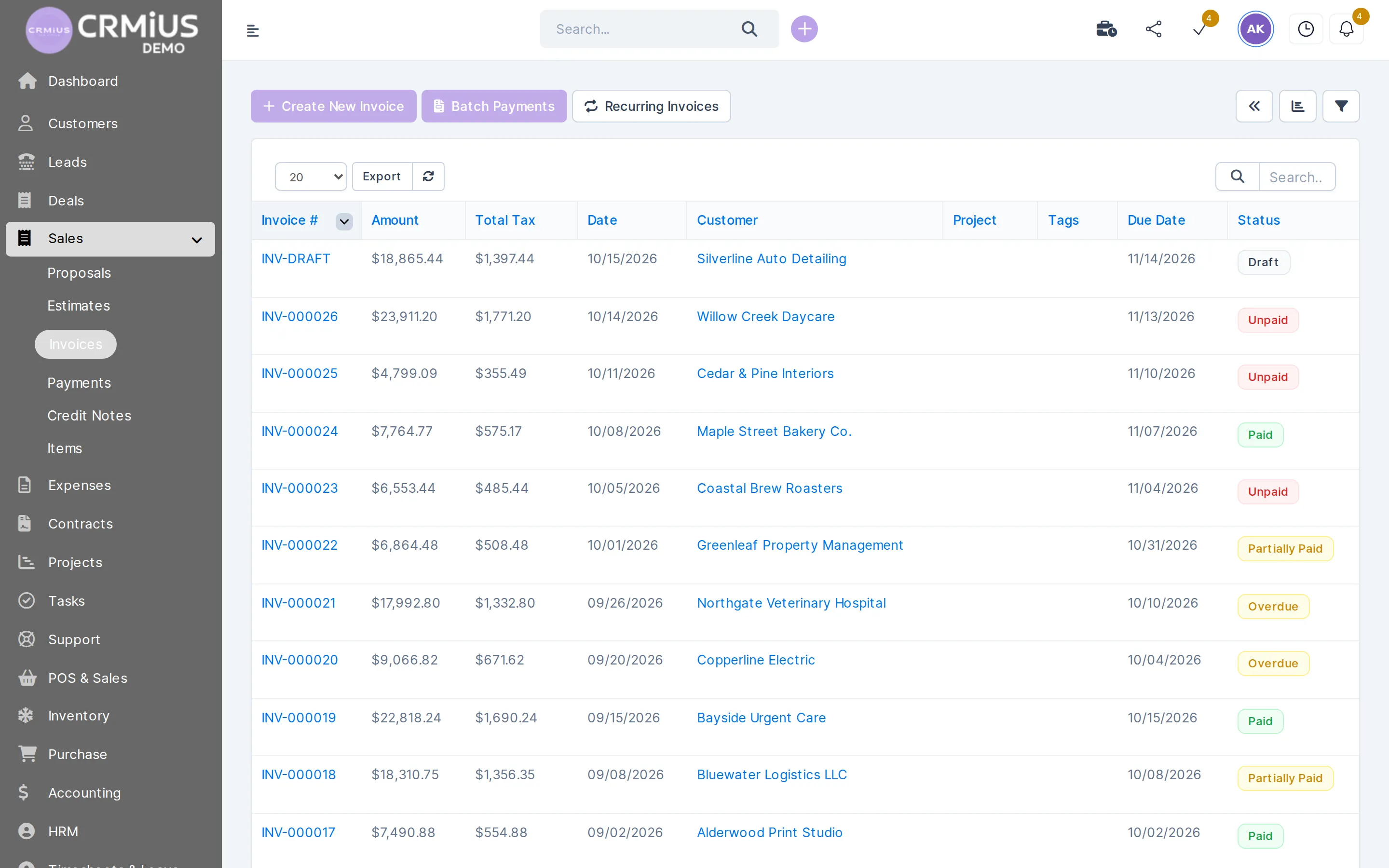
An e-commerce CRM is the back office of an online store: one record per buyer with orders, payments, shipments and questions. In CRMiUS an order from your site becomes an invoice on the buyer’s card, is paid through Stripe or PayPal, leaves the warehouse with a delivery note, and after-sale questions arrive as tickets on the same card.
- Connection to the shop: REST API and webhooks, plus web-to-lead forms for inquiries.
- Plans from $100 per month; 14 days free on every plan, full access, no bank card. Compare plans
- Interface in English, Ukrainian, Russian, German and French.
E-commerce back office
What an online store runs in CRMiUS
One card per buyer
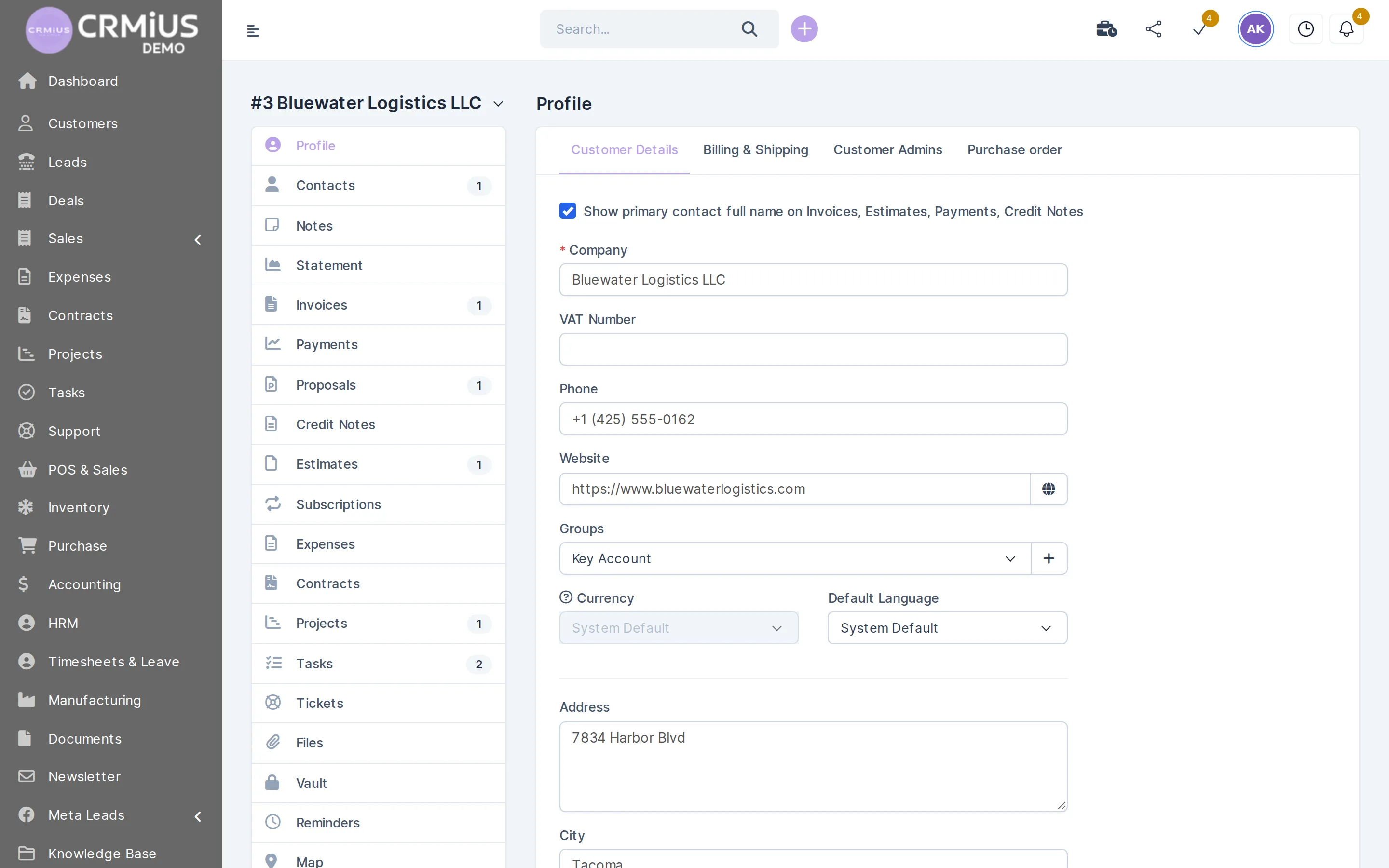
Contacts, billing and shipping addresses, invoices, payments, credit notes, tickets and files in one customer record; the statement shows the balance. See customer management.
Orders recorded as invoices
Items from the product catalogue, taxes and multi-currency; the invoice PDF carries your branding.
Online payment by card
Stripe and PayPal on the invoice: the payment is recorded against it and the status turns to Paid. Unpaid invoices get payment reminders. Details in finance CRM.
Stock in several warehouses
Balance per warehouse, delivery notes, transfers and min/max alerts per item. See warehouse management.
Restocking from suppliers
Purchase requests, purchase orders and goods receipts that add the delivered quantity to stock. See procurement.
Questions and returns
Emails turn into tickets on the buyer’s card, with predefined replies and a knowledge base; a refund is issued as a credit note. See helpdesk.
Repeat sales
Customer groups and CRMiUS MailFlow campaigns to buyers and leads. See CRM marketing.
Reports for the owner
Sales, payments, income against expenses and customer reports; dashboards with widgets. See reports.
How an online order runs through CRMiUS
One order touches five parts of the system. Each step leaves a document on the buyer’s card, so anyone on the team can see where the order stands.
- 01OrderThe site passes the order to the REST API, and it is recorded as an invoice on the buyer’s card.
REST API · webhooks - 02PaymentThe buyer pays by card through Stripe or PayPal; the payment lands on the invoice.
Paid - 03ShipmentThe warehouse issues a delivery note, and the item leaves the stock of its warehouse.
delivery note - 04After-saleA question or a return request arrives as a ticket on the same card; a refund is a credit note.
ticket · credit note - 05RestockAn item at its minimum triggers an alert, and purchasing reorders from the supplier.
min / max
Buyer card
Everything about a buyer on one screen
Open a customer and every document is one tab away: what they bought, paid, returned and asked.
- Contacts, billing and shipping addresses, customer group
- Invoices, payments and credit notes with a statement
- Support tickets, files, notes and reminders
- Customer portal: the buyer sees invoices and pays online
From paid invoice to parcel

Stock is kept per warehouse, so the team packs from the right shelf and the balance on the screen matches the shelf. When the warehouse issues a delivery note, the item leaves stock and the shipment appears in the buyer’s history.
- Several warehouses, each with its own balance, and transfers between them
- Goods receipts and delivery notes with a movement history per item
- Minimum and maximum stock per item with a reorder alert
- Serial numbers and expiry dates where the goods need them
- Inventory counts
More on warehouse management, purchasing from suppliers and deliveries and claims.
How CRMiUS connects to your online store
Your storefront, cart and product pages stay on the shop platform you already use. CRMiUS takes over what happens after the order: the buyer, the money, the stock and the service.
Runs in CRMiUS
- Buyer cards and order history
- Invoices, Stripe and PayPal payments, reminders
- Stock, delivery notes and purchasing
- Tickets, returns and credit notes
- Campaigns and reports
Stays on your shop platform
- Storefront and product pages
- Cart
- Site design and content
- REST API: the site writes buyers and orders into CRMiUS and reads data back.
- Webhooks: CRMiUS sends events to your site or other services.
- Web-to-lead forms: wholesale inquiries and questions from the site arrive as leads.
- Facebook Lead Ads and Telegram: leads from ads and chats from the messenger in the same CRM.
A developer sets up the exchange for your shop platform. Our team configures modules and interface for your store as an additional service. All connections: integrations.
Online store setups CRMiUS covers
One online store
Buyer cards, invoices with Stripe and PayPal, one warehouse and tickets for questions and returns.
Online store with a physical shop
The till in the shop runs on CRMiUS POS, so both channels share one customer base and one stock. See retail CRM.
B2B online sales
Trade buyers accept estimates and proposals online, pay invoices in the customer portal and get recurring invoices for regular orders.
Own warehouse and suppliers
Purchase orders, goods receipts and several warehouses keep the catalogue in stock. See procurement.
Price and free trial
Basic costs $100 per month: contacts, tasks and projects, Google Workspace integration and key reports. Advanced costs $150 per month and adds the finance module, time tracking, helpdesk, analytics and dashboards. Corporate is priced individually, with POS terminal support, module and interface customization, a personal manager and priority support.
- 14 days free on every plan, full access, no bank card
- 10% off for annual payment
- Individual terms from 10 users
Which modules your store needs, warehouse included, and which plan covers them, we clarify in the demo. Plans side by side: pricing.
Modules an online store switches on
- Contact and customer management (CRM)Buyer cards and order history.
- Finance and invoicingInvoices, Stripe and PayPal payments, credit notes.
- Warehouse and inventory managementStock, delivery notes, min/max alerts.
- Customer supportTickets for questions and returns.
- Marketing and newslettersMailFlow campaigns and customer groups.
- For retailPOS for a physical shop next to the site.
Questions and answers
What is an e-commerce CRM?
The back office of an online store: one record per buyer with orders, payments, shipments and questions. In CRMiUS the buyer’s card holds invoices, payments, credit notes and tickets, and stock is kept in the warehouse module.
Can CRMiUS connect to my online store?
Yes, through the REST API and webhooks. The storefront and cart stay on your shop platform; a developer sets up the exchange of buyers and orders. Our team configures modules and interface as an additional service.
Which online payments does CRMiUS accept?
Stripe and PayPal. The buyer pays the invoice by card, the payment is recorded against it, and unpaid invoices get reminders. Trade buyers can also pay in the customer portal.
Does CRMiUS track stock for e-commerce?
Yes. The warehouse module keeps the balance per warehouse, issues delivery notes, moves goods between warehouses and alerts when an item reaches its minimum.
How are returns handled?
The return request arrives as a ticket on the buyer’s card. When the goods come back, the refund is issued as a credit note, so the statement shows the correct balance.
How is it different from a retail CRM?
This page covers orders from a website. The retail CRM page covers shops with a till. A business with both uses one customer base and one stock.
How much does a CRM for an online store cost?
Basic is $100 per month, Advanced $150, Corporate is priced individually; annual payment gives 10% off. Every plan starts with 14 days free. Compare plans.
Can I try it without registering?
Yes. The live demo opens a fictional company with customers, invoices and stock; data resets every 6 hours. The 14-day free trial needs no bank card.
Start 14-day free trial
- 14 days free, no card
- from $100 / month
- 30+ connected modules
- 5 interface languages