Logistics CRM with inventory: from request to delivery
Requests, quotes, contracts, invoices, delivery notes and customer claims in one system, with stock for every warehouse. From $100 a month, 14 days free.
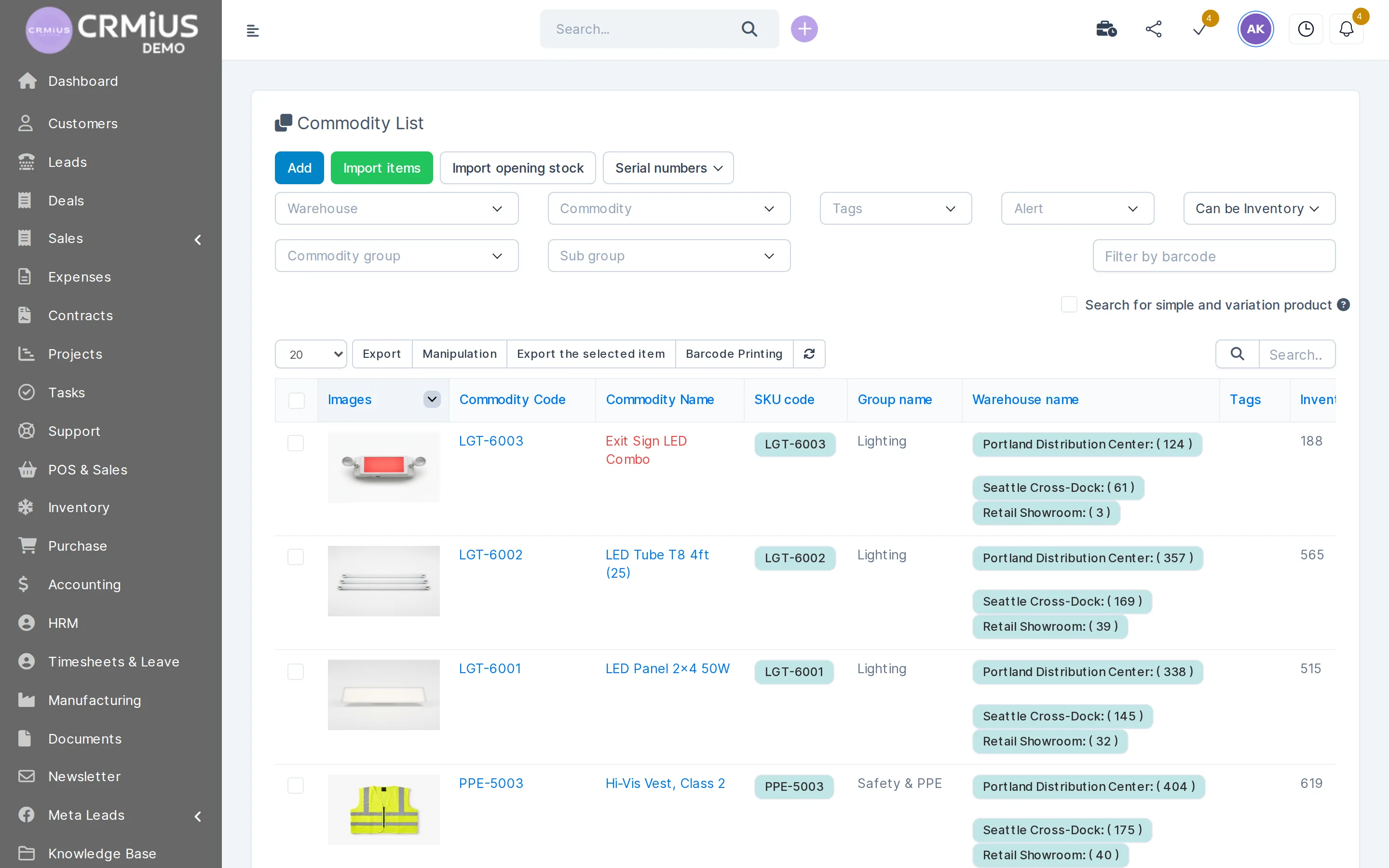
What a logistics CRM does in CRMiUS
A logistics CRM keeps the commercial side of moving goods in one system: customer requests, quotes, contracts, invoices, delivery notes and claims. In CRMiUS each delivery note comes from an invoice and takes stock from a chosen warehouse, so sales, the warehouse and customer service see the same order, the same customer and the same balance.
- Requests on a kanban board from web forms, Facebook Lead Ads or CSV import
- Estimates and proposals the customer accepts online; contracts with e-signature
- Delivery notes from invoices, with the shipping warehouse and a delivery status
- Stock per warehouse, transfers between warehouses and min/max reorder alerts
- Tickets for claims and delivery changes, with departments and priorities
Price: plans from $100 a month (Basic), Advanced $150, Corporate priced individually; 10% off with annual payment. 14-day free trial with full access, no bank card. Compare plans
From request to delivery: the order path in CRMiUS
Each step is a document on the customer card, so anyone on the team can open the chain from the first request to the last claim.
Requests
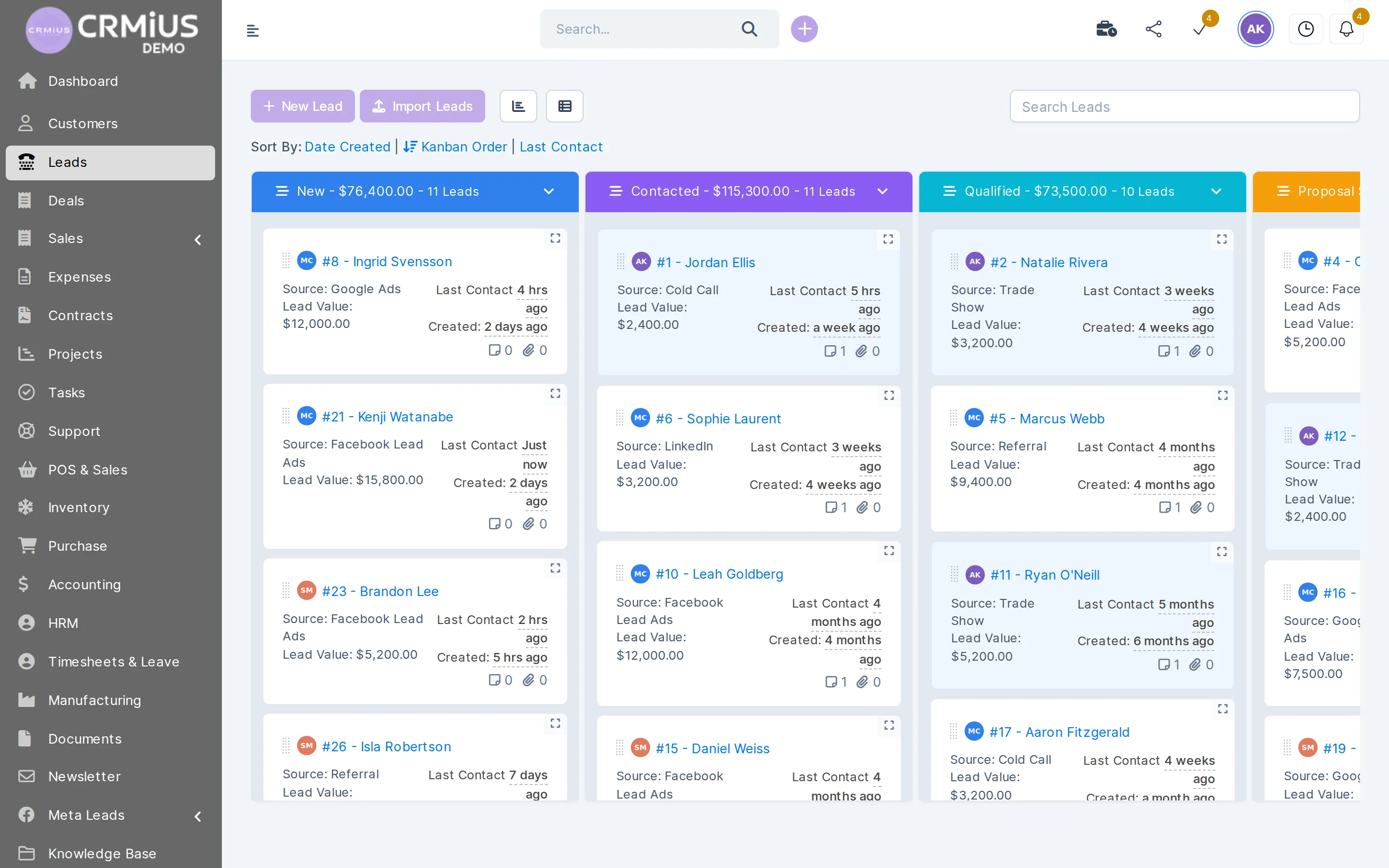
Every transport or delivery request on one board
Requests from the site, ads and referrals land in columns by status, and each card shows who on the team handles it.
- Columns by status: new, contacted, qualified, proposal sent
- Source on every card: form, Facebook Lead Ads, referral, trade show
- Request value and time since the last contact
- Add requests by hand or import them from a file
What a logistics team does in CRMiUS
Takes requests
Web-to-lead forms on your site, Facebook Lead Ads and CSV import put requests on one kanban board with source, owner and reminder.
Sends quotes
Estimates and proposals with items, taxes and currency; the customer accepts online and the estimate becomes an invoice in one click.
Signs contracts
Contracts go out for e-signature; renewal dates stay on the customer card.
Invoices regular customers
Recurring invoices, credit notes, payment reminders and online payment through Stripe or PayPal.
Ships from stock
The delivery note takes items, quantities and the warehouse from the invoice; its status shows what is ready and what is delivered.
Moves and counts stock
Transfers between warehouses and inventory counts keep balances in line with the shelf; min/max alerts show what to reorder.
Handles claims
Tickets with departments, priorities and predefined replies; customer emails arrive as tickets.
Plans the day
Tasks with checklists, assignees and timers: “book carrier” or “upload delivery note” stays visible until it is done.
Claims and after-sales
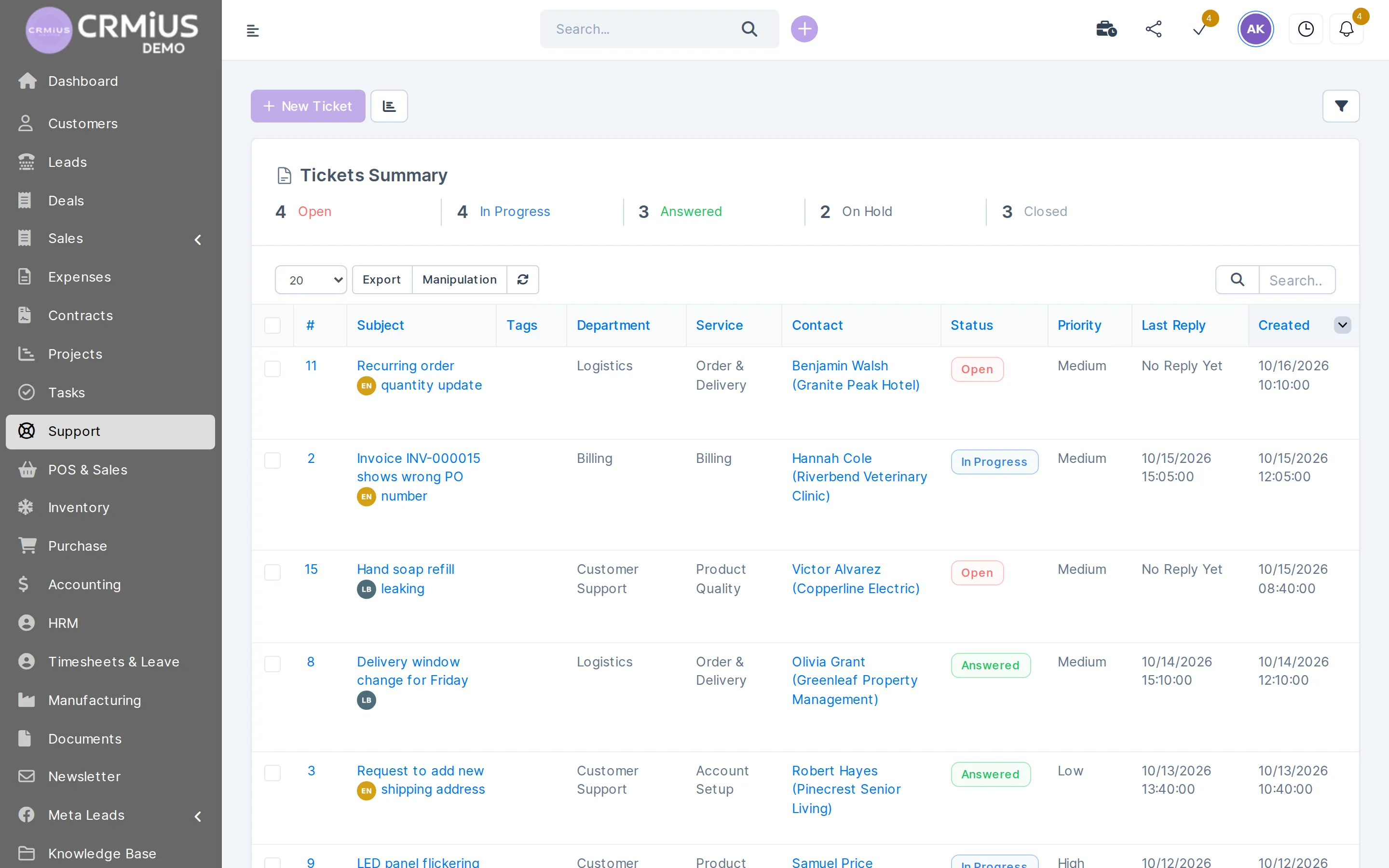
Delivery claims become tickets with a department and a priority
A missing case, a wrong PO number on an invoice, a new delivery window: each request has an owner and a status.
- Departments and services, e.g. Logistics and Order & Delivery
- Customer emails piped into tickets
- Predefined replies for typical cases
- Summary by status: open, in progress, answered, on hold, closed
CRM for a transport or forwarding company: what CRMiUS covers

Transport, forwarding and distribution companies use CRMiUS for the work around the cargo: requests, prices, contracts, invoices, documents and customer claims. Vehicle GPS tracking, route planning, dispatching and telematics stay in your TMS or fleet software. The REST API and webhooks let your developer pass orders and statuses between CRMiUS and that system.
What your customers see
In the customer portal your clients open their invoices, estimates, proposals, contracts and tickets and pay online. Portal access is switched on per contact.
Where stock and purchasing live
Balances, receipts and inventory counts are described on the warehouse management system page; supplier orders placed after a min-stock alert are on the procurement management page. Claims and after-sales work run in the customer support module.
Getting started
Open the live demo without sign-up: it is a fictional distributor, Northwind Supply Co., with warehouses, deliveries and tickets already filled in. Then start the 14-day trial, import customers and items from CSV and set up warehouses, roles and ticket departments. Module configuration and team training are available as CRMiUS services.
Spreadsheets and email, separate tools or CRMiUS
| Spreadsheets and email | Separate tools | CRMiUS | |
|---|---|---|---|
| Request → quote | copied by hand | export and import between apps | the estimate is created from the lead or customer |
| Quote → invoice | retyped | depends on the integration | one click |
| Stock after shipping | updated by hand | synced if an integration exists | goes down with the delivery note |
| Customer claims | in personal mailboxes | a separate helpdesk | tickets on the customer card |
| Access by department | shared files | set per app | roles and permissions per staff member |
How to start
- 01
Live demo
Open the demo company without sign-up and walk an order from estimate to delivery note.
- 02
Trial
14 days with full access, no bank card.
- 03
Import
Customers, contacts and items from CSV; opening stock per warehouse.
- 04
Setup
Warehouses, roles, ticket departments and document templates with your branding.
- 05
Plan
Basic, Advanced or Corporate; 10% off with annual payment.
Works together with
Logistics data is shared with the modules that create and use it.
- Warehouse and inventory managementStock per warehouse, receipts and delivery notes.
- Procurement managementPurchase orders to suppliers after a min-stock alert.
- Finance and invoicingInvoices, payments and expenses.
- Customer supportTickets for claims and delivery changes.
- E-signature for contractsContracts signed online.
- Reports and dashboardsReports on sales, invoices and payments.
Who uses it
Freight forwarders and transport companies
Requests, quotes, contracts and claims per customer; trips stay in the TMS.
Distributors and wholesalers
Deliveries from several warehouses, each tied to an invoice. See CRM for wholesale distribution.
Retail chains
Transfers from the central warehouse to stores.
Equipment and consumables suppliers
Serial numbers and expiry dates on the items that need them.
Questions and answers
What is a logistics CRM?
A CRM for logistics holds the customers, requests, quotes, contracts, invoices and claims of a logistics or trading company in one system. CRMiUS adds a warehouse: delivery notes come from invoices and change stock in the chosen warehouse.
Does CRMiUS track vehicles or plan routes?
GPS tracking, route planning and dispatching are outside CRMiUS and stay in your TMS or fleet software. CRMiUS covers customers, documents, stock and claims; the REST API and webhooks connect it with other systems.
Can CRMiUS handle delivery claims?
Yes. A claim becomes a ticket with a department, a priority and a status; customer emails can arrive as tickets, and predefined replies cover typical cases.
Can I move stock between warehouses?
Yes. A transfer moves items between warehouses or stores with a document, and each warehouse keeps its own balance.
How much does a logistics CRM from CRMiUS cost?
Plans start at $100 a month (Basic); Advanced is $150 and Corporate is priced individually. Annual payment gives 10% off, and every plan has a 14-day free trial. See pricing.
Can customers see their invoices and contracts online?
Yes. In the customer portal clients open invoices, estimates, proposals, contracts and tickets and pay online by card through Stripe or PayPal.
Modules
- Contact and customer management (CRM)→
- Finance and invoicing→
- Warehouse and inventory management→
- Project management→
- Marketing and newsletters→
- Reports and dashboards→
- Roles and access rights→
- Task management→
- Customer support→
- IP telephony→
- E-signature for contracts→
- Sales and leads management→
- Document management→
- Procurement management→
- HR management→
Start 14-day free trial
- 14 days free, no card
- from $100 / month
- 30+ connected modules
- 5 interface languages