CRM for agencies and service businesses, with project billing
Proposals, contracts, projects, hours and invoices sit on one client card. Your team logs time on tasks, and the project is invoiced by a fixed fee or by hours in one click. 14 days free.
What a CRM for agencies does
A CRM for agencies and service businesses keeps the whole client cycle in one system: the inquiry, the proposal, the signed contract, the project with its tasks and hours, and the invoice. In CRMiUS the client accepts the proposal online, task timers fill the timesheet, and unbilled hours turn into an invoice the client pays by card.
- Proposals and estimates the client accepts online
- Contracts signed electronically
- Projects with milestones, Gantt chart, tasks and files
- Timesheets filled by task timers
- Project billing: fixed fee, project hours or task hours
- Customer portal with projects, invoices and online payment
Price: clients, projects and tasks are in Basic at $100 a month. The full agency cycle with time tracking and project invoices needs Advanced at $150 a month; Corporate is priced individually. 10% off with annual payment, individual terms from 10 users. 14-day free trial with full access, no bank card. Compare plans
From inquiry to paid invoice: how client work runs
Every step leaves a record on the client card, so the account manager, the project lead and accounting look at the same history.
Steps 2, 3 and 7 happen in the customer portal: the client opens proposals, estimates, contracts, project progress and invoices there and pays online. Your team does the rest inside CRMiUS.
What you get
What an agency or service firm runs in CRMiUS
Eight parts of client work that otherwise sit in separate files and tools.
Leads from your website
Web-to-lead forms on your site create leads with their source; the board shows them by status, and a won lead becomes a client in one click.
Proposals and estimates
Built from your catalogue of services; the client accepts the proposal online, and an accepted estimate becomes an invoice in one click.
Contracts with e-signature
The client signs online; renewals are tracked on the contract. Electronic signatures.
Projects on the client card
Milestones, tasks with checklists, Gantt chart, files and discussions next to the client's deals and invoices.
Time tracking
Team members start a timer on a task; each timesheet line keeps the person, the task, start, end and a note.
Project billing
Fixed fee, project hours or task hours, chosen per project; billable expenses go on the same invoice. Monthly retainers run as recurring invoices.
Customer portal
Clients see project progress, files, proposals, estimates, contracts and invoices, and pay online by card.
Roles and access
Each staff member sees what their role allows: designers and consultants their tasks, accounting the invoices. Roles and permissions.
Project overview
Hours and money of one project on one screen
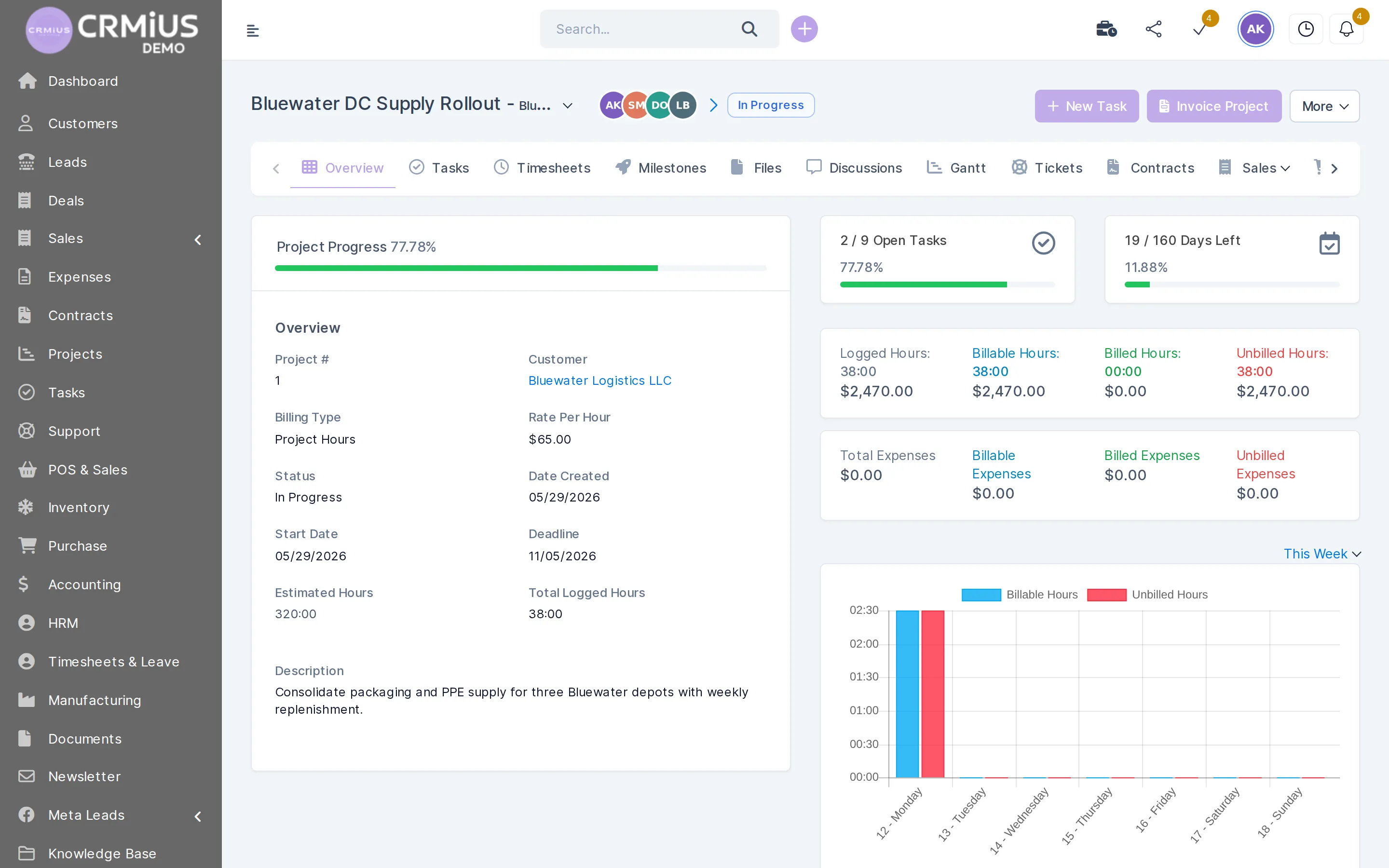
The project overview shows how much work is logged, billed and still unbilled before you send the next invoice.
- Billing type and hourly rate on the project
- Logged, billable, billed and unbilled hours
- Billable and unbilled expenses
- “Invoice project” turns unbilled hours into an invoice
Fixed fee, hourly or retainer: billing the way you sell

Each project in CRMiUS has its own billing type, so one agency sells a fixed-price website to one client, hourly consulting to another and a monthly retainer to a third.
- Fixed fee. The project is invoiced at the agreed amount; the timesheet still shows how many hours the team spent against the estimate.
- Project hours. One hourly rate for the project; logged hours are invoiced from the unbilled total.
- Task hours. Hours are counted and invoiced task by task.
- Retainer. A recurring invoice is created every month on its own; extra work outside the retainer runs as a separate project billed by hours.
- Expenses. Stock images, printing, travel or subcontractors recorded as billable expenses go onto the client's invoice.
Invoices come out as PDF with your branding, in the client's currency and with your taxes; the client pays by card through Stripe or PayPal, bank transfers are recorded by hand. More in the finance module.
Proposals and estimates
Every estimate has a status and an expiry date
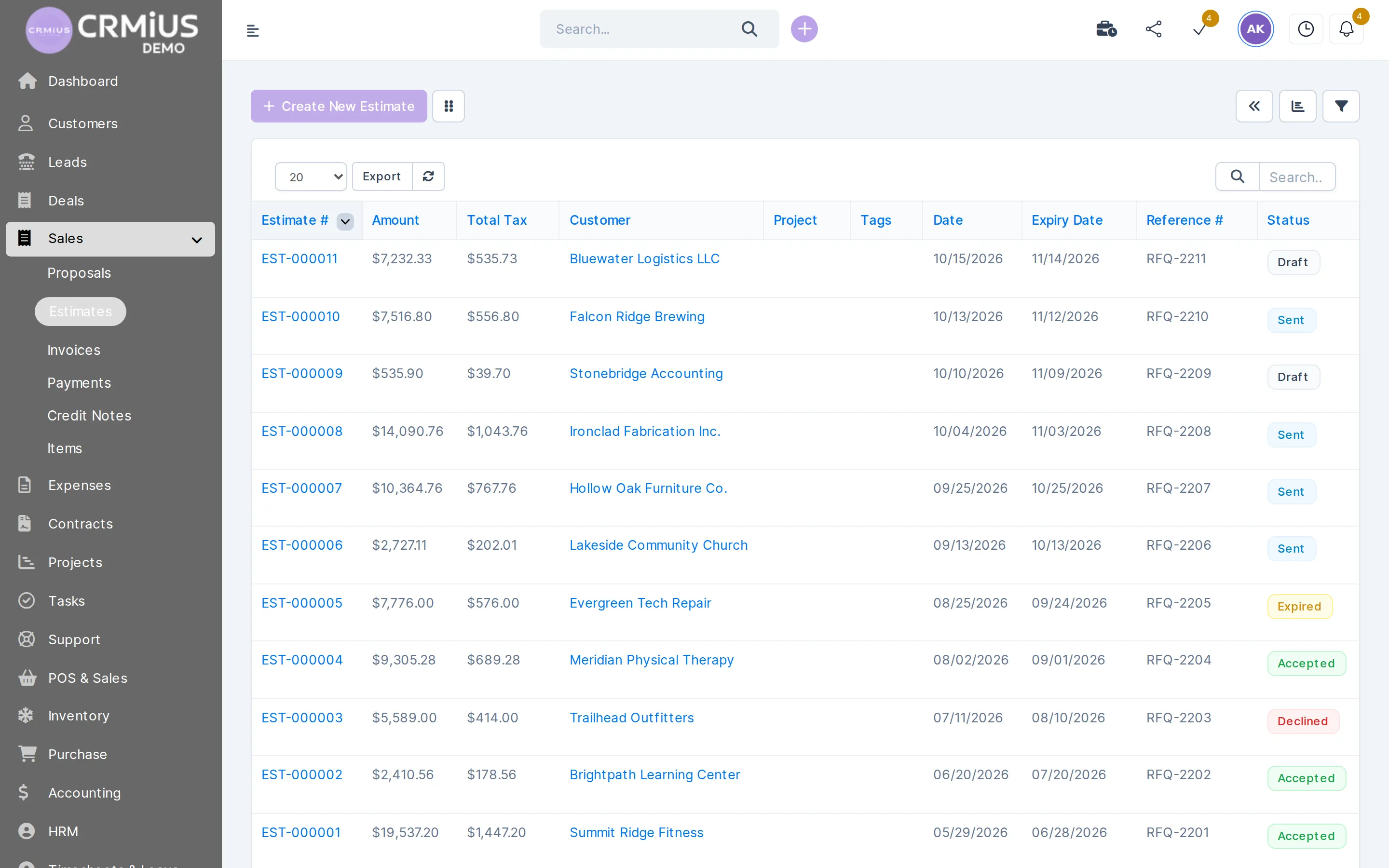
The list shows drafts, estimates sent and waiting for an answer, and accepted ones, so follow-ups go to the right clients.
- Draft, Sent, Accepted, Declined and Expired statuses
- Expiry date and your reference number
- An accepted estimate becomes an invoice in one click
- The client accepts in the customer portal
Which service businesses work this way
Projects, billing types and roles are set for your company, so the same cycle fits different kinds of client work.
Marketing, advertising and creative agencies
Monthly retainers as recurring invoices, campaigns and launches as projects with hours, files and the client conversation inside the project.
Web, IT and software studios
Milestones on the Gantt chart, tasks per sprint, and support tickets after launch on the same client card: help desk in the CRM.
Consultancies and advisory firms
Fixed-fee engagements, contracts signed online, documents and discussions in the project, hours visible against the estimate.
Engineering and design offices
Project stages as milestones, hours of every specialist logged on tasks, invoices by fixed fee or by hours.
Spreadsheets and separate tools, or one CRMiUS
A document editor, a time tracker and an invoicing app compared with the client cycle in CRMiUS, step by step.
Proposal
CRMiUSAccepted online, status in the list
Spreadsheets and separate toolsFile sent by email, answer in the inbox
Contract
CRMiUSE-signature on the client card
Spreadsheets and separate toolsPrinted, signed, scanned
Hours
CRMiUSTask timers fill the timesheet
Spreadsheets and separate toolsExported from a time tracker
Invoice
CRMiUSFrom unbilled hours in one click
Spreadsheets and separate toolsHours retyped into the invoice
Client updates
CRMiUSProgress, files and invoices in the portal
Spreadsheets and separate toolsStatus emails and calls
Budget
CRMiUSLogged against estimated hours, billed against unbilled
Spreadsheets and separate toolsSpreadsheet updated by hand
What's included, how we start, timeline and price
How we start
- Live demo. Open the live demo without sign-up: a fictional company with client projects, estimates, timesheets and invoices.
- Free trial. 14 days with full access and no bank card, on your own clients and projects.
- Setup. We configure the modules and the interface for your company: catalogue of services, billing types, proposal and invoice templates with your branding, roles in the team.
- Import. Clients and contacts come in from a CSV file.
- Training. We train the team; technical support works 24/7 on every plan.
Setup and team training are CRMiUS services on request.
Timeline
A workable plan for the 14 trial days; the pace depends on how many clients and running projects you bring in:
- Days 1–2: import clients, add the catalogue of services, set billing types.
- Days 3–7: send the first proposals from CRMiUS, open current projects, the team logs hours with timers.
- Days 8–14: issue the first invoices from timesheets, give clients portal access, compare logged and estimated hours.
What we need from you
Your client list as a CSV file, the services with prices, the billing type for each kind of project, the proposal and invoice texts you send today, and who in the team does what.
Price
- Basic, $100 a month: clients and contacts, projects and tasks, Google Workspace integration, key reports.
- Advanced (Pro), $150 a month: everything in Basic plus the finance module for invoices and payments, time tracking, help desk, analytics and dashboards.
- Corporate: priced individually, with module and interface customization and a personal manager.
Annual payment takes 10% off ($135 instead of $150 on Advanced). All plans and terms.
Modules an agency switches on
All of them work with the same client card.
- Project managementMilestones, Gantt chart, timesheets and project billing.
- Finance and invoicingInvoices, payments, recurring invoices and expenses.
- E-signature for contractsContracts the client signs online.
- Task managementTask board, checklists, timers and recurring tasks.
- Contact and customer management (CRM)Client card with deals, projects, contracts and invoices.
- Reports and dashboardsTimesheet, sales and income reports.
Questions and answers
What is a CRM for agencies?
A CRM that covers the work after the sale as well: proposals, contracts, projects, logged hours and invoices for each client. In CRMiUS all of it sits on the client card, so a client's history is in one place.
Can I bill one project by fixed fee and another by hours?
Yes. The billing type is set per project: fixed fee, project hours or task hours. Billable expenses can go on the same invoice.
How do monthly retainers work?
Create a recurring invoice for the client: CRMiUS issues it every period, monthly for example, and sends payment reminders for unpaid invoices. Work outside the retainer runs as a separate project billed by hours.
Can clients see their project and pay online?
Yes, in the customer portal. You choose what the client sees: progress, tasks, files, discussions. Proposals, estimates, contracts and invoices are there too, and invoices are paid by card through Stripe or PayPal.
How is a CRM for agencies different from a project management tool?
A project tool plans the work; CRMiUS also holds the sale before it and the invoice after it, on the same client card. The project features in detail: project management in the CRM.
Can we move our clients and current projects?
Clients and contacts are imported from a CSV file. Running projects you open with their remaining milestones; the import and setup can be done by our team as a configuration service.
How much does a CRM for agencies cost?
Clients, projects and tasks are in Basic at $100 a month. Time tracking and project invoices come with Advanced at $150 a month; Corporate is priced individually. Annual payment gives 10% off, teams from 10 users get individual terms, and every plan starts with 14 free days without a bank card. See plans.
Can I try it without signing up?
Yes: the live demo opens a fictional company with projects, estimates, timesheets and invoices and resets every 6 hours. For your own data, start the 14-day free trial.
Start 14-day free trial
- 14 days free, no card
- from $100 / month
- 30+ connected modules
- 5 interface languages