CRM task management: every task tied to a client, deal or project
Assign tasks with a deadline, checklist and followers, move them across a kanban board and log time with a timer. Each task stays in the history of the client or project it belongs to.
What is CRM task management?
CRM task management keeps the team’s to-dos inside the CRM and links each task to its record: a client, lead, deal, project, invoice or ticket. In CRMiUS a task has an assignee, followers, priority, deadline and checklist; time is logged with a timer, routine tasks repeat on schedule, and the manager follows progress on a kanban board.
- Tasks are part of every plan from Basic, $100 per month; timers and timesheets come with Advanced, $150 per month.
- 14 days free on every plan, full access, no bank card needed.
- Interface in English, Ukrainian, Russian, German and French.
Tasks module
What your team does with tasks in CRMiUS
Link each task to its record
Client, lead, deal, project, invoice or ticket: the task opens with its context and stays in that record’s history.
Assign and follow
Assignees, followers, priority and a deadline on every task.
Break work into checklists
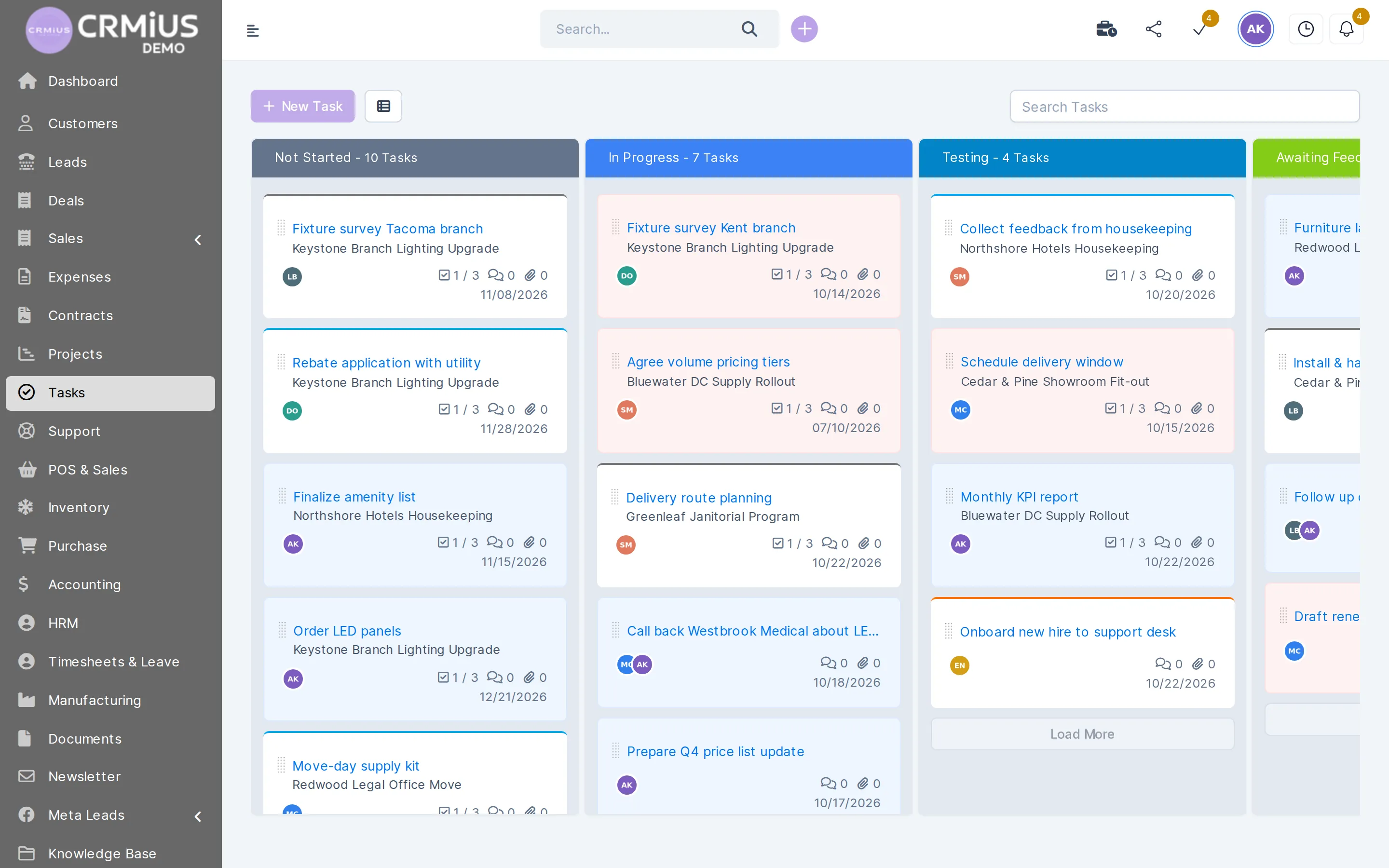
Checklist items, attachments and comments inside the task; the card on the board shows checklist progress, for example 1/3.
Move tasks on a kanban board
Columns by status, from Not Started through In Progress, Testing and Awaiting Feedback to Complete. Drag a card to change its status.
Log time with a timer
Start and stop the timer on the task; hours go to timesheets, timesheet reports and project billing.
Repeat routine work
Recurring tasks are created daily, weekly or monthly: reports, payment checks, contract renewals.
Get reminded in time
Reminders before the deadline, push notifications and mentions in comments; overdue tasks stand out for the manager.
Automate routines
CRMiUS Automation runs rule-based workflows for repeated task work; see process automation.
How a task moves from request to done
Every task follows the same path, so anyone on the team can open the board and see where the work stands.
- 01CreateFrom a client card, a deal, a project or a ticket, or straight on the board.
- 02AssignAssignee, followers, priority and deadline.
- 03WorkChecklist items ticked, files and comments added, time logged with the timer.
In Progress - 04ReviewThe result waits for a check or for the client’s answer.
TestingAwaiting Feedback - 05DoneLogged hours stay in the timesheet and can be billed with the project.
Complete
Time tracking
Hours from task timers land in timesheets
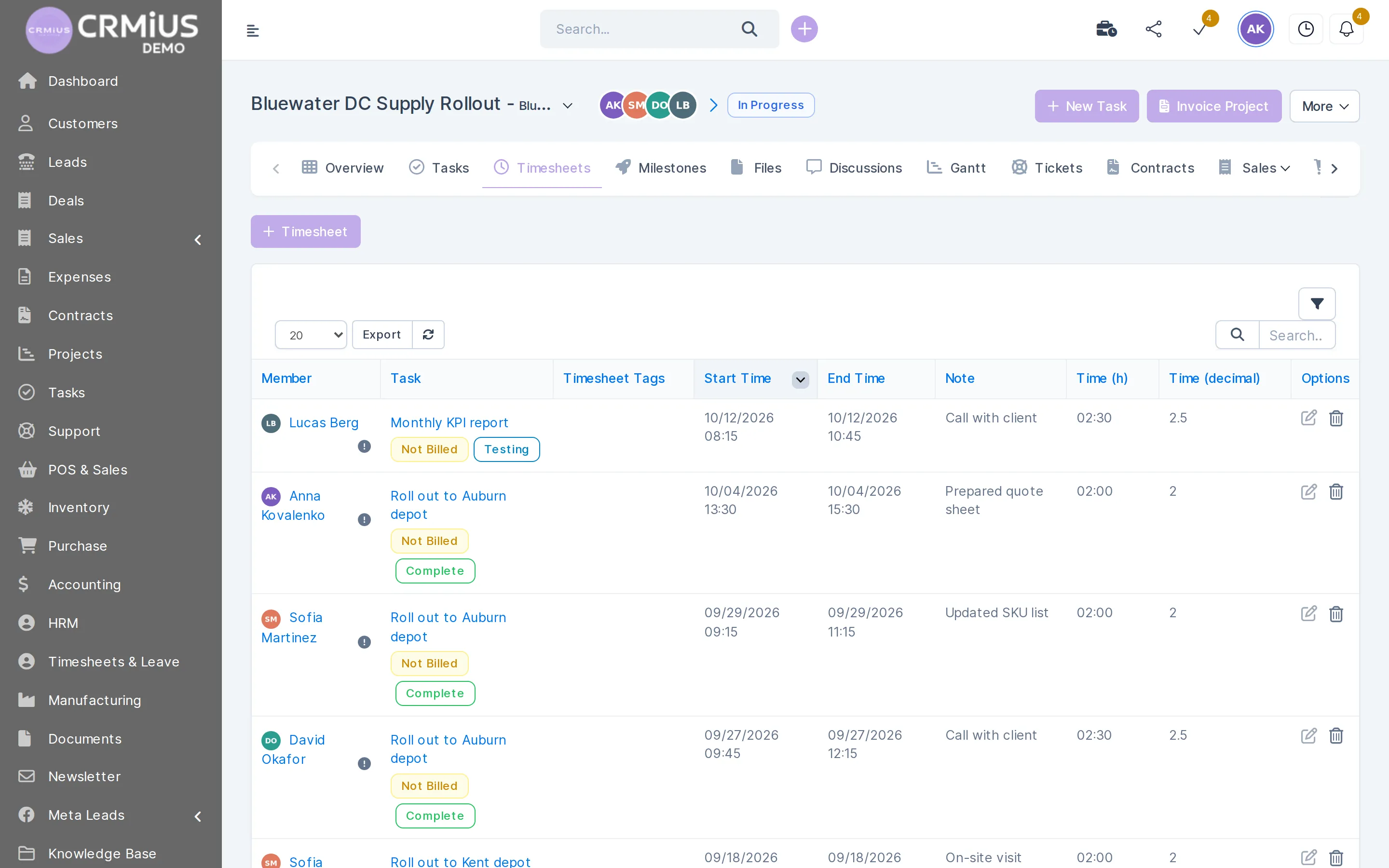
The employee starts the timer on a task and stops it when the work is done. The entry appears in the project timesheet.
- Member, task, start and end time and a note on every entry
- Hours as time and as a decimal number for billing
- Billed or not billed status on each entry
- Export of the timesheet list
Plan the week and keep deadlines

The staff calendar shows each employee’s tasks and deadlines next to events. On the board the manager filters by person, project or client and sees what is moving and what is late. Reminders go out before the due date, and overdue tasks are highlighted.
- Kanban by status or a list with filters
- Staff calendar with tasks, deadlines and events
- Google Calendar through the Google Workspace integration; see integrations
- Timesheet and time reports in reports and dashboards
Tasks or projects: which part of CRMiUS you need
Every project task is a regular task, so both use the same board, checklists and timers. Projects add a frame around a body of work for one client.
Tasks
- To-dos and routines of any department
- Linked to a client, lead, deal, ticket or invoice
- Kanban by status, checklists, timers
- Recurring tasks and reminders
Projects
- Work for a client with a start and an end
- Milestones and a Gantt chart
- Timesheets, files and discussions per project
- Project billing: fixed price, hourly or task hours
More on project management in CRMiUS
Who uses tasks in CRMiUS
Sales teams
Follow-up calls and meetings as tasks on the lead or deal, with a reminder before the deadline.
Agencies and service firms
Client tasks with hours logged by timer, then billed together with the project. Full set-up: CRM for agencies and service businesses.
Support
A ticket that needs work from another department becomes a task with its own deadline.
Back office
Recurring routines such as reports, payment checks and renewals come back on schedule.
Price and free trial
Basic costs $100 per month and already includes tasks and projects, contacts, the Google Workspace integration and key reports. Advanced costs $150 per month and adds time tracking, the finance module, helpdesk, analytics and dashboards. Corporate is priced individually, with module and interface customisation, a personal manager and priority support.
- 14 days free on every plan, full access, no bank card
- 10% off for annual payment
- Individual terms from 10 users
Plans compared on the pricing page.
Works together with
- Project managementTasks grouped under project milestones and billed with the project.
- Contact and customer management (CRM)Tasks on the client card, in the client’s history.
- Sales and leads managementFollow-up tasks on leads and deals.
- Customer supportTickets turned into tasks.
- Reports and dashboardsTimesheet and time reports.
- Process AutomationRule-based automation of routine tasks.
Questions and answers
What is CRM task management?
Task management built into the CRM: each task is linked to a client, lead, deal, project or ticket, so the team sees the context and the result stays in the client history.
How is a CRM task manager different from a separate to-do app?
In the CRM each task sits on the client, deal or project it belongs to. The whole team sees the history in one place, and hours, reminders and reports use the same data as sales and invoices.
Does CRMiUS have a kanban board for tasks?
Yes. Tasks can be viewed as a kanban board by status (Not Started, In Progress, Testing, Awaiting Feedback, Complete) or as a list with filters by person, project or client.
Can tasks repeat automatically?
Yes. Recurring tasks are created on a daily, weekly or monthly schedule. For other routines there is CRMiUS Automation with rule-based workflows.
Is time tracking included, and in which plan?
Tasks are included from the Basic plan at $100 per month. Timers on tasks and timesheets are part of time tracking in the Advanced plan at $150 per month.
What is the difference between tasks and projects in CRMiUS?
A task is one piece of work with an assignee and a deadline. A project groups tasks for one client and adds milestones, a Gantt chart, timesheets and project billing. See project management.
Can I try task management without registering?
Yes. The live demo opens a fictional company with tasks already on the board; data resets every 6 hours. A 14-day free trial with full access needs no bank card.
Modules
- Contact and customer management (CRM)→
- Finance and invoicing→
- Warehouse and inventory management→
- Project management→
- Marketing and newsletters→
- Reports and dashboards→
- Roles and access rights→
- Customer support→
- IP telephony→
- E-signature for contracts→
- Sales and leads management→
- Logistics and inventory→
- Document management→
- Procurement management→
- HR management→
Start 14-day free trial
- 14 days free, no card
- from $100 / month
- 30+ connected modules
- 5 interface languages