CRM contacts and customer management on one customer card
Every company, its people and everything that happened with them sit on one card, so any manager can call a client and know where the relationship stands. From $100 a month, 14 days free.
What CRM contact management means in CRMiUS
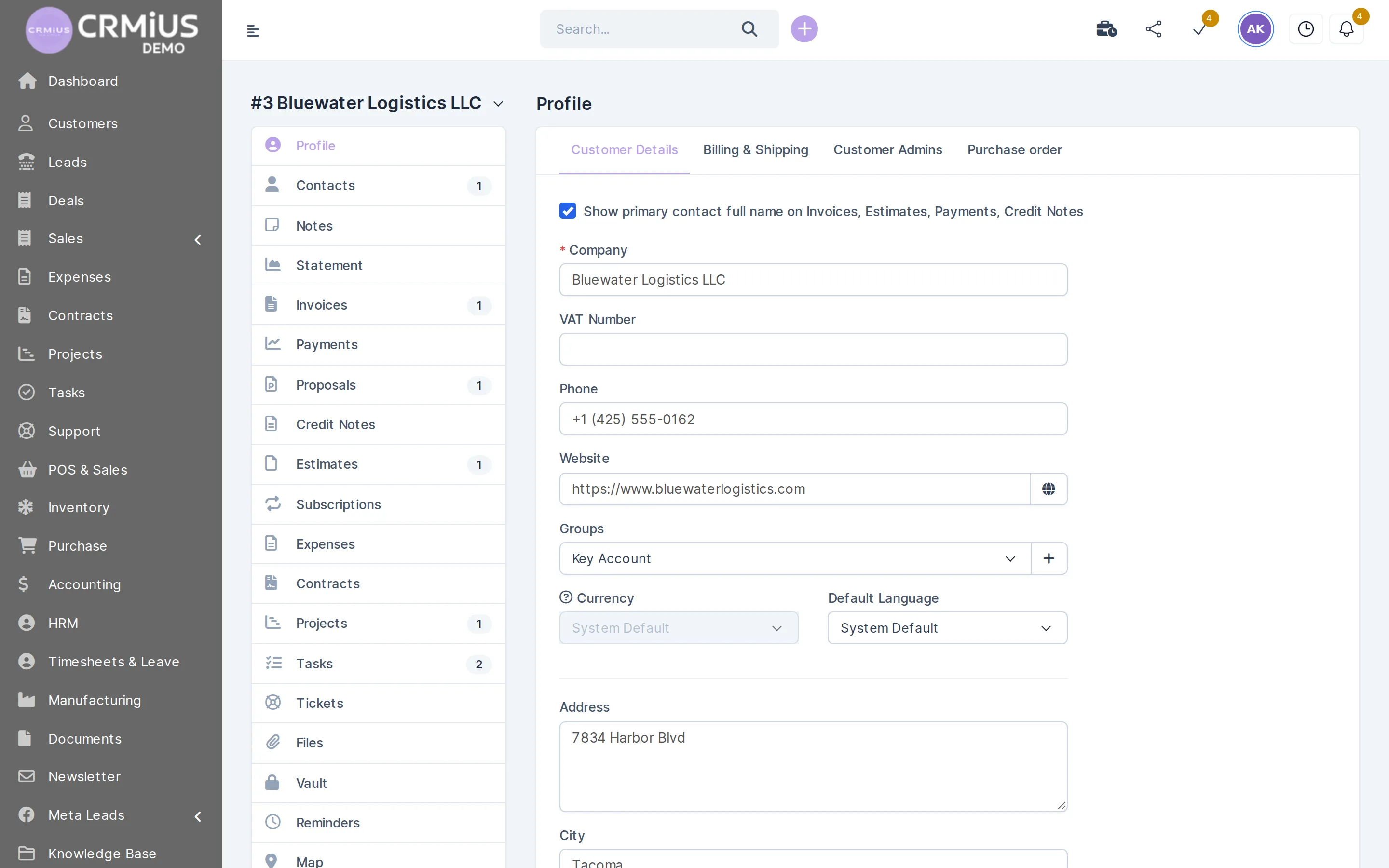
CRM contact management keeps each company and the people you deal with there on one customer card, together with everything that happened between you. In CRMiUS the card holds contacts with one primary contact, notes, files and reminders, plus proposals, invoices, payments, projects and tickets. Clients get their own login to the customer portal.
- Companies with any number of contacts, one of them primary
- Tabs for notes, statement, invoices, payments, proposals, estimates, contracts, projects, tasks, tickets and files
- Groups, custom fields, currency and default language for each customer
- Reminders for the next follow-up, sent to the responsible staff member
- Customer portal with invoices, estimates, contracts, projects, tickets and online payment
Price: contact management is part of every plan, from Basic at $100 a month. Invoices, payments and statements on the card come with the finance module in Advanced at $150. 10% off with annual payment, individual terms from 10 users. 14-day free trial with full access and no bank card. Compare plans
Customer card
Everything about a client on one card
The card has a tab for each kind of record: Contacts, Notes, Statement, Invoices, Payments, Proposals, Estimates, Contracts, Projects, Tasks, Tickets, Files and Reminders. A number next to a tab shows how many records it holds.
- Profile with VAT number, phone, website, group, currency and language
- Separate billing and shipping addresses
- Customer Admins: the staff responsible for this account
- Primary contact's name on invoices, estimates and payments
How a customer record builds up in CRMiUS
A card starts from a won lead or an import and grows with every document. Each step leaves a record on the card, so a colleague can take over the account without asking around.
What your team does with the customer base
Keep one customer list
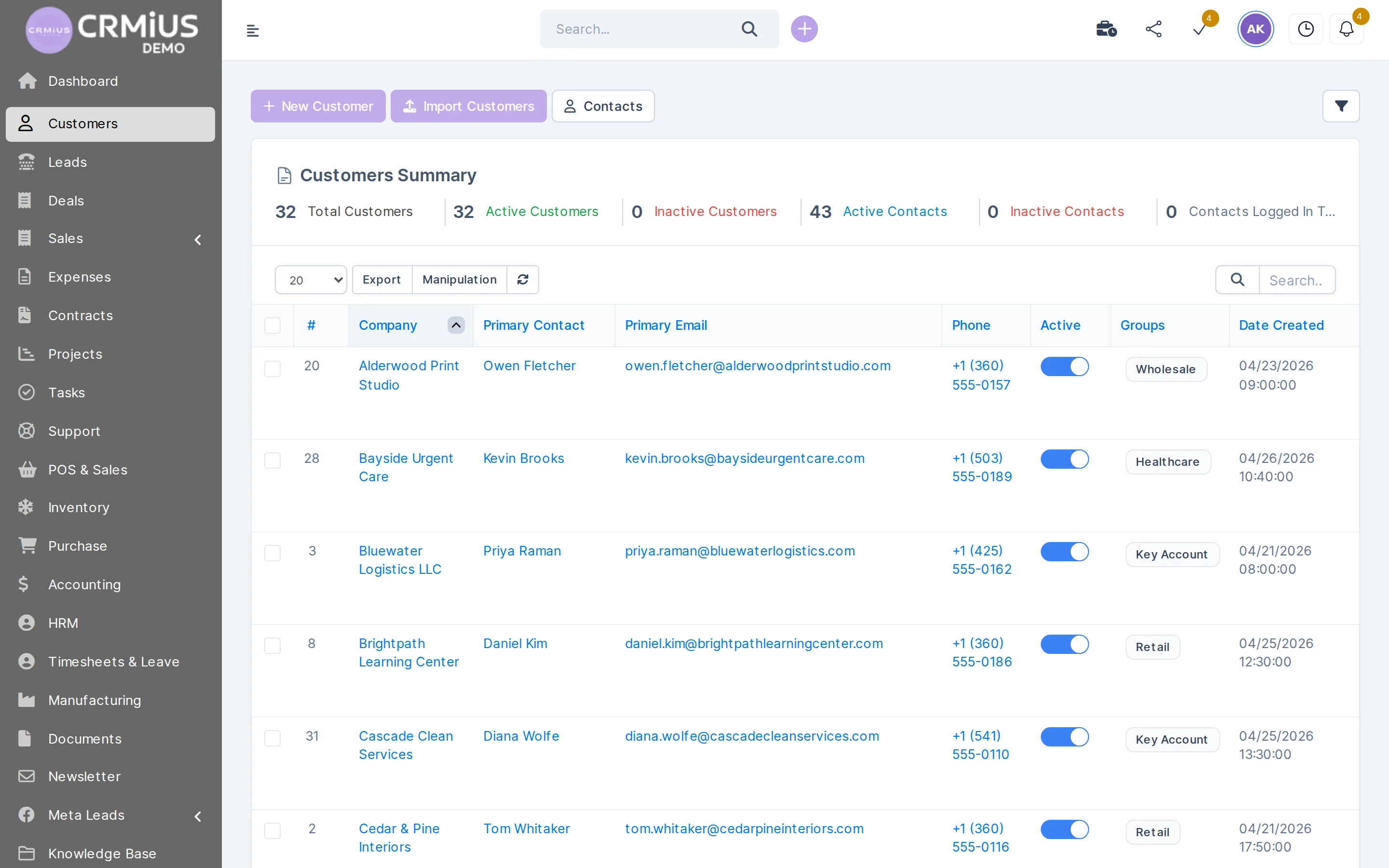
Companies with phone, website, group and custom fields. The list shows the primary contact, email, phone, group and date created.
Add several contacts per company
Director, accountant, buyer: each contact has an email, phone and role, and one is marked as primary.
Import and export
Import Customers loads a CSV from a spreadsheet or an old system; Export takes the list out again.
Follow up on time
A reminder on the card notifies the responsible person on the chosen date; tasks keep larger work on schedule.
See the base at a glance
The summary above the list counts total, active and inactive customers and active and inactive contacts.
Send a statement
The statement shows what was invoiced and paid for any period, ready to send to the client.
Open the customer portal
Contacts log in to see invoices, estimates, proposals, contracts, projects and tickets and pay online via Stripe or PayPal.
Decide who sees what
Role-based permissions per staff member set what each employee can view and edit; the activity log records changes.
Address book, spreadsheet or CRM: what changes

An address book or a shared spreadsheet keeps names, emails and phone numbers. To learn which invoice is unpaid, which proposal waits for an answer or who promised to call back, the team still searches mail and asks each other. In a CRM each contact is linked to the work done with the client, so the answer is on the card.
- A spreadsheet is enough while one person keeps a short list of clients.
- A contact manager adds notes and reminders; sales and invoices still live in other tools.
- CRMiUS keeps contacts, proposals, invoices, projects and tickets in one database, so sales, accounting and support open the same card.
What we need from you to start
Your customer list as a spreadsheet (company, contact person, email, phone, address), the groups you split clients into and who is responsible for which accounts. You load the file with Import Customers; module configuration and team training are available as CRMiUS services.
Choosing a CRM for a small team? Read CRM for small business and the article 10 key CRM features that simplify customer management.
Moving your customer base into CRMiUS
Usually five steps. How long they take depends on how clean the list is and how many people work with it.
- 01
Export the list
Save customers and contacts from your spreadsheet or old system as a CSV file.
- 02
Import customers
Load the file with Import Customers and check the list and the summary counts.
- 03
Group and assign
Put customers into groups and set the responsible staff on each card.
- 04
Connect Google Workspace
Google Calendar and Gmail via IMAP, so meetings and mail stay inside the CRM.
- 05
Open the portal
Give portal access to the contacts who should see invoices and documents.
Works together with
The customer card is where data from these modules meets.
- Sales and leads managementWon leads convert to customers with their history.
- Finance and invoicingInvoices, payments and statements on the card (Advanced).
- Customer supportTickets tab on the card; clients open tickets in the portal.
- Project managementProjects the client can follow in the portal.
- Marketing and newslettersMailFlow newsletters to customer and lead lists.
- Roles and access rightsWho can view and edit customer records.
Who it fits
Wholesale and distribution
Dealer accounts with several buyers, groups by terms or region, and a statement for every reconciliation.
Service companies
Contracts, invoices and requests on one card; with the helpdesk module tickets land on the same card.
Agencies and consultancies
Proposals accepted online and projects the client follows in the portal — see project management.
Growing sales teams
A responsible manager on each account and role permissions — see CRM for large companies.
Questions and answers
What is CRM contact management?
It is the part of a CRM that stores companies and the people in them together with every interaction: proposals, invoices, projects, tickets, notes and reminders. The team works from one shared history.
What is the difference between a contact manager and a CRM?
A contact manager keeps names, details, notes and reminders. A CRM links the same contacts to sales, invoicing, projects and support, so one card shows what the client bought, owes and asked for.
Can one company have several contacts?
Yes. A company can have any number of contacts with their own email, phone and role. One is the primary contact, and their name can appear on invoices, estimates and payments.
How do I move customers from Excel?
Save the sheet as CSV and load it with Import Customers. The list can be exported again at any time with Export.
What does the client see in the customer portal?
Their invoices, estimates, proposals, contracts, projects and tickets. Invoices can be paid online through Stripe or PayPal.
How much does contact management cost?
Contact management is in every plan, from Basic at $100 per month. Invoices, payments and statements on the card need Advanced at $150. Annual payment gives 10% off, from 10 users terms are individual, and every plan starts with a 14-day free trial without a bank card.
Where can I try the customer card?
Open the live demo without sign-up: a fictional company with customers, contacts, invoices and projects, reset every 6 hours. Or start the 14-day free trial.
Modules
- Finance and invoicing→
- Warehouse and inventory management→
- Project management→
- Marketing and newsletters→
- Reports and dashboards→
- Roles and access rights→
- Task management→
- Customer support→
- IP telephony→
- E-signature for contracts→
- Sales and leads management→
- Logistics and inventory→
- Document management→
- Procurement management→
- HR management→
Start 14-day free trial
- 14 days free, no card
- from $100 / month
- 30+ connected modules
- 5 interface languages