CRM with telephony: every call on the lead and customer card
Connect your company's IP telephony to CRMiUS: managers call from the card, record the outcome and plan the next call in the same place. From $100 a month, 14 days free.
What CRM telephony integration means in CRMiUS
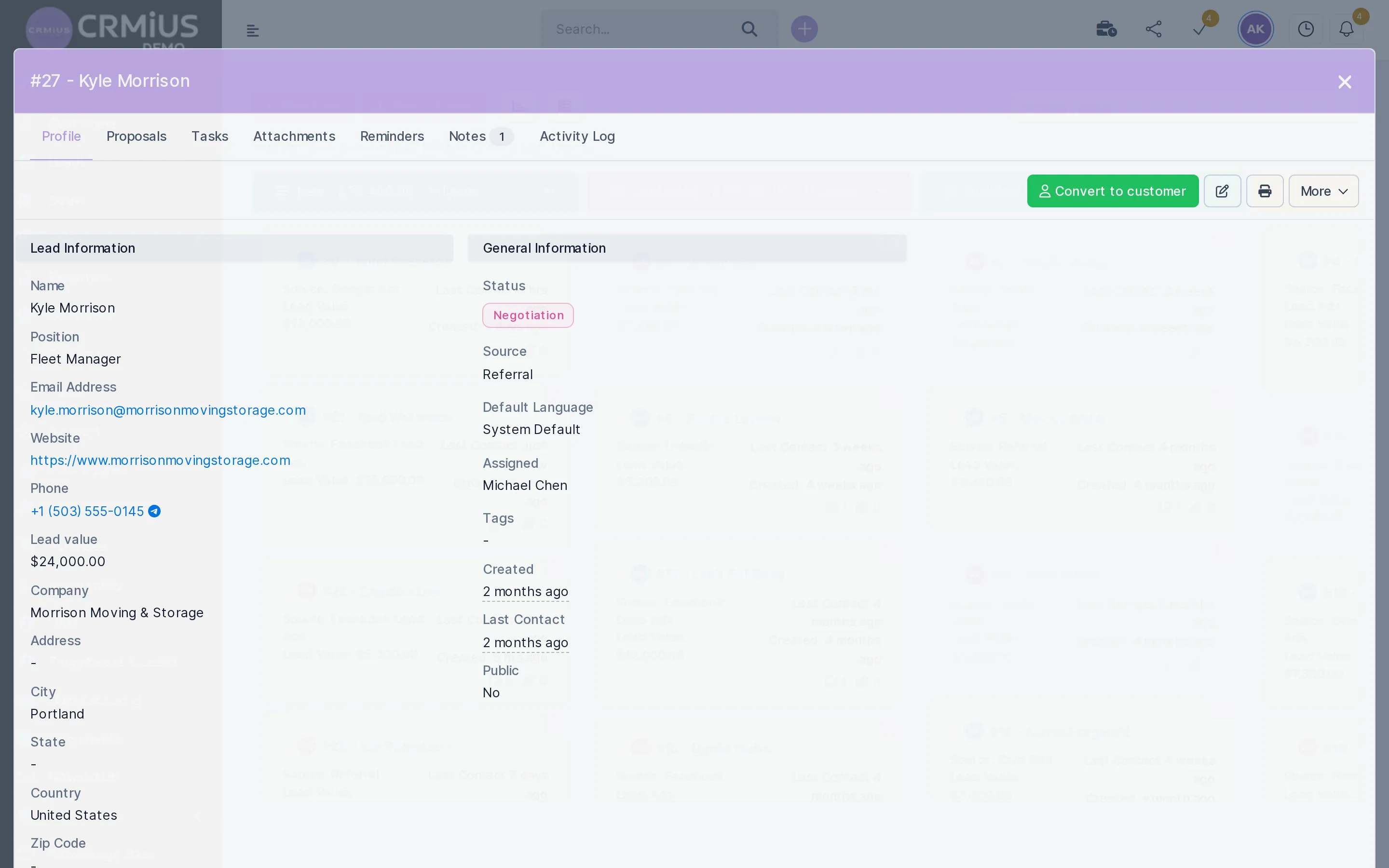
CRM telephony integration links your phone system to the CRM so every call lands in the customer history. In CRMiUS our team connects your IP telephony during setup; managers call from the lead or customer card, log the outcome and notes, and set a reminder or task for the next contact. Your telephony provider stays the same.
- IP telephony connection to your provider, configured by the CRMiUS team
- Calls from the lead, contact and customer card
- Call log with outcome and notes in the customer history
- Call-back reminders and tasks with an assignee and a date
- PilotAI module: an AI voice assistant that calls and follows up leads
Price: plans from $100 a month (Basic), Advanced $150, Corporate priced individually; 10% off with annual payment. The telephony connection is configured together with your module set; calls are billed by your telephony provider. 14-day free trial, no bank card. Compare plans
What one call leaves in CRMiUS
The conversation itself goes through your telephony. Everything around it — who was called, what was agreed, when to call again — stays in the CRM and comes back as the next task.
Customer history
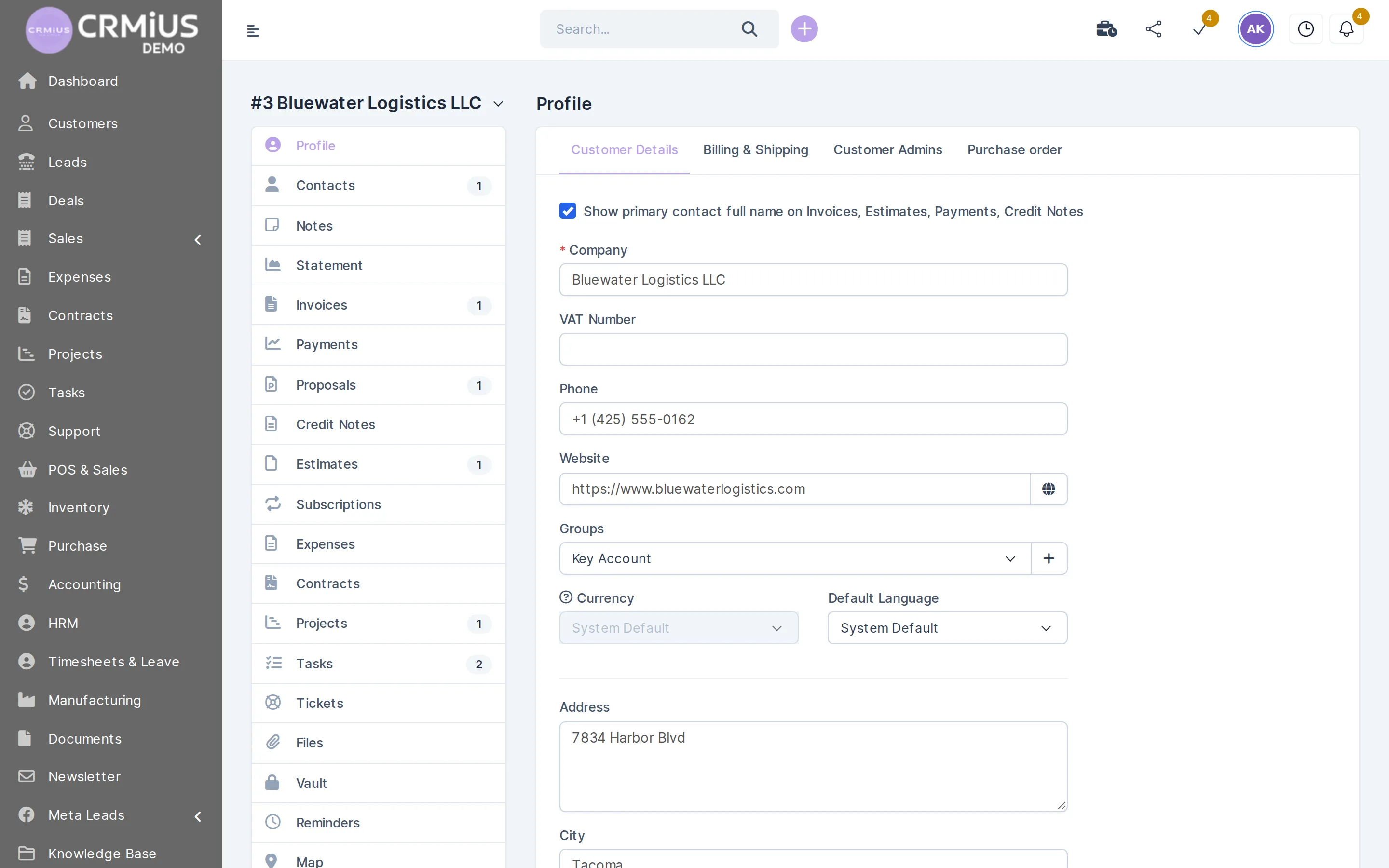
Calls sit next to everything else about the client
Notes, reminders, tasks, invoices and tickets are tabs of one customer record, so whoever makes the next call sees the whole story.
- Company phone number and contacts on the profile
- Notes and reminders on the same record
- Tasks with an assignee and a due date
- The client's invoices, proposals and tickets one tab away
What sales and support do with calls in CRMiUS
Call from the card
The number is on the lead, contact and customer record; the call goes through your connected IP telephony.
Log every conversation
Outcome and notes are saved to the customer history and visible to the whole team.
Schedule call-backs
A reminder or task with a date and an assignee keeps the promised call on someone's list.
Hand over with full context
Before dialing, a colleague sees who called, when, and what was agreed.
Move the deal forward
After the call the lead changes status on the kanban board, and the proposal goes out from the same record.
Let AI make the first call
The PilotAI module calls new leads by voice, asks qualifying questions and saves the answers to the lead.
Review activity
The activity log and lead reports show what each manager did with their leads.
How we connect telephony to your CRM

The connection is part of the CRMiUS setup, an additional service, and usually takes four steps; timing depends on your provider and how many people work the phones.
- You tell us which IP telephony or PBX you use and which employees make and take calls.
- We check the connection to your provider and configure it on your CRMiUS.
- We set up the call routine: lead statuses, reminders and tasks, automation rules for routine steps.
- We train the team to log calls and plan the next contact from the card.
Human calls and AI calls
Managers handle the conversations that need a person. The first call to new leads and repeat calls to leads who did not answer can go to the PilotAI voice assistant: it calls by itself, asks qualifying questions and saves the answers to the lead card, so managers start with leads that are already sorted.
Calls are billed by your telephony provider; CRMiUS does not charge for calls. If you want to check your telephony first, show it to us in a demo and we will tell you plainly what we can connect.
Phone and spreadsheet, telephony apart from the CRM, or CRMiUS with telephony
| Phone and spreadsheet | Telephony separate from the CRM | CRMiUS with IP telephony | |
|---|---|---|---|
| Where call history lives | in the manager's notes | in the phone system's call list | on the lead and customer card |
| Promised call-back | kept in the manager's head | a separate calendar | reminder or task on the record |
| Handing a client to a colleague | retold in person | notes copied by hand | the colleague opens the card |
| Manager activity | self-reported | call list in another system | activity log and lead reports |
| First call to a new lead | when someone gets to it | when someone gets to it | a manager or the PilotAI voice assistant |
Works together with
A call is part of the customer history, so telephony is linked to the sales, support and reporting modules.
- Sales and leads managementCalls on leads in the sales pipeline.
- Contact and customer management (CRM)Call history on the customer card.
- AI functionsPilotAI calls leads by voice.
- Process AutomationRules set reminders and change statuses.
- Customer supportLog phone requests as tickets.
- Reports and dashboardsLead and activity reports.
Who uses it
Sales teams
Inbound and outbound calls on leads in the pipeline — see lead management.
Support lines
The call is logged on the customer card and the request becomes a ticket in customer support.
Account managers
Regular calls to existing clients with invoices, contracts and history at hand — see customer management.
Teams on the road
Card, notes and reminders in the CRMiUS mobile app.
Questions and answers
What is CRM telephony integration?
It is a link between your company's phone system and the CRM: calls are made from customer records, and each call with its outcome and notes is saved to the customer history. In CRMiUS it works with IP telephony.
Which telephony can be connected to CRMiUS?
CRMiUS connects to IP telephony. Tell us which provider or PBX you use; our team checks the connection and configures it during setup.
Are calls saved in the customer history?
Yes. Each call is logged with its outcome and notes on the lead or customer card, next to reminders, tasks, proposals and invoices.
Can a CRM call leads automatically?
Yes, with the PilotAI module: an AI voice assistant calls new leads, asks qualifying questions, follows up on schedule and saves the answers to the lead card. More on the AI functions page.
How much does a CRM with telephony cost?
CRMiUS plans: Basic $100 per month, Advanced $150, Corporate priced individually. Annual payment gives 10% off, and from 10 users terms are individual. Calls are billed by your telephony provider.
How can I try it?
Telephony is connected on your own CRMiUS during setup. Lead and customer cards, notes, reminders and tasks can be seen in the live demo without sign-up (data resets every 6 hours) or in the 14-day free trial with full access and no bank card.
Modules
- Contact and customer management (CRM)→
- Finance and invoicing→
- Warehouse and inventory management→
- Project management→
- Marketing and newsletters→
- Reports and dashboards→
- Roles and access rights→
- Task management→
- Customer support→
- E-signature for contracts→
- Sales and leads management→
- Logistics and inventory→
- Document management→
- Procurement management→
- HR management→
Start 14-day free trial
- 14 days free, no card
- from $100 / month
- 30+ connected modules
- 5 interface languages