CRM with document management: folders, versions, approvals
Contracts, price lists and policies sit in folders next to your clients and deals, go through approval and an electronic signature, and reach the customer with the right access level. From $100 a month, 14 days free.
What CRM document management does in CRMiUS
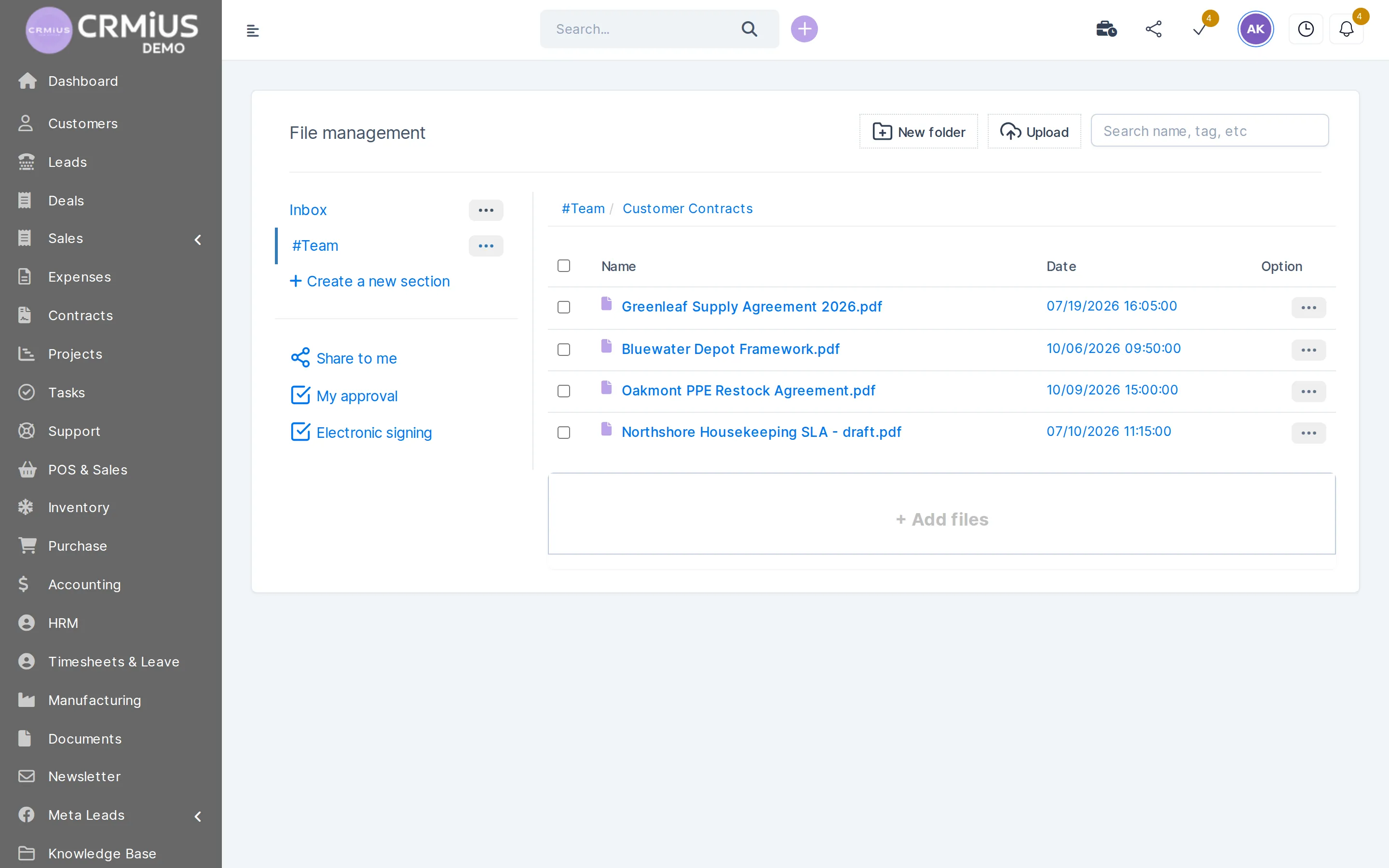
CRM document management keeps company files inside the CRM where sales, finance and projects already work. In CRMiUS the documents module stores files in sections and folders, records tags, a document number and a due date, sends a file for approval or electronic signature and shares it with staff or customers at a chosen access level.
- Sections and folders, search by file name or tag
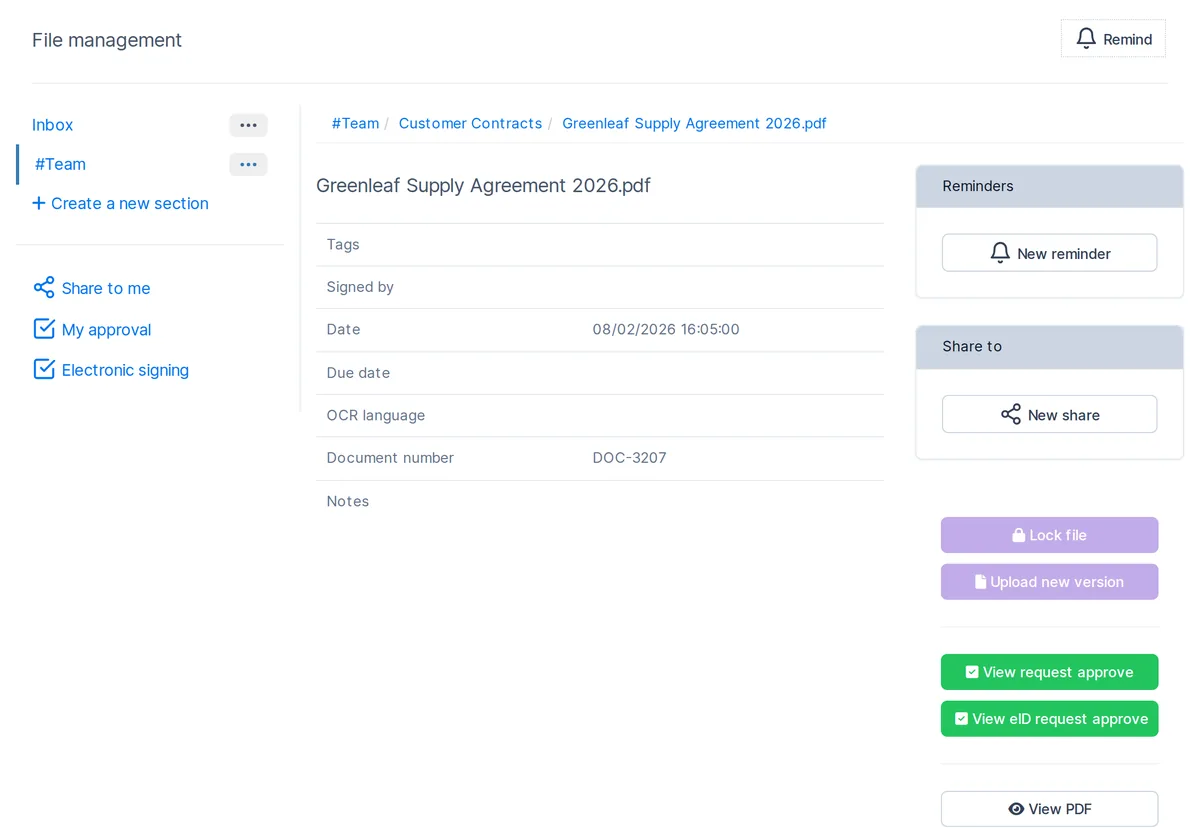
- A new version is uploaded onto the same document card; a file can be locked against edits
- Approval requests and eID signature requests, with “My approval” and “Electronic signing” lists
- Sharing with a colleague, a customer or a customer group: preview, viewer, editor or upload only, with an expiry date
- Due date and email reminders on each document
Price: plans from $100 a month (Basic), Advanced $150, Corporate priced individually; 10% off with annual payment, individual terms from 10 users. Which modules you need, document management included, and which plan covers them, we clarify in the demo. 14-day free trial, no bank card. Compare plans
Document workflow in the CRM, step by step
Each step below is a button or a list in the documents module. When a file changes after review, it returns to the start as a new version and goes through approval again.
Documents on the client card
Contracts and sales documents stay with the client
Proposals, estimates, invoices and contracts are created in the CRM as PDFs with your company branding and stay on the client record.
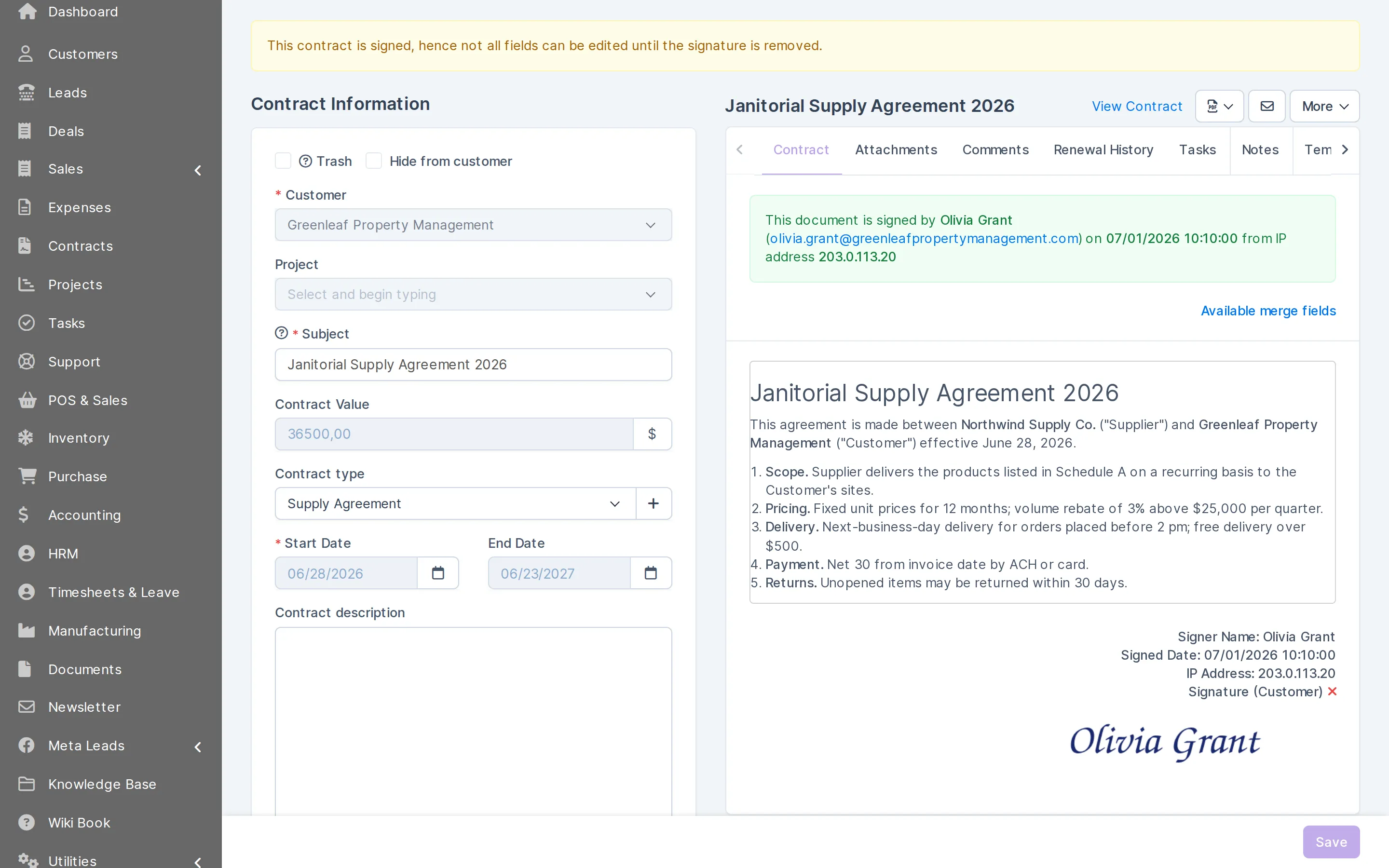
- Contracts with online signature by the customer and renewal dates
- Estimates turn into invoices in one click
- The customer portal shows invoices, estimates, proposals and contracts to the client
- Files attached to the client, the project or the ticket
What your team does with documents in CRMiUS
Build the archive
Sections for teams and folders for clients, suppliers, price lists or HR; search finds a file by name or tag.
Describe each file
Tags, date, due date, document number, notes, custom fields and links to related files.
Keep versions
Upload a new version onto the same card; lock a file so nobody overwrites it during review.
Request approval
Send the file to the colleagues who must check it; they see it in their “My approval” list.
Collect an eID signature
Request an electronic signature; the signer draws it on screen and the request moves to done.
Share with the right level
Give a colleague, a customer or a customer group preview, viewer, editor or upload-only access, with an expiry date.
Track deadlines
Set a reminder by date to any email address, for a renewal, a payment or a review.
Move and download
Move or duplicate files between folders, view PDFs in the browser and download a whole folder.
Access rights, signatures and the client portal
Three levels decide who sees a document. Roles set what each employee may open in the CRM (see roles and access rights). Sharing opens a single file to a colleague, a customer or a customer group with one of four permissions — preview, viewer, editor or upload only — and an optional expiry date. The customer portal shows each client their own invoices, estimates, proposals, contracts, projects and tickets.
Two kinds of signature
Inside the documents module an eID request collects a signature from the person who approves a file, drawn on screen. Contracts with customers are signed online by the customer in the contracts module — see electronic signatures.
A CRM with documents, or a separate DMS?
A CRM with document management suits a company whose documents follow clients, deals, purchases and projects: contracts, completion certificates, price lists, specifications, internal policies. If you need archive-grade records management with retention schedules and scanning lines, show us your process in a demo and we will say plainly which part CRMiUS covers.
Getting started, as an additional service: we create sections and folders, set roles and sharing rules and train the team. Module configuration and training are CRMiUS services.
Shared drive and email, a separate DMS or CRMiUS
| Shared drive and email | Separate DMS | CRMiUS | |
|---|---|---|---|
| Where the contract lives | a folder plus email attachments | in the DMS, the client in the CRM | on the client card and in the document archive |
| Approval | replies in an email thread | workflow inside the DMS | approval request and “My approval” list |
| Signature | print, sign, scan | depends on the product | eID request on screen; customers sign contracts online |
| Access for the customer | attachment or open link | depends on the product | four permission levels with expiry, customer portal |
| Deadlines | calendar entry by hand | depends on the product | due date and email reminder on the document |
Works together with
Documents connect to the modules where they are created and used.
- E-signature for contractsContracts signed online by the customer.
- Contact and customer management (CRM)Files, contracts and statements on the client card.
- Project managementProject files, discussions and the customer's view of the project.
- Roles and access rightsRoles decide who may open which records.
- Finance and invoicingEstimates, invoices and credit notes as branded PDFs.
- Procurement managementVendor contracts and vendor invoices in purchasing.
Who uses it
Professional services
Contracts, completion certificates and reports per client, approved before sending; the client sees their documents in the portal.
Sales teams
Price lists and proposal templates in one folder with the current version; contracts follow the deal — see customer management.
Project companies
Specifications and drawings with approvals and due dates next to project management.
Purchasing and back office
Vendor agreements, HR documents and internal policies with restricted sharing — linked to procurement.
Questions and answers
What is CRM document management?
It is a document archive inside the CRM: files sit in folders with access rights, versions, approvals and signatures, next to the clients, deals and projects they belong to. Sales, finance and project teams work with documents without a separate system.
How much does a CRM with document management cost?
CRMiUS plans start at $100 a month (Basic); Advanced is $150 and Corporate is priced individually. Annual payment gives 10% off and from 10 users terms are individual. Which modules and plan fit you, we clarify in the demo; the first 14 days are free, no bank card.
Can I set up a document approval workflow?
Yes. Send a file for approval to the colleagues who must check it; each of them sees it in the “My approval” list. If the file changes, upload a new version onto the same card and request approval again.
Can documents be signed electronically?
Yes. In the documents module you request an eID signature and the signer draws it on screen. Customer contracts are signed online by the customer in the contracts module and stay on the client record.
Who can see a document?
Roles define what each employee may open. A single file can be shared with a colleague, a customer or a customer group as preview, viewer, editor or upload only, with an expiry date.
Does CRMiUS keep document versions?
Yes. A revised file is uploaded as a new version onto the same document card, and a file can be locked so nobody changes it during review.
How can I try it?
Open the live demo without sign-up: a fictional distributor with a #Team section and folders of contracts, vendor agreements and price lists, reset every 6 hours. Or start the 14-day trial with full access and no bank card.
Modules
- Contact and customer management (CRM)→
- Finance and invoicing→
- Warehouse and inventory management→
- Project management→
- Marketing and newsletters→
- Reports and dashboards→
- Roles and access rights→
- Task management→
- Customer support→
- IP telephony→
- E-signature for contracts→
- Sales and leads management→
- Logistics and inventory→
- Procurement management→
- HR management→
Start 14-day free trial
- 14 days free, no card
- from $100 / month
- 30+ connected modules
- 5 interface languages