CRM for banks and financial companies
The front office in one system: client cards, loan and account applications, documents with versions, contracts signed online, access by role and an activity log. Core banking stays where it is.
What is a CRM for banks?
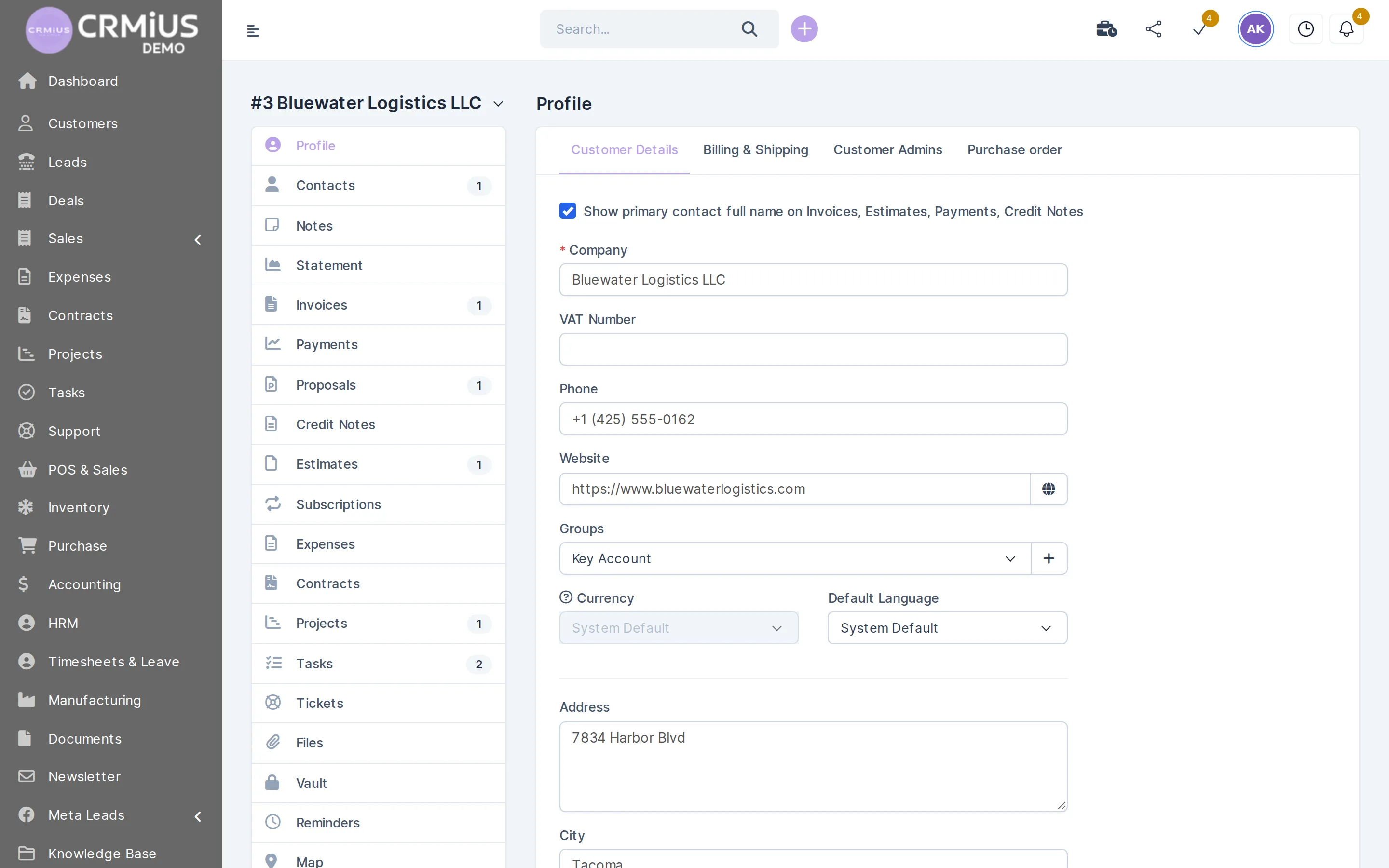
A CRM for banks is the front-office system where advisers keep client cards, run loan and account applications, collect documents and plan follow-ups. CRMiUS covers exactly this work: one card per client with history and files, an application pipeline with your stages, contracts signed online, roles that limit who sees which clients, and an activity log.
- Accounts, balances and payments stay in your core banking system; CRMiUS exchanges data through the REST API and webhooks.
- From $100 per month, 14 days free on every plan, no bank card needed.
- Interface in English, Ukrainian, Russian, German and French.
Front office
What bank and lender teams do in CRMiUS
Keep one card per client
Contacts, companies with several contacts, client groups, files, notes, reminders and the full history of communication.
Run applications by stage
Loan, account or service applications on a board with your own stages, sources, a responsible employee and reminders.
Receive requests from the website
Web-to-lead forms on your site create an application with its source; a qualified lead converts to a client in one click.
Store documents with versions
Document management with folders, versions, sharing and approvals; each client keeps their files on the card.
Sign contracts online
The client signs the contract with an electronic signature; renewal dates stay on the contract.
Limit access by role
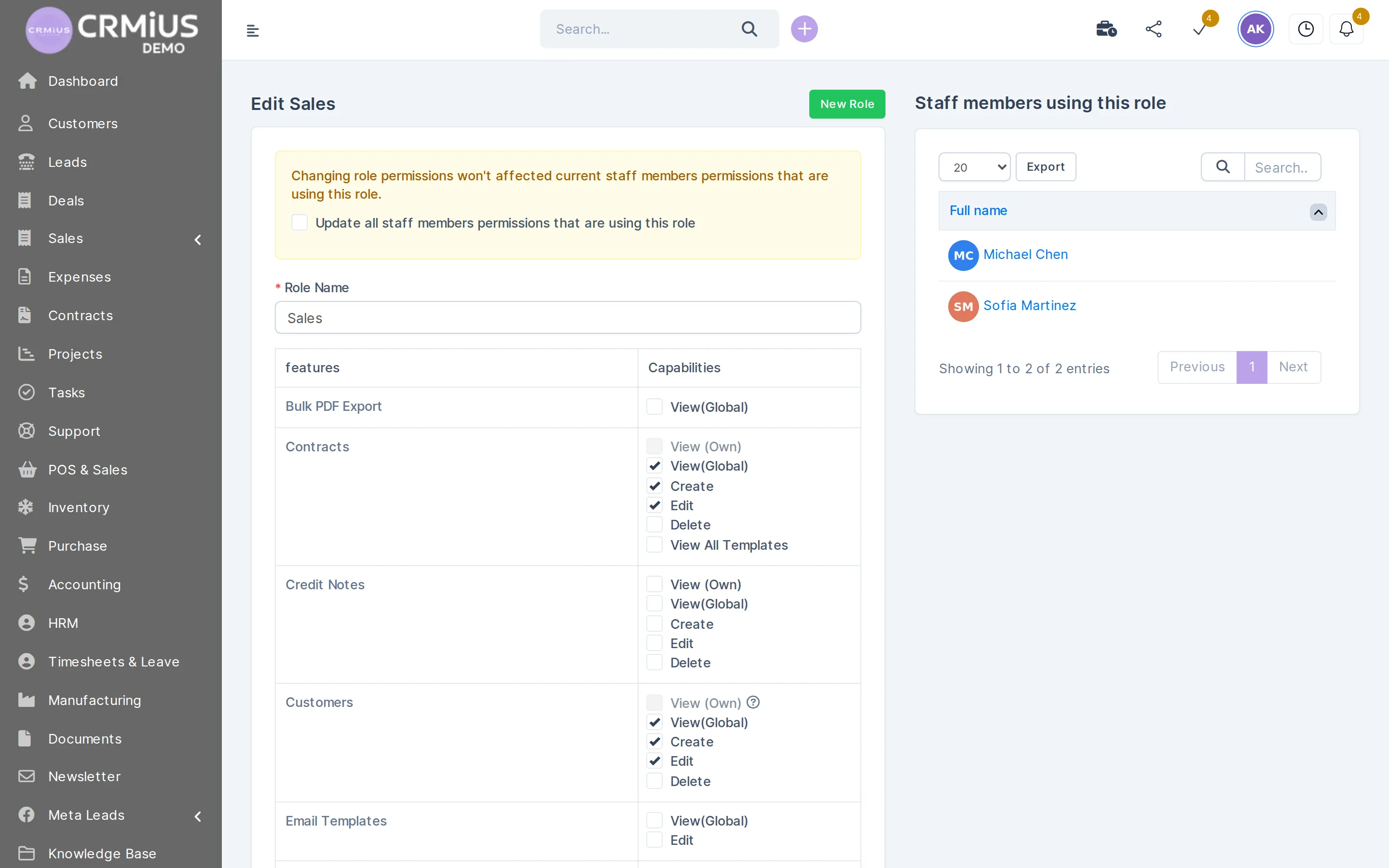
Rights per role and per staff member: view own or all records, create, edit, delete. The activity log records actions.
Handle requests and complaints
Tickets with departments, priorities and statuses; emails to the support address turn into tickets.
Report to management
Lead conversion, customer reports and dashboards with widgets by adviser or team.
Access control
Each employee sees their part of the client book
Rights are set on the role and inherited by every employee in it. A change made on the role reaches the whole team.
- View own or view all — separately for clients, contracts and other modules
- Separate rights to create, edit and delete
- Individual permissions for a staff member on top of the role
- The activity log shows who did what
How a loan or account application runs
The application stays in one place from the first request to the signed contract, and every step has a responsible employee.
- 01RequestA form on your website or an adviser in the branch creates the application with its source.
- 02DocumentsThe adviser collects documents into the client folder; new uploads keep earlier versions.
- 03ReviewThe application moves through your stages; each reviewer gets a task and a deadline.
- 04ContractThe client signs the contract online; the signed copy stays on the client card.
- 05ServiceReminders for periodic reviews and renewals; client requests arrive as tickets.
What CRMiUS covers and what stays in your banking systems
CRMiUS is a CRM for the front office. Here is where each part of the work runs.
In CRMiUS
- Client card, contacts and interaction history
- Loan, account and service applications by stage
- Collecting documents, versions, approvals (document management module)
- Contract signing by the client (electronic signature)
- Tasks, reviews and renewal reminders
In your core banking system
- Accounts, balances, transactions
- Payment processing
REST API and webhooks connect both systems.
Access control and data protection
Every employee works in CRMiUS under a role with rights per module. An adviser can be limited to their own clients while a supervisor sees the whole book; the activity log records actions in the system. The connection is protected with SSL and data is backed up regularly.
- Roles and individual permissions per staff member
- Activity log
- SSL and regular backups
- Shield, the security toolset module
KYC and compliance checks run in your specialized tools; in CRMiUS you keep their results as documents and as stages of the application. Read more about roles and access rights.
How to test a CRM for your bank in 14 days
- Open the live demo without registration to see the interface in your language.
- Start the trial and create two roles: an adviser who sees own clients and a supervisor who sees all.
- Run one test application through your stages and check the activity log.
- Upload a document twice to see versions, then send a test contract for online signature.
- Put a web-to-lead form on a test page and check that the application arrives with its source.
- Ask our team how the REST API and webhooks fit your core system; see integrations.
Price and free trial
Basic costs $100 per month: contacts, tasks and projects, Google Workspace integration and key reports. Advanced costs $150 per month and adds the finance module, time tracking, helpdesk, analytics and dashboards. Corporate is priced individually: module and interface customization, a personal manager and priority support.
- 14 days free on every plan, full access, no bank card
- 10% off for annual payment
- Individual terms from 10 users
We confirm which modules your team needs, and on which plan, when setting up the trial. Plans compared: CRMiUS pricing; for larger organizations see CRM for large companies.
Modules a bank front office uses
- Contact and customer management (CRM)Client cards, contacts and history.
- Sales and leads managementApplications board with stages and sources.
- Document managementDocuments with folders, versions and approvals.
- E-signature for contractsContracts signed online by the client.
- Roles and access rightsRoles, own or all records, individual rights.
- Reports and dashboardsConversion and customer reports, dashboards.
Questions and answers
What is a CRM for banks?
A CRM for banks is the front-office system for client relationships: client cards with history, loan and account applications by stage, documents, tasks and access control. Accounts and transactions stay in the core banking system.
Can CRMiUS replace a core banking system?
CRMiUS covers the front office: clients, applications, documents, contracts, tasks and access. Accounts, balances, transactions and payment processing stay in your core banking system, and the two exchange data through the REST API and webhooks.
How is access to client data restricted?
Each role has rights per module: view own or all records, create, edit, delete. A staff member can get individual permissions on top of the role, and the activity log records actions.
How is client data protected in CRMiUS?
Access by role, the activity log, SSL on every connection and regular backups. The Shield module adds a security toolset.
Can clients sign contracts online?
Yes. Contracts are signed with an electronic signature, and renewal dates stay on the contract. Signed documents remain on the client card.
Does CRMiUS connect to our internal systems?
Through the REST API and webhooks. Google Workspace and Telegram connect out of the box. Our team scopes the integration during onboarding.
How much does a CRM for a bank cost?
Basic $100 per month, Advanced $150 per month, Corporate priced individually. Every plan starts with 14 days free and no card; annual payment saves 10%, and individual terms start from 10 users.
Can we see CRMiUS without registering?
Yes. The live demo opens a fictional company as administrator, no sign-up; its data resets every 6 hours.
Start 14-day free trial
- 14 days free, no card
- from $100 / month
- 30+ connected modules
- 5 interface languages