CRM help desk for support teams and service desks
Your support team works from one ticket queue with the customer's invoices, contracts and earlier requests beside every reply. Engineers get tasks, the head of support sees every status. 14 days free.
What a CRM help desk gives a support team
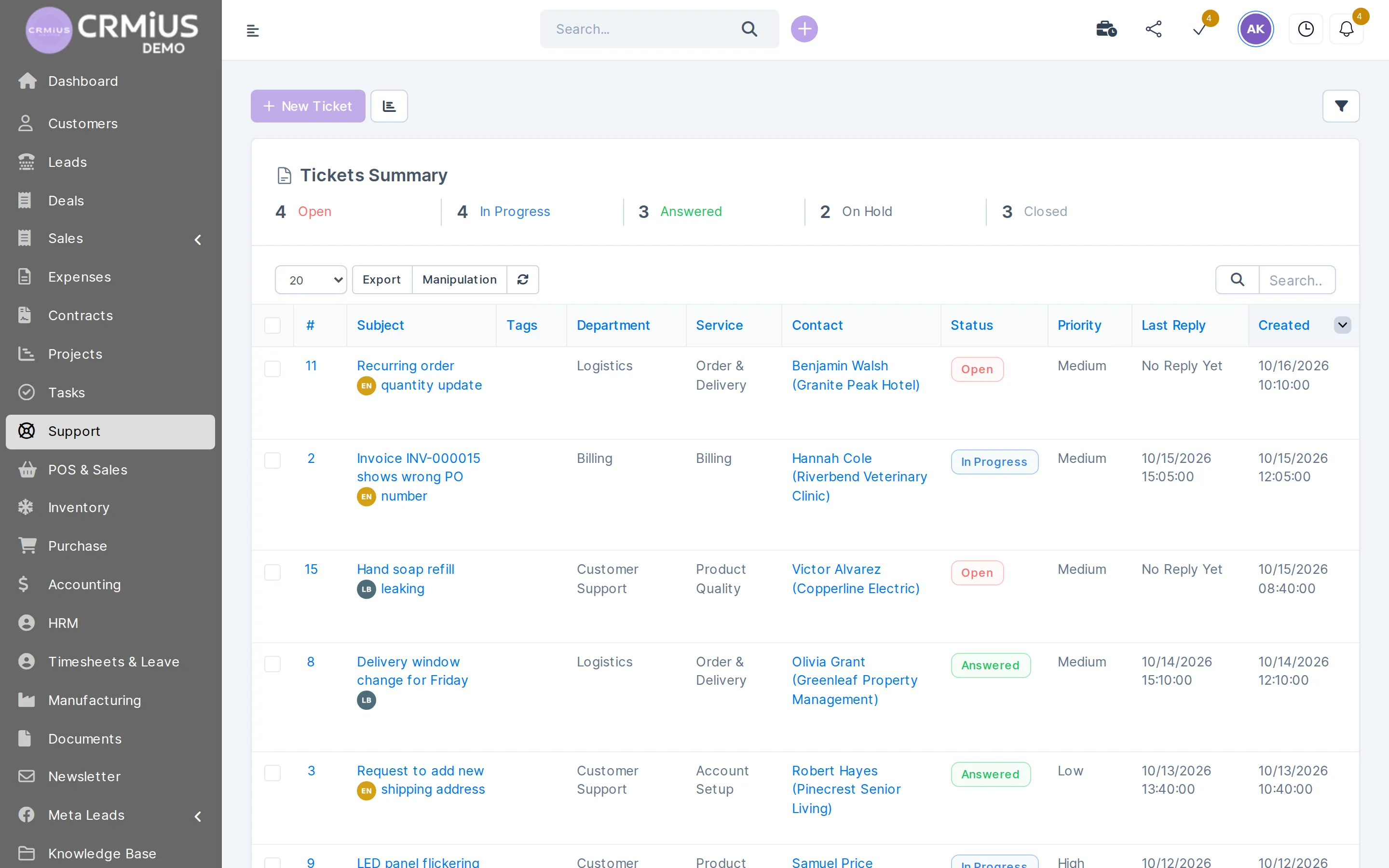
A CRM help desk is a ticket queue inside the CRM, so the support team answers every request with the customer's history at hand. In CRMiUS, support emails and portal requests become tickets; the team sorts them by department and priority, replies with predefined answers, passes engineering work on as tasks and turns repeated questions into knowledge base articles.
- One queue for the support email and the customer portal
- Department, service, priority and status on every ticket
- Invoices, contracts, projects and earlier tickets on the customer card
- Escalations to engineers and field staff as tasks with a due date
- Ticket counts by status for the head of support
Price: the help desk comes with Advanced at $150 a month and with Corporate, priced individually. 10% off with annual payment, individual terms from 10 users. 14-day free trial with full access, no bank card. Compare plans
How a support team's day runs in CRMiUS
Requests come in through two doors and leave through three. The diagram shows where each one goes; below it is the same day, step by step.
The same day, step by step
- Morning. The head of support opens the ticket list: the summary on top counts Open, In progress, Answered, On hold and Closed tickets, and filters show what waits in each department.
- First replies. Agents take tickets from their department. The customer card is one click away: what the customer bought, which invoices are open, which contract applies.
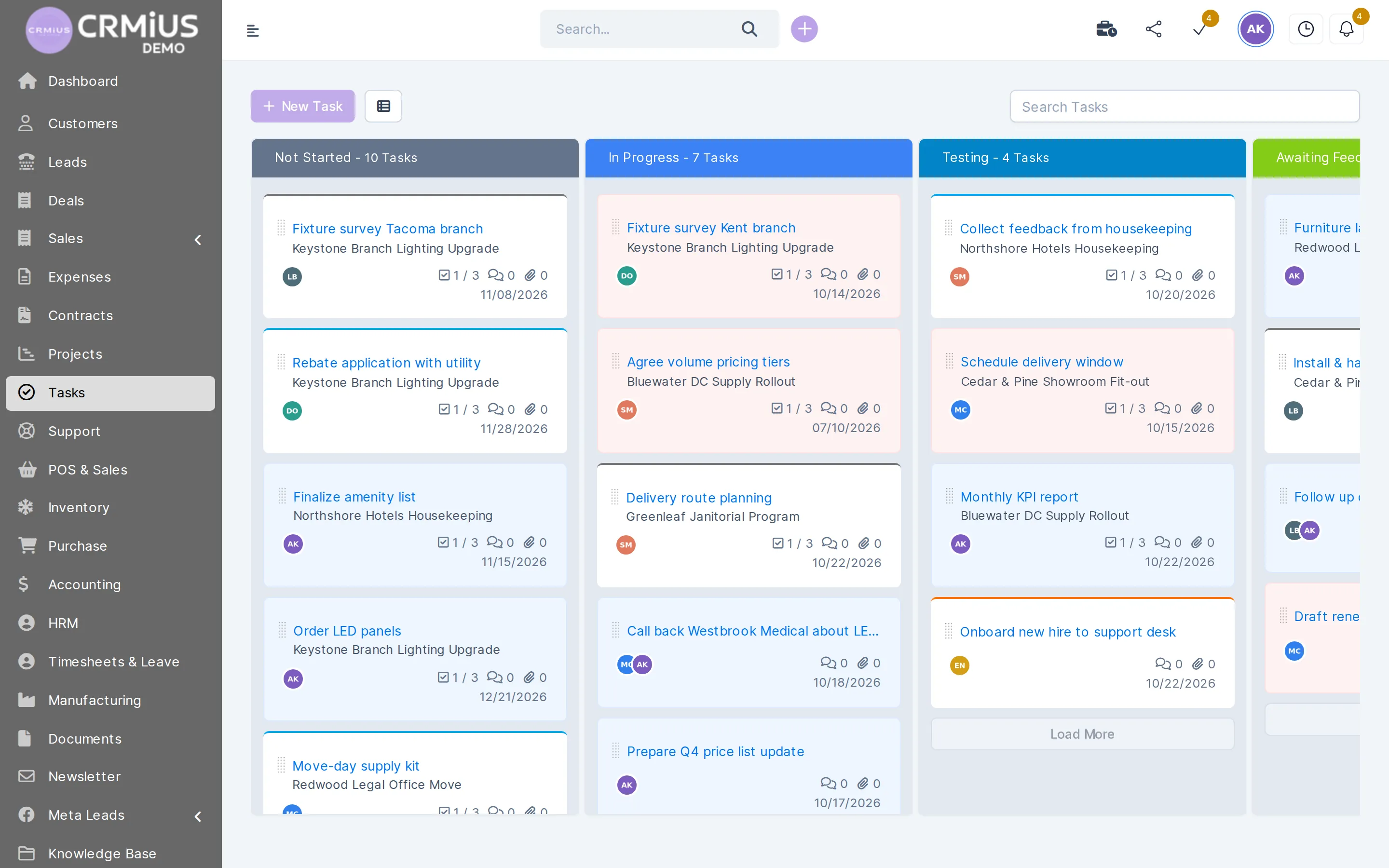
- Escalation. A fault that needs hands-on work becomes a task for an engineer with a due date. The engineer sees it on the task board or in the mobile app, attaches photos from the site and logs time with the task timer.
- Waiting for the customer. Tickets that wait for a photo, a serial number or a visit go On hold, so the open queue shows only what the team can move today.
- End of day. Questions the team answered again and again become knowledge base articles; customers find them in the portal before writing to you.
Roles
Who does what in the support team
Everyone works in the same CRM, each with the rights their role needs.
Support agent
Takes tickets from the department queue, replies with predefined answers, adds internal notes and attachments, opens a ticket by hand after a call.
Engineer or field technician
Gets escalations as tasks with a due date and checklist, works from the task board or the phone, logs time with the timer.
Head of support
Sees counts by status and the last reply on every ticket, reassigns work, keeps predefined replies and the knowledge base current.
Account manager
Sees open tickets on the customer card before a renewal or a new offer and reads the thread without asking support.
Customer
Opens tickets and reads answers in the customer portal, next to their invoices, estimates, contracts and projects.
Administrator
Gives each staff member the rights they need: roles and access rights.
Escalations
Engineering work goes to the task board
When a ticket needs more than an answer, the agent creates a task. Engineers see it among their other work, with status, due date, checklist and comments.
- Task created from the ticket, link kept
- Assignee, followers and due date
- Checklist, comments and attachments
- Timer and timesheet for the time spent
Priorities, response targets and workload

Every ticket carries a priority, a status, the time it was created and the time of the last reply. The list sorts and filters by them, so the team works to the response targets you agreed with customers: high priority first, then the oldest tickets without a reply.
- Response targets are a team agreement: write them down per priority, and the head of support checks the Last reply column during the day.
- Workload shows in the ticket summary by status and on dashboards with widgets.
- Rules from the CRMiUS Automation module act on escalation tasks: a task left without activity for several days gets a new priority or assignee and a reminder. Tickets themselves use the built-in support actions: email to ticket and auto-close.
- Customer feedback comes from surveys sent once the work is done.
Which support teams set it up this way
Departments and services in CRMiUS are your own lists, so the same queue fits different kinds of support.
Equipment suppliers
Service and warranty requests go to a Service department; the agent sees the customer's invoices before replying.
IT service providers
A service desk for clients: incidents and change requests by service, fixes as tasks for engineers.
Online stores
Order, delivery and return questions with the customer's history at hand: CRM for online business.
B2B companies with account managers
Support and sales share one customer card, so a renewal call starts with the open tickets in view.
Shared inbox or a CRM help desk
This is what changes when support moves from a shared mailbox and a spreadsheet into CRMiUS.
| Question | CRMiUS help desk | Shared inbox and spreadsheet |
|---|---|---|
| Who owns a request | The assigned agent in a department queue | Whoever opens the email first |
| Customer history | Invoices, contracts, projects and earlier tickets on the card | Looked up in other systems |
| Work for engineers | A task with assignee, due date and timer, linked to the ticket | Forwarded emails and chat messages |
| What the customer sees | Tickets, answers and articles in the customer portal | Their own sent emails |
| What the head of support sees | Summary by status, last reply, dashboards | Counts made by hand |
How we launch your support desk
What we need from you: the support email address, the list of departments and services, a dozen answers the team writes most often, and who takes escalations.
- Setup. We connect email piping, create departments, services, priorities and predefined replies, and open the customer portal.
- Roles. Agents, engineers and the head of support get their own rights.
- Live tickets. The team runs on real requests during the 14-day free trial.
- Knowledge base. The first articles come from the questions customers repeat.
Module configuration and team training are available as CRMiUS services; technical support 24/7 is included in every plan. Ticket functions in detail: help desk module with tickets and email piping.
Modules your support team switches on
Each module works on the same customer record.
- Customer supportTickets, email piping, predefined replies, knowledge base.
- Contact and customer management (CRM)Customer card with invoices, contracts and tickets.
- Task managementTasks for engineers with due dates and timers.
- Mobile CRM appTasks, customers and photos from the phone.
- Reports and dashboardsDashboards for the head of support.
- Roles and access rightsRights for agents, engineers and leads.
Questions and answers
What is a CRM help desk?
A help desk inside the CRM: customer requests arrive as tickets, go to a department and get answered, and every thread stays on the customer's card next to sales, invoices and contracts.
What is the difference between a CRM and a help desk or service desk?
A CRM keeps customers, sales and billing; a help desk or service desk handles requests. In CRMiUS both share one database, so the agent sees what the customer bought and the account manager sees open tickets.
Can we work to response targets (SLA)?
Every ticket has a priority, a status, a creation time and a last-reply time, and the list sorts and filters by them. Teams agree targets per priority and check them in the list. The CRMiUS Automation module adds rules for escalation tasks, for example a new priority after several days without activity; we check your specific rules on a demo.
Can field engineers work from a phone?
Yes. Escalations become tasks, and engineers open their tasks and customer cards in the CRMiUS mobile app, close tasks and attach photos.
Can customers see the status of their tickets?
Yes. In the customer portal they open tickets, read answers and browse knowledge base articles, next to their invoices and contracts.
How much does the CRMiUS help desk cost?
The help desk is part of Advanced at $150 per month and of Corporate, priced individually. Annual payment gives 10% off; from 10 users terms are individual. Every plan starts with a 14-day free trial, no bank card.
How can we try it?
Open the live demo without sign-up: a fictional company with tickets in several departments, reset every 6 hours. Or start the 14-day free trial and run your team on real tickets.
Start 14-day free trial
- 14 days free, no card
- from $100 / month
- 30+ connected modules
- 5 interface languages