CRM support software: a helpdesk with tickets inside your CRM
Customer emails become tickets, go to the right department and get an answer from a ready reply, with the customer's invoices, contracts and projects next to the conversation. 14 days free.
What CRM support software does in CRMiUS
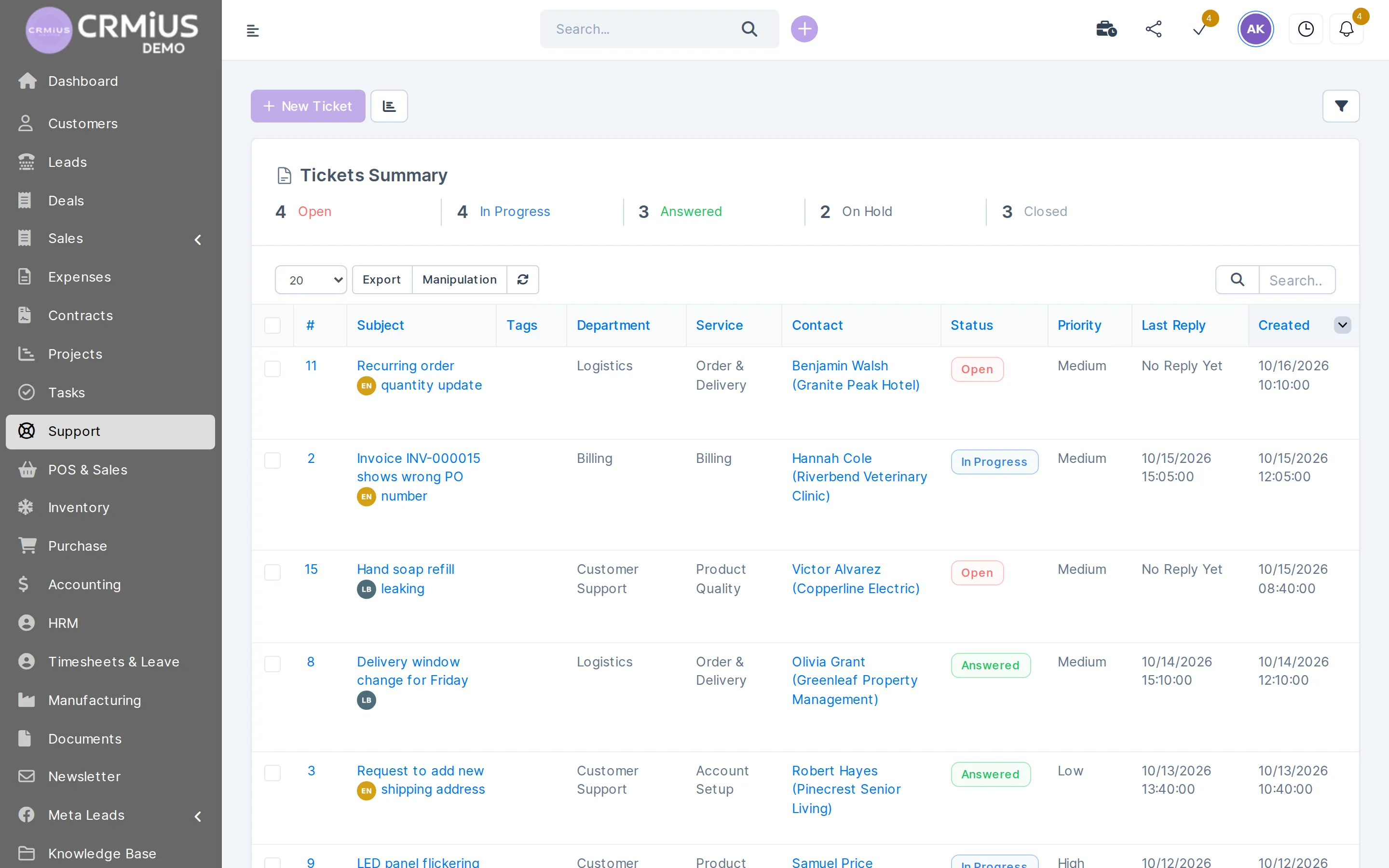
CRM support software is a helpdesk built into the CRM, so every customer request becomes a ticket attached to the customer. In CRMiUS, email piping turns messages to your support address into tickets and customers can open tickets in the portal. Agents route them by department and priority and answer with predefined replies.
- Tickets from your support email and from the customer portal
- Departments, priorities, statuses and an assigned agent on every ticket
- Predefined replies, internal notes and attachments in one thread
- Knowledge base articles customers read in the portal
- Tickets on the customer card next to invoices, contracts and projects
Price: the helpdesk is part of Advanced at $150 a month and of Corporate, priced individually (Basic at $100 covers contacts, tasks, projects and reports). 10% off with annual payment, individual terms from 10 users. 14-day free trial with full access and no bank card. Compare plans
How a ticket moves through the CRMiUS helpdesk
Five steps from the customer's email to a closed ticket. Each step leaves a record on the ticket, so anyone on the team can pick it up.
Customer card
Tickets next to invoices, contracts and projects
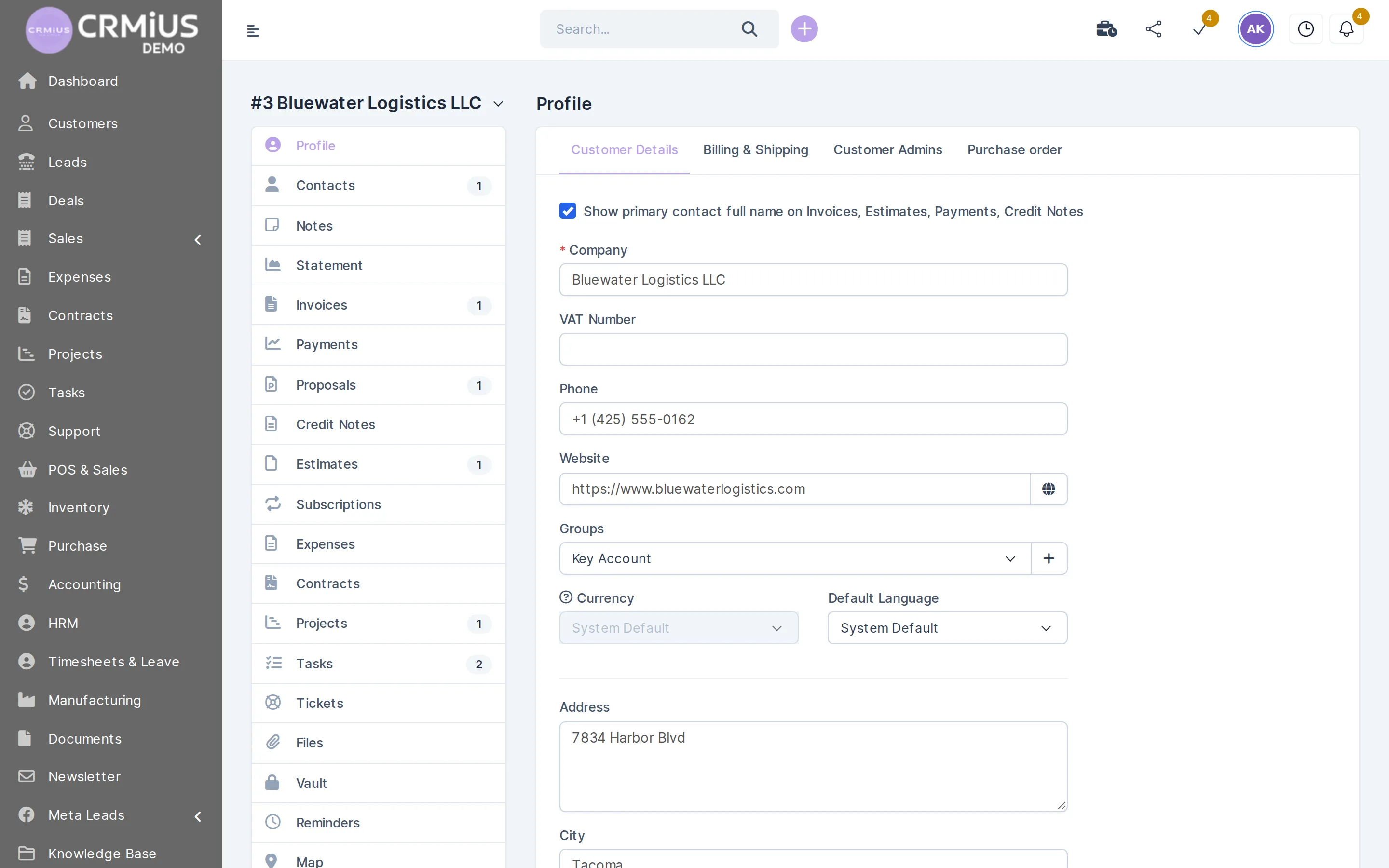
The customer card has a Tickets tab beside Invoices, Contracts and Projects, so the agent sees what the customer bought and what is in progress before replying.
- Tickets tab on every customer card
- Invoices, payments and statement in the same card
- Contracts and projects the request may refer to
- Notes and reminders shared with sales
What your support team does in the helpdesk module
Turn emails into tickets
Email piping reads your support address and creates a ticket with the customer attached.
Give customers a portal
Customers log in, open tickets, read answers and browse knowledge base articles.
Route by department
Billing, delivery, technical questions: each department has its own queue and agents.
Set priority and status
Open, In progress, Answered, On hold, Closed — the list shows a count for each status at the top.
Answer with predefined replies
Save answers to common questions once and insert them into any ticket.
Keep internal notes
Internal notes stay inside the ticket, visible to the team only.
Turn a ticket into a task
When a fix needs work, create a task for an engineer and keep the ticket linked.
Ask for feedback
Customer satisfaction surveys show how clients rate your service.
A helpdesk inside the CRM or a separate helpdesk tool?

A separate helpdesk tool keeps its own contact list. Agents then switch to the CRM to check what the customer bought, and sales rarely sees open complaints. With the helpdesk inside CRMiUS the ticket, the customer card, invoices and contracts share one database.
- The helpdesk in the CRM suits companies where support and sales talk to the same customers: equipment suppliers, IT services, agencies, online stores.
- A dedicated contact-center platform is usually chosen by large call centers that run phone queues across many lines. If that is your case, show us your process in a demo and we will say plainly which part CRMiUS covers.
What we need from you to start
Your support email address, a list of departments, ten or so answers your team writes most often and the questions customers ask again and again. We set up email piping, departments and predefined replies, and the first knowledge base articles come from those repeated questions. This setup, like module configuration and team training, is an additional CRMiUS service.
For a whole support department, see CRM for support teams and service desks: the day-to-day setup.
Works together with
Ticket data is shared with the modules your support team touches every day.
- Contact and customer management (CRM)Tickets tab on the customer card next to invoices and projects.
- Task managementTasks created from tickets for engineers.
- For support teamsHow a support department runs its day in CRMiUS.
- Reports and dashboardsDashboards with widgets for the support lead.
- IntegrationsGmail via IMAP, Telegram, REST API and webhooks.
Who uses it
SaaS and IT services
Bug reports and questions in one queue; fixes become tasks in project management.
Equipment suppliers
Warranty and service requests with the customer's invoices on the same card.
Agencies
Change requests from clients tracked per project and billed through timesheets.
Online stores
Order questions and returns with the order history at hand — see CRM for online business.
Questions and answers
What is CRM support software?
It is a helpdesk inside the CRM: customer requests arrive as tickets, are routed and answered, and each conversation stays in the customer's history next to sales and billing.
Can tickets be created from email?
Yes. Email piping turns messages sent to your support address into tickets and links them to the customer.
Is there a customer portal for tickets?
Yes. Customers log in to open tickets, read answers and browse the knowledge base. The same portal shows their invoices, estimates, contracts and projects.
Which ticket statuses and priorities are there?
Tickets move through Open, In progress, Answered, On hold and Closed, and each ticket carries a priority and a department. The ticket list shows a count per status.
How much does the CRMiUS helpdesk cost?
The helpdesk is part of Advanced at $150 per month and of Corporate, priced individually. Annual payment gives 10% off and from 10 users terms are individual. Every plan starts with a 14-day free trial.
Who supports CRMiUS itself?
Technical support 24/7 is included in every plan; Corporate adds priority support and a personal manager. Write to info@crmius.com.
How can I try the helpdesk?
Open the live demo without sign-up: a fictional company with tickets in several departments, reset every 6 hours. Or start the 14-day free trial with full access and no bank card.
Modules
- Contact and customer management (CRM)→
- Finance and invoicing→
- Warehouse and inventory management→
- Project management→
- Marketing and newsletters→
- Reports and dashboards→
- Roles and access rights→
- Task management→
- IP telephony→
- E-signature for contracts→
- Sales and leads management→
- Logistics and inventory→
- Document management→
- Procurement management→
- HR management→
Start 14-day free trial
- 14 days free, no card
- from $100 / month
- 30+ connected modules
- 5 interface languages