Procurement management system: from purchase request to vendor bill
Purchase requests, vendor quotes, purchase orders, goods receipt and vendor bills run in one CRM, next to your stock and finances.
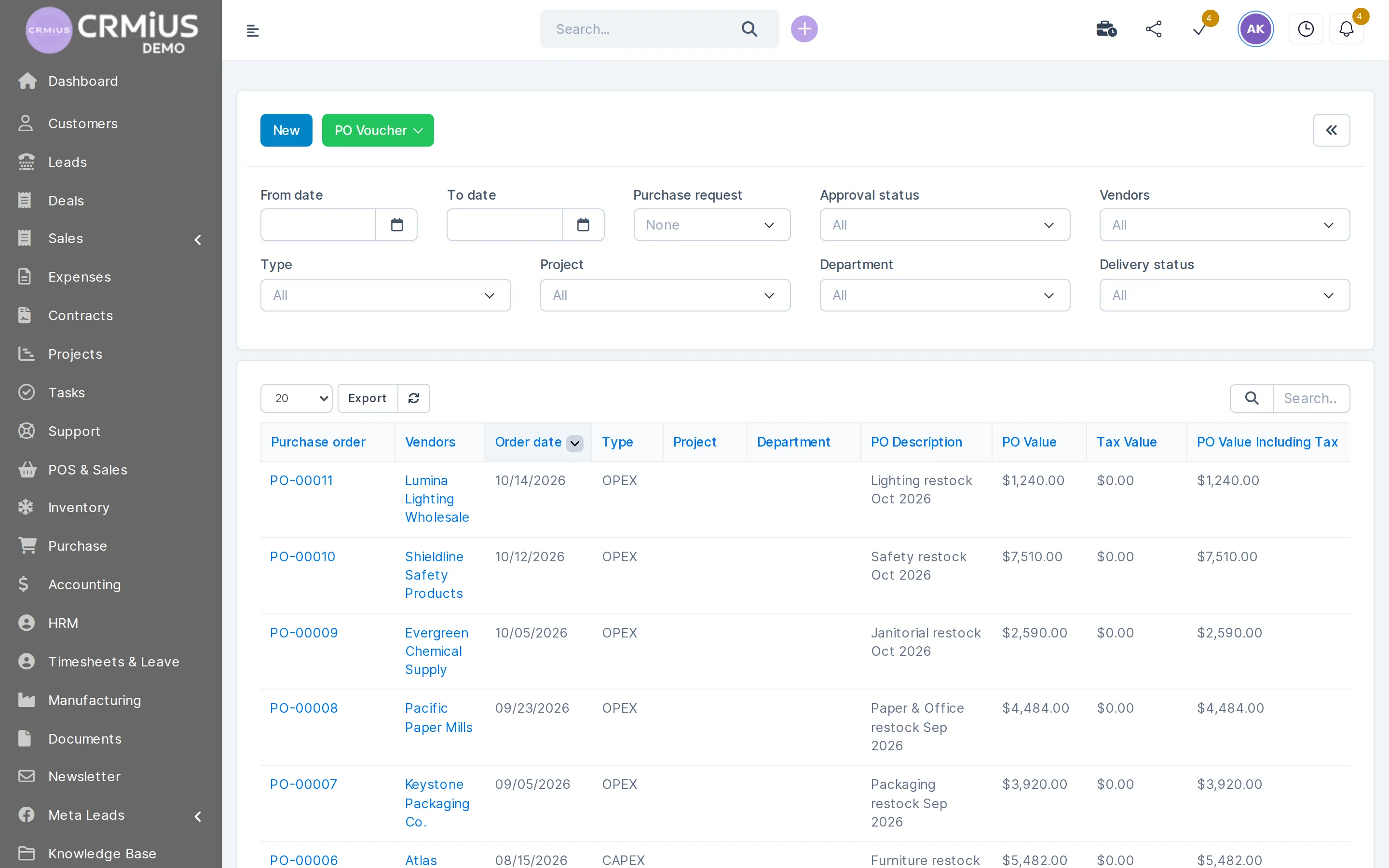
What the CRMiUS procurement management system does
A procurement management system runs each purchase from an internal request to goods on the shelf and the vendor bill in the books. In CRMiUS it is a CRM module: an employee raises a request, the buyer collects quotes from several vendors, the chosen quote becomes a purchase order, and the warehouse receives the goods against it.
- Vendor directory with contacts, payment terms, contracts and purchase history
- Purchase requests with approval before money is committed
- Quotations from several vendors on one request
- Purchase orders as PDF, partial deliveries tracked against the same order
- Goods receipt adds stock to the warehouse; vendor bills land in finance
The purchase chain from request to vendor bill
Procurement in CRMiUS is one chain of linked documents. The buyer creates the quote request from the purchase request, the purchase order from the chosen quote and the goods receipt from the order, so items, quantities and prices carry over from step to step.
What the purchasing team does in the module
One place for the buyer, the approving manager, the warehouse and accounting.
Keep a vendor base
A vendor card holds contacts, payment terms, quotations, contracts, purchase orders and invoices in one record.
Collect purchase requests
Departments request items and quantities; the request is approved before money is committed.
Compare vendor quotes
Ask several vendors to price the same request and pick the best offer by price and terms.
Issue purchase orders
The chosen quote becomes a purchase order, sent to the vendor as a PDF with your branding, in the vendor's currency with taxes.
Receive goods
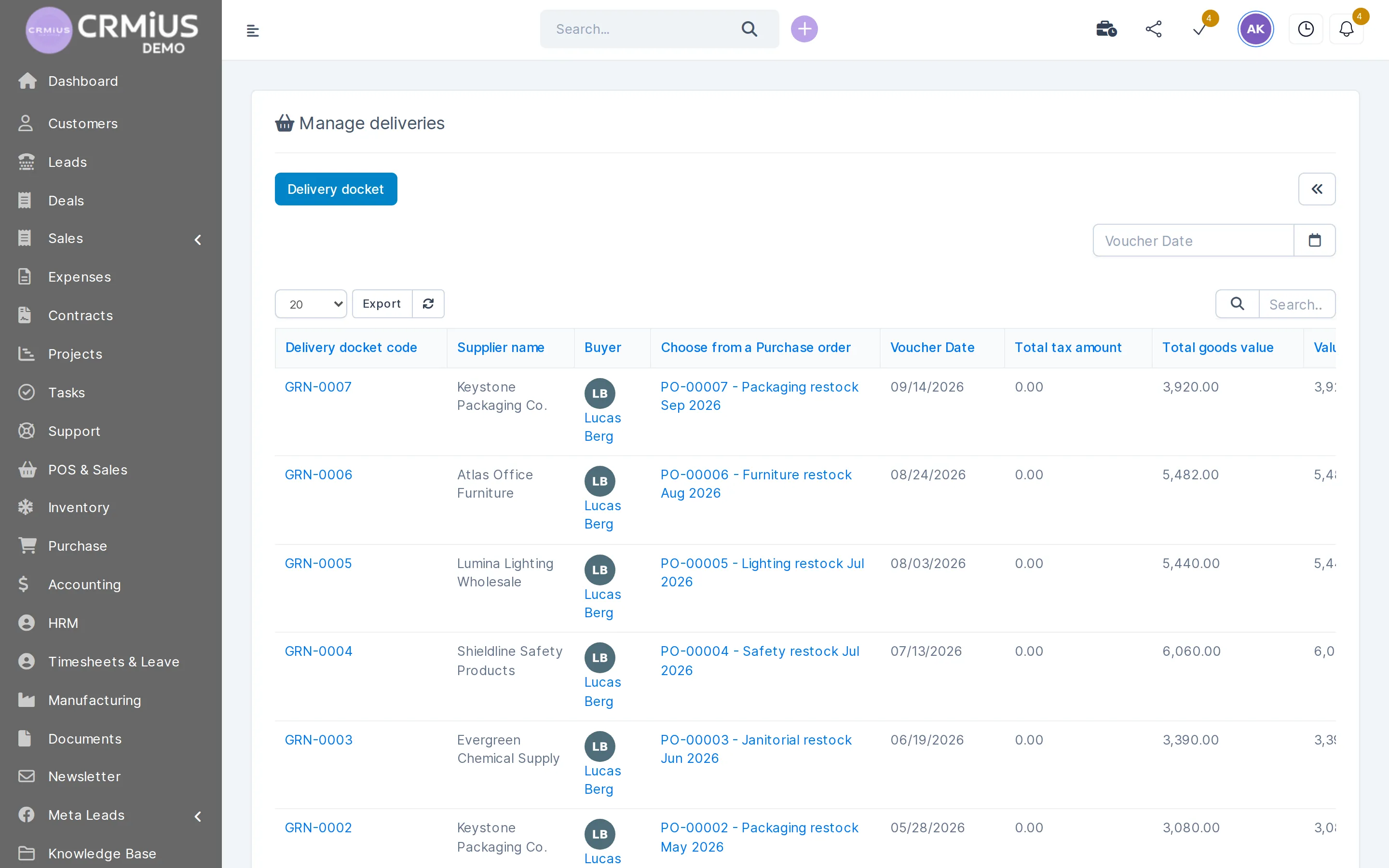
The warehouse records the receipt against the order, including partial deliveries, and stock updates in the chosen warehouse.
Store vendor bills
Vendor contracts and invoices sit with the order; expenses flow to the finance module.
Control spending
Open orders, committed amounts and spending by vendor and period in reports and dashboards.
One vendor card for the whole purchase history
Open a vendor and you see everything you buy from them: contacts, quotations, contracts, purchase orders and purchase invoices. Before reordering, the buyer checks the last prices and terms; accounting finds each invoice next to the order it belongs to.

Try it yourself: open the live demo, go to Purchase → Vendors. No sign-up; data resets every 6 hours.
Goods receipt
What has arrived and what is still on the way
Every purchase order shows its delivery status, and each receipt is a stock movement in the warehouse.
- Order status from draft to fully received
- Partial deliveries recorded against the same order
- Serial numbers and expiry dates kept in the warehouse
- Purchase history per vendor and per item
Spreadsheet, separate purchasing app or procurement inside the CRM
| Spreadsheet and email | Separate purchasing app | CRMiUS | |
|---|---|---|---|
| Purchase requests | In messages and files | In the app | Request with approval in the CRM |
| Vendor quotes | Collected and compared by hand | In the app | Several quotes on one request |
| Stock after delivery | Updated by hand | Synced with the stock system through an integration | Goods receipt adds stock to the warehouse |
| Vendor bill and expense | Retyped into accounting | Exported to accounting | Stored with the order, expense in the finance module |
| Who sees the order status | Whoever has the file | The purchasing team | Everyone your role settings allow |
Who uses it
Wholesale and distribution
Regular purchases from many vendors with price comparison and stock in several warehouses. See CRM for wholesale distribution.
Retail chains
Store requests collected centrally and ordered in one batch.
Service companies
Equipment and materials for projects bought with approval.
Small production
Raw materials ordered at minimum stock; the manufacturing module with bills of materials works on top of purchasing and the warehouse. See CRM for manufacturing.
Price and how to start
CRMiUS plans start at $100 per month (Basic), Advanced is $150 per month, Corporate is priced individually. Which modules you need, procurement included, and which plan covers them, we clarify in the demo. See all plans and what they include.
- 14 days free on every plan, full access, no bank card
- 10% off for annual payment, individual terms from 10 users
- Setup of modules and interface and team training as additional services
- Vendors and items can be imported from CSV or added through the REST API
To start, prepare your vendor list, your item catalogue and the list of warehouses.
Questions and answers
What is a procurement management system?
Software that runs purchasing from request to delivery: approvals, vendor quotes, purchase orders, goods receipt and vendor bills. In CRMiUS it is a module of the CRM, connected to the warehouse and finance.
Why manage procurement in a CRM?
Vendors, stock, customers and finances share one database. A purchase order, the goods receipt and the later sale of those goods stay linked, and nobody retypes items between systems.
Can we compare offers from several vendors?
Yes. One purchase request can collect quotations from several vendors, and the chosen one becomes the purchase order.
Does receiving goods update stock? What about partial deliveries?
Yes. The goods receipt recorded against the purchase order adds the items to the selected warehouse. Each partial delivery is recorded against the same order until it is fully received.
Where are vendor contracts and invoices stored?
On the vendor card and with the purchase order. Expenses from vendor bills flow to the finance module.
How much does it cost?
CRMiUS plans start at $100 per month; which modules you need, procurement included, and which plan covers them, we clarify in the demo. Every plan starts with a 14-day free trial, no card needed.
Can I see the procurement module without signing up?
Yes. The public live demo opens a fictional company with vendors and purchase orders, no sign-up; its data resets every 6 hours.
Modules
- Contact and customer management (CRM)→
- Finance and invoicing→
- Warehouse and inventory management→
- Project management→
- Marketing and newsletters→
- Reports and dashboards→
- Roles and access rights→
- Task management→
- Customer support→
- IP telephony→
- E-signature for contracts→
- Sales and leads management→
- Logistics and inventory→
- Document management→
- HR management→
Start 14-day free trial
- 14 days free, no card
- from $100 / month
- 30+ connected modules
- 5 interface languages