CRM process automation: rules, reminders and recurring work
CRMiUS creates recurring invoices and tasks, sends payment and contract reminders and runs your task rules on its own. The team keeps the decisions; the CRM keeps the routine steps on time.
What is CRM process automation?
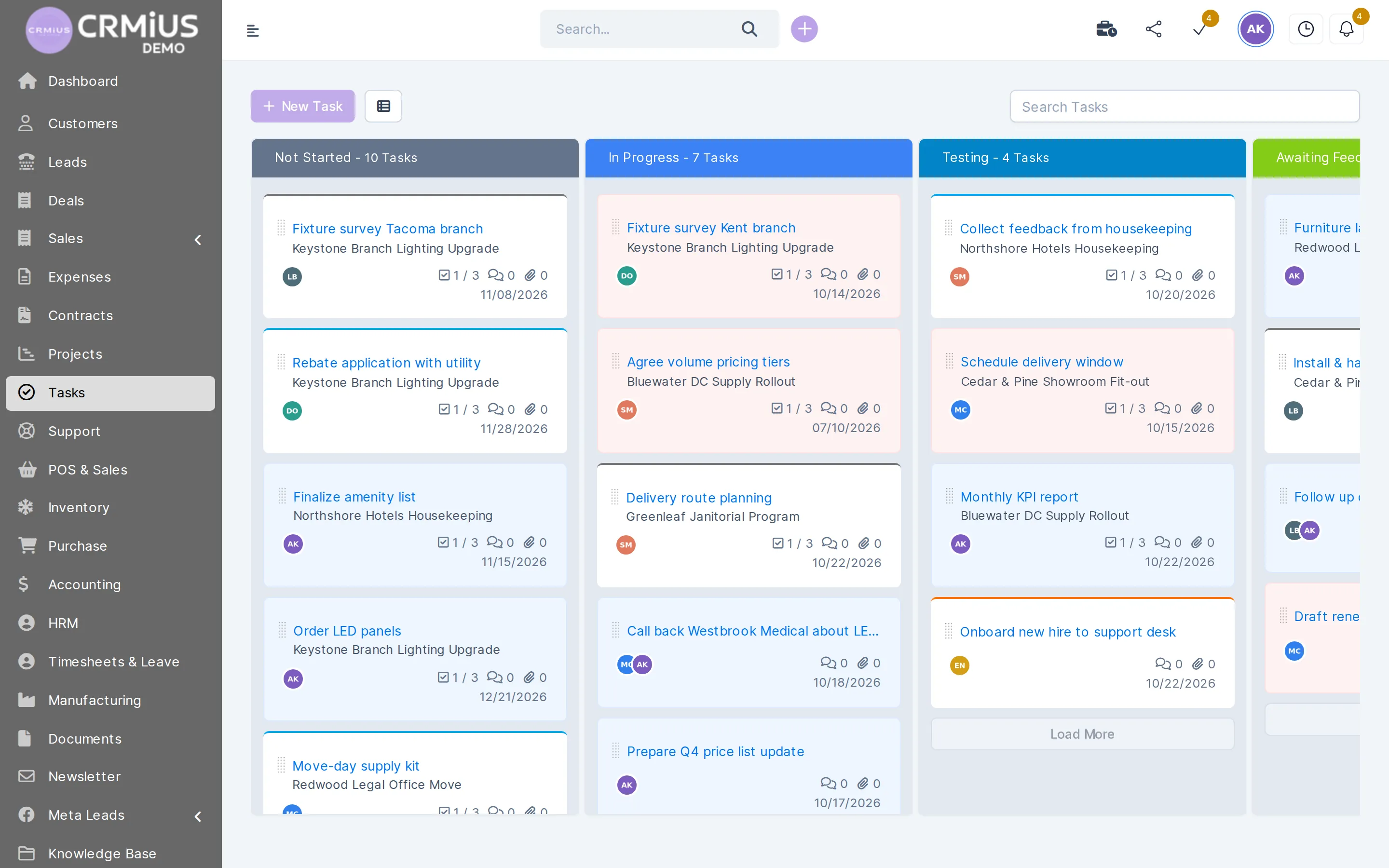
CRM process automation means the CRM performs routine steps by itself. CRMiUS creates recurring invoices, expenses and tasks, sends payment reminders, reminds about contracts and deadlines, and runs your own rules: when a task is created, reaches its due date or stays untouched for days, the rule changes its status, assignee or priority and adds a comment or reminder.
- Built in: automatic actions in invoices, contracts, tasks, leads and tickets; on top, CRMiUS Automation for task rules.
- Webhooks and the REST API pass events to other systems.
- Plans from $100 per month; 14 days free with full access, no bank card.
Three layers of automation in CRMiUS
Many routine steps are covered by settings that already exist in the modules. Rules come in where the order of task work matters. Everything that has to leave the CRM goes out through webhooks.
Built-in automatic actions
Recurring invoices, payment reminders, contract and deadline reminders, lead capture from forms and mail, auto-closing tickets. You set days and hours once.
CRMiUS Automation
Your own rules for tasks: triggers joined with AND or OR, then one or more actions. Each rule can be switched on and off.
Webhooks and REST API
Events about leads, contacts, invoices, payments, estimates, contracts, projects, tasks and tickets go to the systems you already use.
How an automation rule works
A rule in CRMiUS Automation has a name, one or more triggers and one or more actions. Triggers are joined with AND (all must match) or OR (any one is enough). Date triggers and the inactivity check run on the CRM schedule; the others fire the moment a task changes.
When
- Task is inactive for ≥ 3 days
- Due date is today
Then
- Add reminder for the assignee
- Add follower: team lead
- Change priority to High
- Add comment “Check status”
Other rules teams build the same way: a new task in a project gets a default follower and a tag; a task moved to Complete gets a closing comment; when the due date changes, the task gets a reminder. Tasks themselves are described on the task management page.
CRMiUS Automation
Triggers and actions you can combine
Task created
The rule runs as soon as a task appears, from a project, a client card or the board.
Status or priority changed
For example, status changed to Testing or priority changed to Urgent.
Dates
Start date is today, due date is today, start date changed, due date changed.
No activity for N days
Inactivity with conditions =, >, <, >=, <= on the number of days.
Custom field value
The rule reacts when a custom field on the task takes a given value.
Change the task
Set a new status or priority, or move the due date by a number of days.
Bring in people
Add an assignee or a follower, or replace all of them with one person.
Comments, reminders, tags, timer
Add a comment or a reminder, add, remove or replace tags, set a custom field, log time with a comment.
Automatic actions built into the modules
These run without any rule. You switch them on and set the days or hours in the settings.
| Area | What CRMiUS does by itself | What you set |
|---|---|---|
| Invoices | Creates the next recurring invoice as a draft, as unpaid, or creates and sends it; sends a reminder before the due date and an overdue notice, then repeats it | Days before due date, days after overdue, repeat interval, hour of sending |
| Estimates and proposals | Reminds the customer before the estimate or proposal expires | Days before expiry |
| Contracts | Sends sign reminders until the customer signs online; warns before the contract ends | Reminder interval, days before end. See e-signature |
| Tasks | Creates recurring tasks; reminds assignees before the deadline; stops a forgotten timer; reminds about completed tasks that were not billed | Repeat period, days before deadline, hours for the timer |
| Leads | A web form or the connected mailbox creates the lead with status, source and responsible person and notifies the staff you choose | Form fields, defaults, who gets notified. See lead management |
| Support | Turns e-mails into tickets; closes tickets without a reply after the set time | Hours before auto-close. See helpdesk |
| Expenses | Creates recurring expenses; billable expenses can go to the customer invoice | Repeat period |
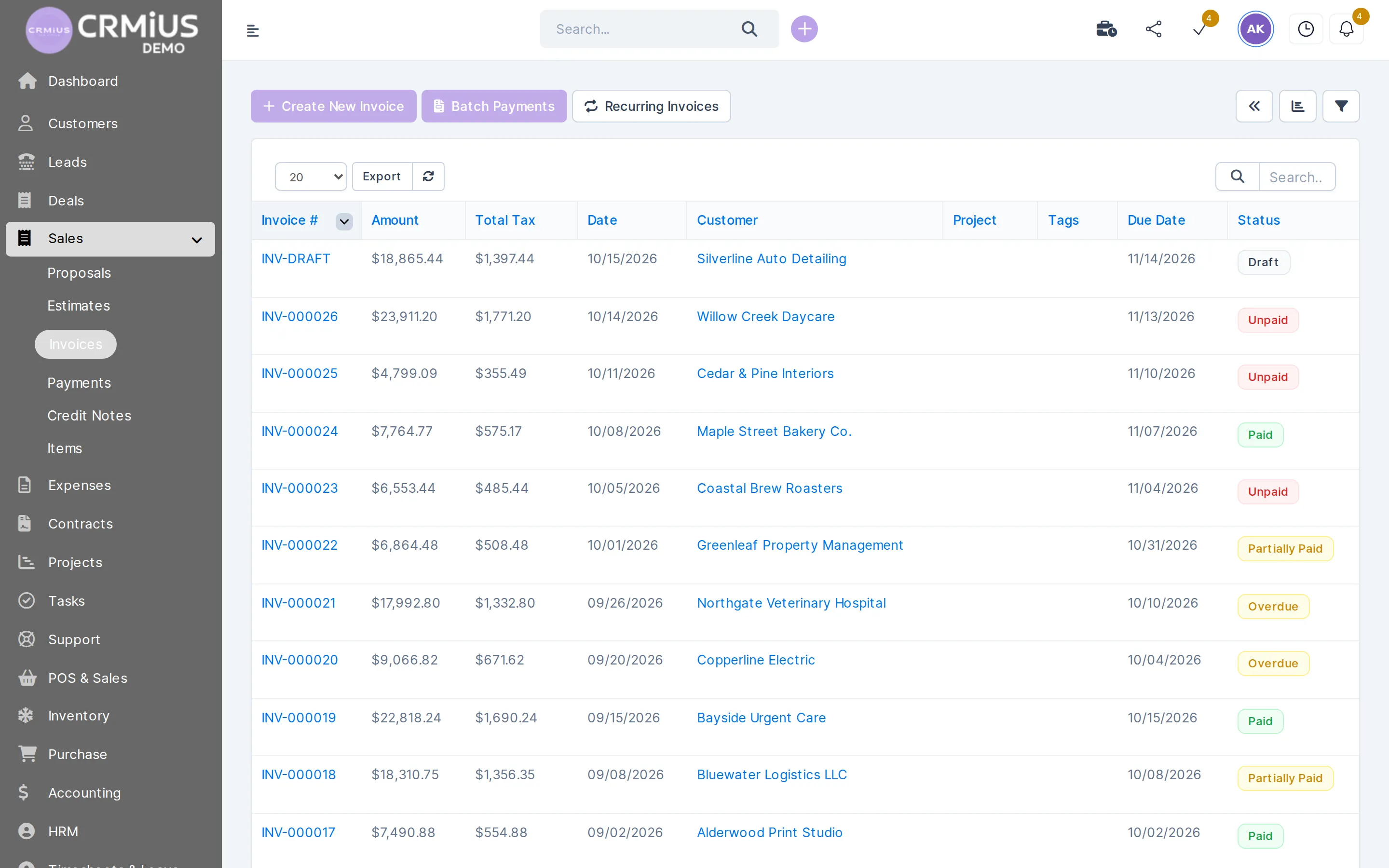
Invoices
Overdue invoices stand out, reminders go out on schedule
The invoice list shows each status. Due reminders and overdue notices are sent by the CRM on the days you set in the settings.
- Statuses: draft, unpaid, partially paid, paid, overdue
- Recurring invoices generated from a template invoice
- Online payment by card via Stripe or PayPal
- Payments recorded on the invoice and in reports
Benefits of process automation, and where it stops

- Steps happen on time. Reminders and recurring invoices go out on the set day, also during holidays and busy weeks.
- One rule for everyone. A new employee works by the same rule as the team lead.
- Stalled work becomes visible. The inactivity trigger finds tasks nobody touched.
- Traceable. Every rule shows when it last fired and on which task; the activity log keeps the changes.
Rules in CRMiUS Automation work on tasks. Leads, invoices, contracts and tickets use the built-in actions in the table above. Scenarios that span several systems go through webhooks and the REST API, which usually needs a developer on your side. Rules or interface changes beyond that are part of module customization in the Corporate plan.
How to start automating in CRMiUS
- 01
List the routine
Write down what the team repeats every week: reminders, invoices, follow-ups, handovers.
- 02
Switch on built-in actions
Recurring invoices, payment and contract reminders, task deadline reminders, ticket auto-close.
- 03
Create a task rule
Name, AND or OR, triggers, actions. Start with one rule, for example for stalled tasks.
- 04
Check and adjust
After a few days look at “last triggered” in the rule list, change values or deactivate the rule.
Price and free trial
Basic costs $100 per month and includes contacts, tasks and projects, the Google Workspace integration and key reports. Advanced costs $150 per month and adds the finance module, time tracking, helpdesk, analytics and dashboards. Corporate is priced individually and adds module and interface customization, a personal manager and priority support.
- 14 days free on every plan, full access, no bank card
- 10% off for annual payment
- Setup of modules and team training as an additional service
In the live demo the settings are locked, so rules and reminders can be tried in your own trial account. Plans compared on the pricing page.
Works together with
- Task managementTasks that rules change: status, assignee, due date, reminders.
- Finance and invoicingRecurring invoices, due reminders and overdue notices.
- Sales and leads managementLeads from web forms and mail with status, source and owner.
- Customer supportE-mail to ticket and auto-close of quiet tickets.
- IntegrationsWebhooks and REST API for your other systems.
- AI functionsPilotAI: AI voice assistant that calls and follows up leads.
Questions and answers
What is CRM process automation?
The CRM performs routine steps by itself: it creates recurring invoices and tasks, sends reminders and runs rules that change tasks when a trigger fires. People keep the decisions and the client conversations.
What are the benefits of process automation in a CRM?
Reminders and recurring invoices go out on time, everyone works by the same rule, stalled tasks surface, and each rule shows when it last fired. CRMiUS publishes no average savings figure; the effect depends on how much of your routine repeats.
Which processes can CRMiUS automate?
- Invoices: recurring, due reminders, overdue notices
- Contracts: sign and expiry reminders
- Tasks: recurring tasks, deadline reminders, rules in CRMiUS Automation
- Leads: capture from web forms and mail with a responsible person
- Support: e-mail to ticket, auto-close
What can a CRMiUS Automation rule do?
On a task trigger (created, status or priority changed, start or due date today or changed, no activity for N days, custom field value) it can change status, priority or due date, add or replace assignees and followers, add a comment, reminder or tag, set a custom field or log time.
Can CRMiUS send recurring invoices and payment reminders automatically?
Yes. A recurring invoice is created as a draft, as unpaid, or created and sent. Reminders go out before the due date, and overdue notices after it, with a repeat interval you set. See finance and invoicing.
Can CRMiUS pass events to other systems?
Yes. Webhooks send events about leads, contacts, invoices, payments, estimates, proposals, contracts, projects, tasks, tickets and expenses; the REST API reads and writes data. See integrations.
Can I try automation without registering?
The live demo shows tasks, invoices and tickets of a fictional company; its settings are locked. To set up your own rules and reminders, start the 14-day free trial: full access, no bank card.
Start 14-day free trial
- 14 days free, no card
- from $100 / month
- 30+ connected modules
- 5 interface languages