One CRM for every department in your company
Sales, finance, warehouse, purchasing, projects, support and HR work in one database, and each team sees its own part of it. From $100 a month, 14 days free.
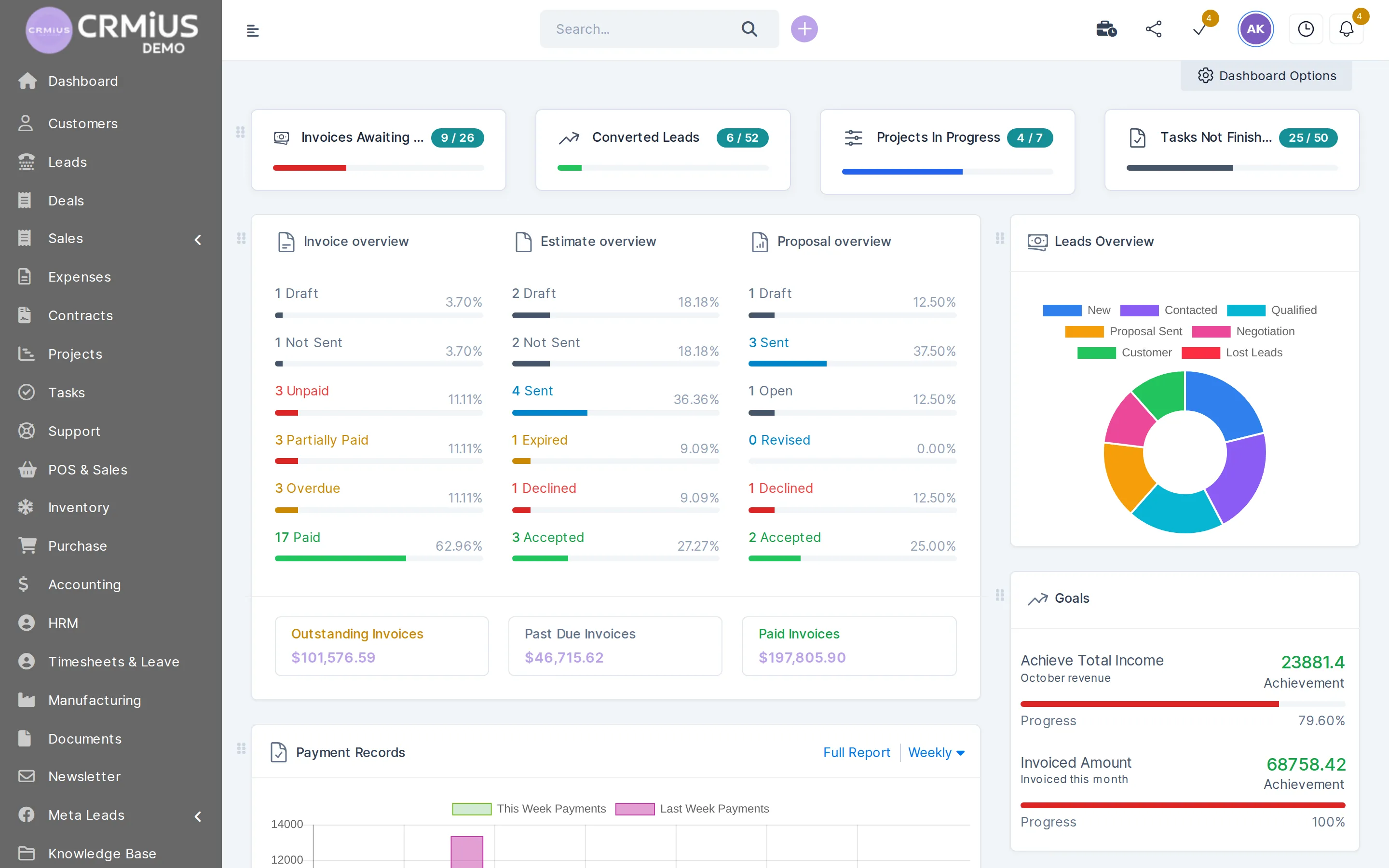
What does CRMiUS give each department?
CRMiUS gives each department its own workspace on one shared database. Sales runs leads and proposals, finance issues invoices and keeps the books, the warehouse and purchasing move stock, project teams log hours, support answers tickets, HR keeps staff records and management reads dashboards. Every team works with the same customers, products and documents.
Feature checklist and which plan includes what: key CRM features.
- Roles: each employee opens the modules of their job and sees their own records or all of them
- Handoffs without retyping: an accepted estimate becomes an invoice, the goods receipt is linked to the purchase order
- Start with one department and add the next one later in the same database
- Browser and mobile app, interface in English, Ukrainian, Russian, German and French
Departments in CRMiUS: daily work, modules and plan
One row per department: what the team does in CRMiUS every day, which module pages describe it and which plan covers it.
| Department | What the team does in CRMiUS | Modules | Plan |
|---|---|---|---|
| Sales | Leads from website forms and Facebook Lead Ads on a kanban board, reminders, proposals the customer accepts online, estimates, a customer card with the whole history. The PilotAI voice assistant calls new leads. | Lead management, customer management, AI functions | Basic; PilotAI on request |
| Marketing | Newsletters to customers and leads (MailFlow), Facebook Lead Ads, GMB Importer that brings businesses from Google in as leads, lead sources, surveys. | Marketing and newsletters | On request |
| Finance and accounting | Estimates turn into invoices in one click, recurring invoices, card payments through Stripe and PayPal, payment reminders, expenses, chart of accounts, bank reconciliation, P&L and balance sheet. | Finance and invoicing | Advanced |
| Warehouse and logistics | Stock by warehouse, goods receipts and delivery notes, transfers between warehouses, min/max stock alerts, serial numbers, expiry dates, inventory counts. | Warehouse management, logistics | On request |
| Purchasing | Purchase requests, vendor quotations, purchase orders, vendor contracts and bills; the goods receipt is linked to the purchase order. | Procurement management | On request |
| Production | Bills of materials, work orders and routings, working on top of warehouse and purchasing. | CRM for manufacturing | On request |
| Projects and services | Milestones, Gantt chart, tasks with checklists and timers, timesheets, project billing by fixed fee or by hours. | Project management, task management | Basic; time tracking in Advanced |
| Customer support | Tickets from email and the customer portal, support departments, priorities, predefined replies, knowledge base. | Customer support | Advanced |
| HR | Staff profiles, departments, job positions, contracts, attendance and leave. | HR management | On request |
| Shops and POS | Point-of-sale sales and sales channels next to stock and the customer base. | CRM for retail | Corporate |
| Management | Dashboards with widgets, goals, reports on sales, payments, lead conversion, expenses vs income and timesheets; roles and the activity log. | Reports and dashboards, roles and access rights | Key reports in Basic; dashboards in Advanced |
«On request» means the module exists in CRMiUS and we confirm which plan covers it for your set. Compare plans · all modules
How one order passes from department to department
Each team adds its part to the same record, so nobody retypes what the previous department entered.
- 01Marketing A form on your website or a Facebook lead ad brings in an enquiry. hands over: a lead with its source
- 02Sales The manager qualifies the lead and sends a proposal; the customer accepts it online. hands over: customer card, accepted proposal
- 03Finance The estimate becomes an invoice in one click; the customer pays by card in the portal. hands over: invoice with the status Paid
- 04Warehouse The delivery note takes the goods off stock; a min-stock alert shows what runs low. hands over: delivery note, stock alert
- 05Purchasing A purchase request turns into a purchase order; the goods receipt puts stock back. hands over: goods receipt
- 06Support The customer's question by email arrives as a ticket on the same customer. hands over: ticket with the order history
- 07Management Dashboards show lead conversion, payments and expenses vs income for the period. result: one report across teams
- customers
- products
- invoices
- stock
- tickets
- staff
What changes when departments share one database
Invoice without retyping
The estimate the customer accepted becomes an invoice in one click, with the same items, prices and taxes. More in finance and invoicing.
Sales sees what is paid
Before a call the manager sees paid, unpaid and overdue invoices and the customer statement right on the customer card.
Low stock reaches purchasing
Min/max alerts show which items to reorder; purchasing raises a request and an order to the vendor in procurement.
Hours and expenses get billed
Timesheets and billable expenses from projects go onto the customer's invoice.
Support hands work on
A ticket that needs work becomes a task for the right person, linked to the same customer in customer support.
One staff list
The employees in HR are the same people who own leads, tasks and tickets, and their roles decide what each one sees.
One set of figures for management
Reports on sales, payments, expenses and timesheets come from the records the teams work in. See reports and dashboards.
Who sees what
Each department opens its own modules
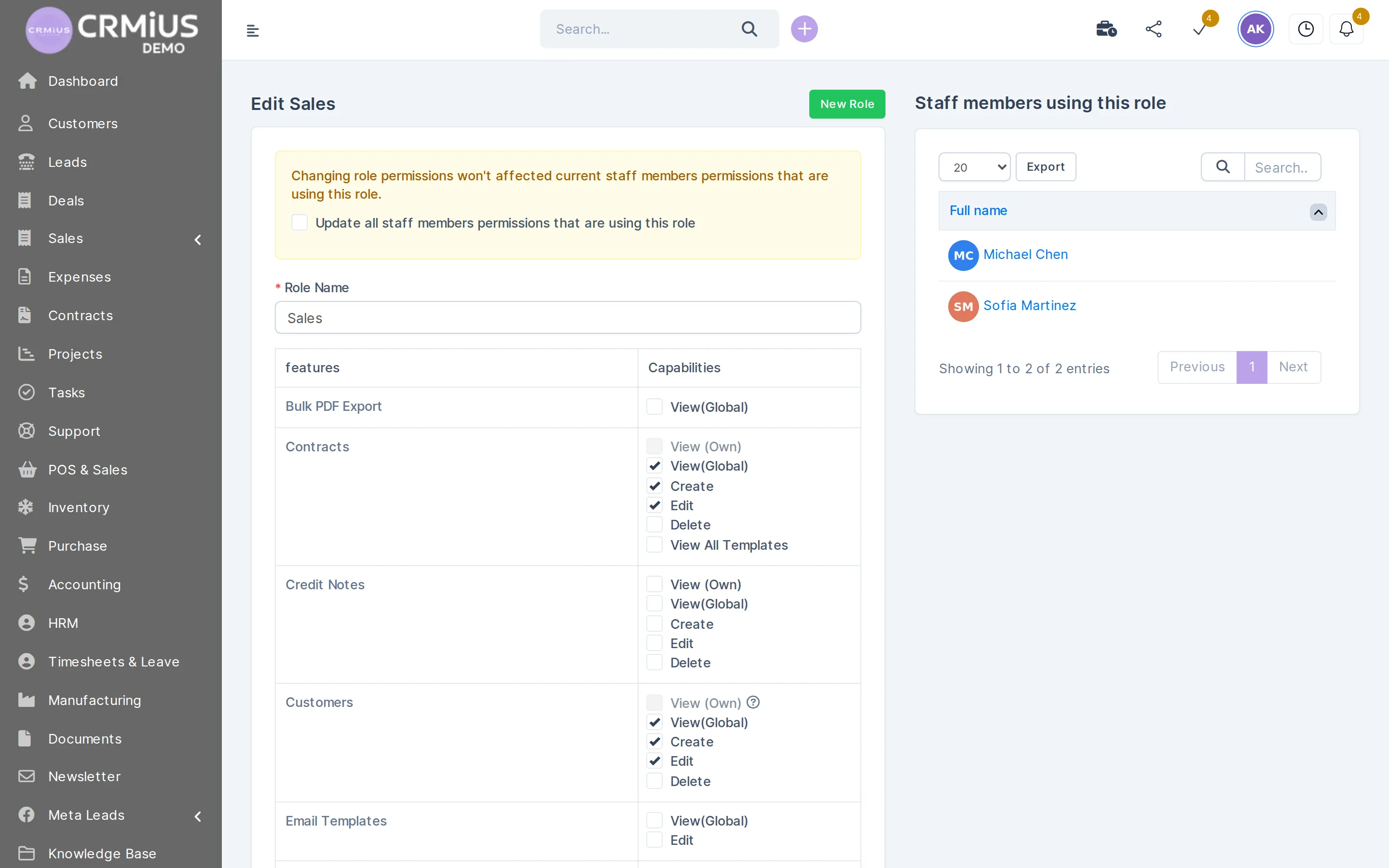
A screen from the CRMiUS demo company: the role «Sales» with permissions per module. Two sales staff work under this role; finance, warehouse and support get roles of their own.
- A role per department: sales, finance, warehouse, support
- View own or all records, create, edit and delete per module
- Individual permissions on top of the role
- Every change kept in the activity log
How to bring departments into CRMiUS
- Choose the first department. Sales and the customer base fit Basic; if you invoice and answer tickets from the CRM, start on Advanced.
- Try it for 14 days with full access and no bank card; import customers and leads from CSV.
- Give each employee a role: which modules they open and whether they see their own records or all of them. See roles and access rights.
- Add the next department once the first one works: warehouse, purchasing, production or HR switch on in the same database, and we confirm the plan for them.
Configuring modules and the interface and team training are additional services; 24/7 technical support comes with every plan. Timing depends on how many departments and how much data you bring; we name it after the first call.
Typical department sets
Small business
Sales, projects and invoices for one team on Basic or Advanced. See CRM for small business.
Wholesale distribution
Sales, warehouse, purchasing and finance on one product list. See CRM for wholesale.
Manufacturing
Production on top of warehouse and purchasing, with sales and invoices next to it. See CRM for manufacturing.
Agency or service firm
Proposals, projects with timesheets, invoices and support. See CRM for agencies.
Start with the module of your department
Each page explains one department's work in detail.
- Sales and leads managementSales: leads, proposals, customer cards.
- Finance and invoicingFinance: estimates, invoices, payments, accounting.
- Warehouse and inventory managementWarehouse: stock, receipts, delivery notes.
- Procurement managementPurchasing: requests, vendor quotes, orders.
- Customer supportSupport: tickets and knowledge base.
- Reports and dashboardsManagement: reports and dashboards.
Questions and answers
What does a CRM give each department?
Each department gets its own working screens on shared data: sales gets the lead pipeline and proposals, finance gets invoices and accounting, the warehouse gets stock and delivery notes, support gets tickets, HR gets staff records and management gets dashboards. In CRMiUS all of them work in one database.
Is CRMiUS only for the sales team?
CRMiUS covers sales and also finance, warehouse, purchasing, production, projects, support, HR and management. Each department switches on its modules in the same database.
Can each department see only its own data?
Yes. A role sets which modules an employee opens and whether they see their own records or all of them; view, create, edit and delete are set per module. Changes stay in the activity log. More in roles and access rights.
Do we have to connect all departments at once?
Start with one department and add the next when the first one works. New modules switch on in the same database, so customers, products and staff stay where they are.
Which plan do we need for several departments?
Basic ($100 a month) covers customers, contacts, tasks, projects and key reports. Advanced ($150) adds finance, time tracking, helpdesk and dashboards. Corporate (priced individually) adds POS and module customization. For warehouse, purchasing, production and HR we confirm the plan for your set of modules; from 10 users the terms are individual.
Can CRMiUS replace a separate ERP?
CRMiUS covers the ERP tasks of accounting, warehouse, purchasing, production and HR with modules on the same database as sales. If your ERP stays, the REST API and webhooks connect the two systems. More in CRM vs ERP.
Can I see the departments in the live demo?
Yes. The live demo signs you in as the administrator of a fictional company with leads, invoices, projects, support tickets, warehouse stock, purchase orders and accounting entries. Settings are locked and the data resets every 6 hours.
Start 14-day free trial
- 14 days free, no card
- from $100 / month
- 30+ connected modules
- 5 interface languages