CRM vs ERP: what each system does and when you need both
A CRM runs customers and sales, an ERP runs stock, purchasing, accounting and production. Here is where the line sits, how to choose, and how CRMiUS puts both sets of modules on one database.
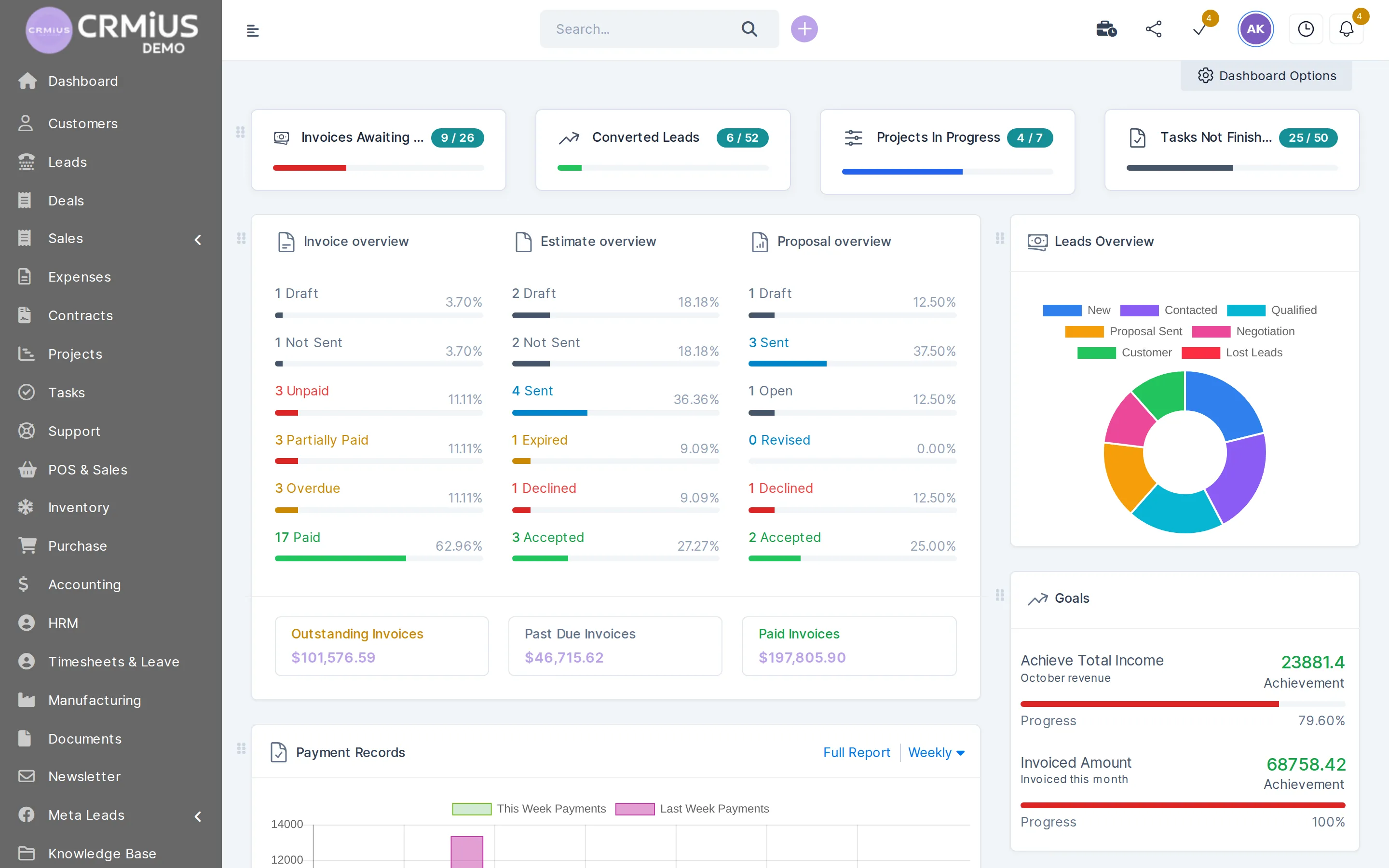
CRM vs ERP: what is the difference?
The difference between CRM and ERP is the side of the business each one runs. A CRM (customer relationship management) tracks leads, customers, deals, quotes and support. An ERP (enterprise resource planning) tracks stock, purchasing, accounting, production and staff. Most companies need both data sets; the question is whether they live in two systems or in one.
- CRM answers “who buys, what did we promise and who follows up”: leads, customer cards, proposals, invoices, tickets
- ERP answers “what do we have, what does it cost and what do we owe”: stock, purchase orders, journal entries, work orders, staff
- The two meet at the order: the invoice from sales becomes a delivery note in the warehouse and an entry in accounting
- Two separate systems need an integration and someone who keeps customer and product lists in sync
- CRMiUS is a CRM with ERP add-on modules (accounting, warehouse, purchasing, manufacturing, HR) on one database
Price: CRMiUS plans start at $100 a month (Basic), Advanced is $150, Corporate is priced individually; 10% off with annual payment, individual terms from 10 users. We agree on the demo which ERP modules go into your plan. 14 days free with full access, no bank card. Compare plans
CRM vs ERP side by side
Categories of software, compared by what they hold and who works in them. The last column shows how the same jobs sit in CRMiUS.
| CRM | ERP | CRMiUS (CRM + ERP modules) | |
|---|---|---|---|
| Main question | Who are our customers and what is the next step with each? | What resources do we have and what do they cost? | Both, on the same customer and product records |
| Core records | Leads, customers, contacts, deals, proposals, tickets | Items, stock, purchase orders, journal entries, bills of materials, staff | All of these, in 30+ connected modules |
| Who works in it | Sales, marketing, customer support, account managers | Finance, warehouse, purchasing, production, HR | Every department, each with its own role and access rights |
| Money side | Quotes, invoices, payments, receivables per customer | Chart of accounts, journal entries, bank reconciliation, P&L, balance sheet | Invoices in the finance module, books in the accounting add-on |
| Stock side | Usually none, or a product price list | Stock by warehouse, receipts, transfers, inventory counts | Warehouse and purchasing add-ons on the same item catalog |
| Typical start | A team that loses leads and follow-ups | A company where stock, purchasing and books outgrew spreadsheets | Start with CRM, switch on ERP modules when the business needs them |
| Connection between them | Integration or manual export | Integration or manual export | One database; REST API and webhooks for any outside system |
Where CRM ends and ERP begins
Follow one order. The first half is CRM work, the second half is ERP work. In two separate systems the handoff happens between steps 4 and 5; in CRMiUS it is the same record moving on.
CRM sidecustomer and sale
- 01Inquiryweb form, call or Facebook Lead AdsLeads
- 02Lead and follow-upstatus, reminders, assigned managerLeads
- 03Proposal or estimatethe customer accepts onlineSales
- 04Invoicedue date, payment link in the customer portalFinance
ERP sidegoods, money, production
- 05Delivery notestock leaves the warehouseWarehouse
- 06Restockminimum stock alert, purchase orderPurchasing
- 07Goods receiptstock is replenished, vendor bill is bookedWarehouse
- 08Booksjournal entries, P&L, balance sheetAccounting
- one customer card
- one item catalog
- one set of reports
- one login
What CRMiUS covers
CRM modules and ERP modules in one system
The CRM part comes with every plan. ERP add-ons are switched on per company, so a services firm and a distributor end up with different menus on the same platform.
Leads and sales
Kanban by status, lead sources, web-to-lead forms, Facebook Lead Ads, proposals accepted online in sales and leads.
Customers and contacts
Companies with several contacts, groups, files, statements and customer portal access on one customer card.
Invoicing and payments
Estimates turn into invoices in one click, recurring invoices, credit notes, Stripe and PayPal in finance.
Accounting
Chart of accounts, journal entries, bank reconciliation, profit and loss and balance sheet in the accounting add-on.
Warehouse
Stock by warehouse, goods receipt and delivery notes, transfers, min/max alerts, serial numbers, expiry dates and counts in the warehouse module.
Purchasing
Vendors, purchase requests, quotations, purchase orders and vendor bills in procurement.
Manufacturing and HR
Bills of materials, work orders and routings (with purchasing and warehouse); staff profiles, departments, attendance and leave in HRM.
Documents and reports
Document management with versions and approvals; sales, payments and income vs expenses in reports and dashboards.
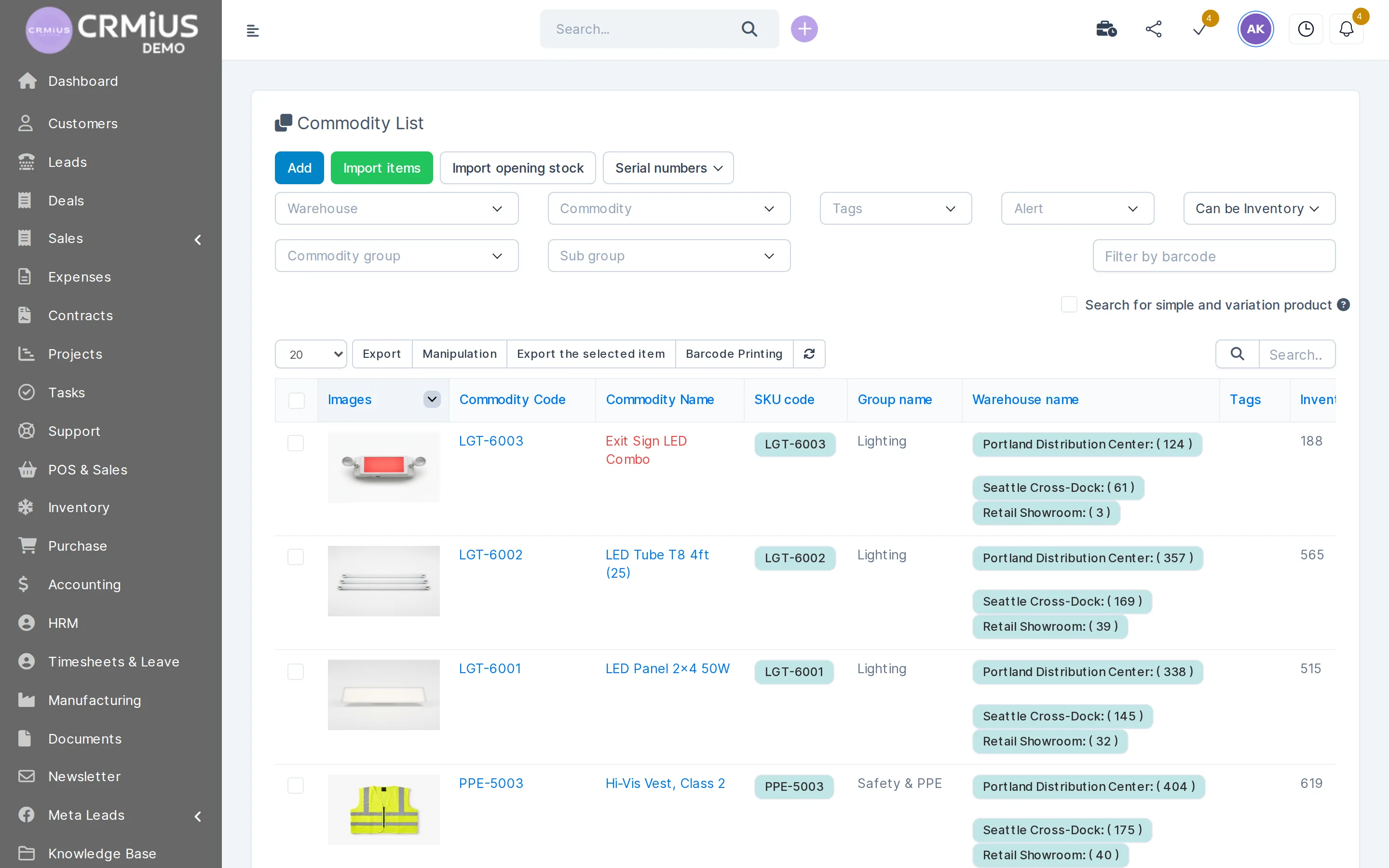
ERP module, CRM database
Stock by warehouse next to the customer and the invoice
The item list in the warehouse module shows code, SKU, group and stock in each warehouse. Sales picks the same items for an estimate, so nobody keeps a second product list.
- Stock per warehouse for every item
- Item and opening stock import from a file at launch
- Filters by warehouse, group, tags, stock alert and barcode; barcode printing
- Serial numbers and expiry dates where the goods need them
Which setup fits which company
Four typical cases. The plan and the module set follow the case.
Services company
Customers, projects, timesheets, invoices. A CRM with finance and project modules covers it; ERP add-ons stay off. See CRM for small business.
Trading and distribution
Sales quote against real stock, purchasing restocks the warehouse, finance chases receivables. CRM plus warehouse and purchasing, see CRM for wholesale distribution.
Small manufacturer
Orders from customers, bills of materials, work orders, components bought from vendors. CRM plus manufacturing, purchasing and warehouse modules. See CRM for manufacturing.
Large company with an ERP already
The ERP stays for books and production; CRMiUS runs sales, customers and support and exchanges data through API and webhooks. See CRM for large companies.
When a separate ERP is still the right call

One system for CRM and ERP work saves an integration and a second product list. A dedicated ERP still makes sense in some cases, and we say so on the demo:
- production planning across many plants with capacity and material requirement planning
- consolidated books for a group of legal entities
- statutory reporting formats that your accountant must file from a specific local program
- an ERP that already runs well, where the real gap is sales and customer work
In the last case CRMiUS works as the CRM next to your ERP: customers, deals, quotes and tickets live in CRMiUS, and REST API and webhooks pass orders and payments between the two.
Six questions before you choose
- Where do you lose money today? Lost leads and slow follow-ups point to CRM. Stock-outs, overstock and late vendor bills point to ERP.
- How many product lists do you keep? If sales and the warehouse use different files, one item catalog matters more than any single feature.
- Who needs access? List departments and decide what each role may see, edit and delete.
- What has to connect? Website forms, payment gateways, email, an existing accounting program.
- What does the total cost include? Plan per month, modules, configuration and training. Compare totals, see also how to choose a CRM.
- Can you test it on your own data? Import a slice of customers and items during a trial and run one real order end to end.
How we start CRMiUS as CRM, ERP or both
Timing depends on the number of modules and the data you move; we name it on the demo after seeing your process.
- 01
Demo on your process
You show how an order runs today; we show the same path in CRMiUS and agree which modules you need.
- 02
14-day trial
Full access without a bank card. Import customers, items and opening stock from CSV files.
- 03
Modules and roles
We configure modules and interface, set roles per department and switch on only the ERP add-ons you use.
- 04
Team training
Each department learns its own screens; setup and training are additional services, support is available 24/7 on every plan.
- 05
Connections
Google Workspace, Stripe, PayPal, Telegram, Facebook Lead Ads, or your ERP through API and webhooks.
Price and what you need to start
Pricing is per company plan, in USD:
- Basic, $100/month: contact management, tasks and projects, Google Workspace integration, key reports
- Advanced, $150/month: everything in Basic plus finance, time tracking, helpdesk, analytics and dashboards
- Corporate, priced individually: everything in Advanced plus POS, a personal manager, module and interface customization, priority support
14 days free on every plan, 10% off with annual payment, individual terms from 10 users. To start, bring a customer list, an item list if you sell goods, and the names of the people who will use the system. All plan details
Modules this guide refers to
- Sales and leads managementLeads, deals and proposals: the CRM half of the order
- Contact and customer management (CRM)Customer card shared by sales, finance and support
- Finance and invoicingInvoices and payments that link sales to the books
- Warehouse and inventory managementStock by warehouse, receipts and delivery notes
- Procurement managementPurchase orders and vendor bills
- IntegrationsAPI, webhooks and ready integrations
Questions and answers
What is the difference between CRM and ERP?
A CRM manages customers and sales: leads, contacts, deals, quotes, invoices and support. An ERP manages internal resources: stock, purchasing, accounting, production and staff. They meet at the order, where a sale turns into a shipment and an accounting entry.
Should we implement CRM or ERP first?
Start where you lose the most. If leads and follow-ups slip, start with CRM. If stock, purchasing and books are the problem, start with the ERP side. In CRMiUS you can begin with CRM modules and switch on warehouse, purchasing or accounting later on the same database.
Can a CRM replace an ERP?
A plain CRM cannot: it has no stock, purchasing or books. A CRM with ERP modules can cover these jobs for small and mid-sized companies. CRMiUS adds accounting, warehouse, purchasing, manufacturing and HR modules; for multi-plant production planning or group consolidation a dedicated ERP is usually kept.
Does CRMiUS have accounting and inventory?
Yes, as add-on modules: accounting with chart of accounts, journal entries, bank reconciliation, P&L and balance sheet; warehouse with stock by warehouse, receipts, delivery notes, transfers and counts. See the warehouse module.
Can CRMiUS work next to our existing ERP?
Yes. CRMiUS has a REST API and webhooks, so orders, customers and payments can pass between CRMiUS and your ERP. We agree on the demo which data goes in which direction. Integrations
Which system does a large business need?
Usually both data sets: CRM for sales and service, ERP for resources and books. Large companies often keep their ERP and add a CRM with roles per department and branch. CRMiUS Corporate is priced individually, with terms from 10 users. CRM for large companies
How much does CRMiUS cost?
Basic $100 a month, Advanced $150 a month, Corporate priced individually. 10% off with annual payment and a 14-day free trial without a bank card. Pricing
Start 14-day free trial
- 14 days free, no card
- from $100 / month
- 30+ connected modules
- 5 interface languages