What is CRM, and how does it help companies boost sales?
CRM is software that keeps every customer, inquiry and deal in one place, so the team answers on time and the manager sees where sales stall. Below: how it works, what it includes and how to start.

Sales can start with a spreadsheet, an inbox and the memory of the best salesperson. That works while there are few inquiries. Once inquiries come from the website, ads, email and phone at the same time, some of them get lost, and nobody can say which channel brings paying customers. A CRM system solves exactly this.
What is CRM?
CRM (customer relationship management) is a system that stores every customer and lead together with the full history of contacts, deals, documents and payments. Each inquiry gets a source, an owner and a stage, the CRM reminds the team about the next step, and reports show which channels and managers turn inquiries into sales.
- One customer card: contacts, notes, files, deals, invoices and support tickets
- A sales pipeline with your stages, owners and reminders
- Proposals, invoices and online payment linked to the same customer
- Reports on conversion by source and by manager
How a CRM works: from first inquiry to repeat sale
The easiest way to understand CRM is to follow one customer through it. This is the path in CRMiUS.
- 01Inquiry arrivesweb form on your site, Facebook Lead Ads, email, CSV import or a call; the lead gets a source and an owner
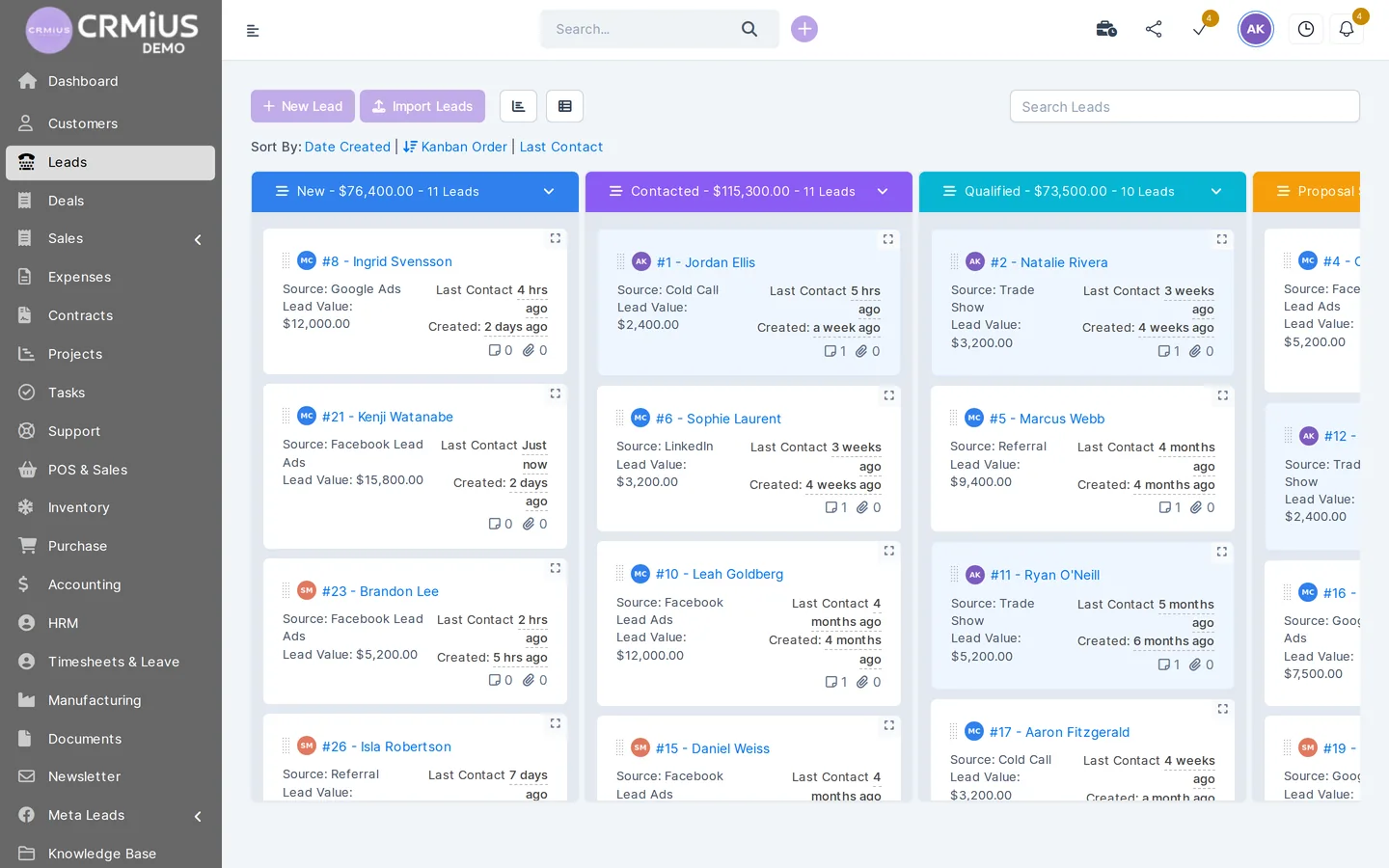
- 02Lead in the pipelinea card on the kanban board in the column of its stage; each column shows how many leads it holds and their total value
- 03Next step on timetasks and reminders in the card, notes and activity log; the manager sees when the last contact was
- 04Proposal and invoicethe customer accepts the proposal online, an estimate becomes an invoice in one click, payment by Stripe or PayPal
- 05Customer with a historythe lead converts into a customer with everything that happened before; the customer portal shows invoices, projects and tickets
- 06Reportsconversion by source and by manager, sales and payments, dashboards
- Repeat salerecurring invoices, payment reminders and email campaigns bring the customer back to step 03 — with the whole history already in the card
What a CRM system includes
The core of any CRM is the customer database and the sales pipeline. Around it a business adds the parts it needs; in CRMiUS these are modules of one system.
- Contacts and customers
- companies with several contacts, groups, files, notes, reminders and statements — customer management in CRM
- Leads and sales
- pipeline by status, sources, assignment, web-to-lead forms, conversion to a customer — lead management
- Documents and payments
- proposals, estimates, invoices, recurring invoices, credit notes, Stripe and PayPal — finance and invoicing
- Marketing
- email campaigns to customers and leads, lead sources, surveys — CRM marketing
- Customer support
- tickets, departments, priorities, email piping into tickets, knowledge base — CRM help desk
- Reports and automation
- CRM reports with dashboards; process automation creates recurring invoices and tasks and runs your rules on tasks
How a CRM helps increase sales
A CRM closes the places where a sales process loses money. Here are six of them.
Every inquiry is on record
Forms, ads, email and imports land in one pipeline, and each lead gets an owner straight away. An inquiry that used to sit in someone’s inbox is now a card with a deadline.
Follow-ups happen on time
Reminders and tasks in the card tell the manager when to call back, and the list shows leads nobody has touched for a while.
The manager sees money in the pipeline
The total value of leads at each stage shows how much is in negotiation and where deals get stuck, so the manager can step in before a deal goes cold.
From proposal to payment faster
The proposal goes from the product catalogue, the customer accepts it online, the invoice is created in one click and can be paid by card. Fewer handovers mean fewer pauses where the customer changes their mind.
Repeat sales from the history
The customer card keeps what the customer bought and when. Recurring invoices, payment reminders and email campaigns turn that history into the next order.
Decisions based on numbers
The leads report shows conversion by source and by manager. You see which channel brings buyers and which only brings inquiries, and where to spend the budget.
The effect depends on the team: a CRM shows the real picture only when managers log their work in it. That is why the first weeks are about agreeing stages and responsibilities, and the software comes second.
Spreadsheet or CRM: what changes
A spreadsheet is a fine start. The difference appears when there are several managers and several inquiry channels.
| Task | Spreadsheet and email | CRM |
|---|---|---|
| New inquiry | copied by hand from the inbox or the site | lands in the pipeline with a source and an owner |
| Next contact | in a personal calendar or in memory | task and reminder in the customer card |
| Customer history | scattered across emails, chats and files | one card: notes, deals, documents, payments |
| Proposal and invoice | typed again in a document editor | from the catalogue; the estimate becomes an invoice in one click |
| Sales report | assembled by hand at the end of the month | built from the data, by source and by manager |
| A manager leaves | contacts and agreements leave with them | customers stay in the system with all history |
Types of CRM
CRM systems are often grouped by the job they do. One system can cover all three.
- Operational CRM — day-to-day work: leads, deals, tasks, documents, support
- Analytical CRM — reports and dashboards over customer data: conversion, sales, payments
- Collaborative CRM — a shared customer record for sales, finance and support, so every department sees the same history
CRMiUS combines these jobs and adds modules for warehouse, purchasing, accounting and projects, so sales and accounting run in one database. How CRM differs from ERP is covered in CRM vs ERP.
When a business needs a CRM
- inquiries come from more than one channel, and nobody can say which channel brings customers
- more than one person sells, and customers get called twice or not at all
- follow-ups depend on personal notes, and deals go quiet after the first proposal
- the sales report is assembled by hand and is out of date by the time it is ready
- the customer history disappears when a manager is on holiday or leaves
Two or more of these signs mean it is time for a CRM. For teams of a few people see CRM for small business.
How to start with a CRM: five steps
This order works for a team of two and for a sales department with several pipelines. The 14-day trial with full access is enough to run real inquiries through the new pipeline before you pay.
- Describe the path of a deal. Write down the stages your customer actually goes through: inquiry, qualification, proposal, invoice, payment. These become the pipeline statuses
- Gather inquiries in one place. Put the web form on your site, connect Facebook Lead Ads, import the customer base from a spreadsheet as CSV
- Agree who does what. Who takes inquiries from which channel and how quickly they answer; set roles and access rights
- Connect documents and payments. Product catalogue for proposals, invoice templates, online payment by Stripe or PayPal
- Review the pipeline every week. Look at conversion by source and by manager, and adjust stages and budget
Price of CRMiUS: Basic $100 a month (contact management, tasks and projects, Google Workspace integration, key reports), Advanced $150 (adds finance, time tracking, help desk, analytics and dashboards), Corporate priced individually. 10% off for annual payment, individual terms from 10 users. All plans
Need help with setup? As an additional service, CRMiUS configures modules and the interface for your company and trains the team; 24/7 technical support is included in every plan. What a CRM costs in total: how much does a CRM cost.
Further reading: how to choose a CRM system, 10 key CRM features, CRM implementation: where to start.
Questions about CRM
What does CRM stand for?
CRM stands for customer relationship management. The term covers both the approach (keeping every contact with a customer on record and using it in sales) and the software that supports it, the CRM system.
What is a CRM system used for?
To keep customers, leads and deals in one database, reach every inquiry on time, prepare proposals and invoices from the customer card and see in reports which channels and managers bring sales.
Does a small business need a CRM?
Yes, once inquiries come from several channels or more than one person sells. A small team gets the most from the pipeline, reminders and one customer card. See CRM for small business.
What is the difference between CRM and ERP?
CRM manages customers and sales: leads, deals, communication. ERP manages company resources: stock, purchasing, production, accounting. CRMiUS has CRM at its core and adds warehouse, purchasing and accounting modules. Details: CRM vs ERP.
How much does a CRM cost?
CRMiUS costs $100 a month on Basic and $150 on Advanced; Corporate is priced individually. Annual payment saves 10%, and every plan starts with a 14-day free trial without a bank card.
How long does it take to start with a CRM?
A basic pipeline with your stages, a web form and an imported customer base can be set up and tested on real inquiries within the 14-day trial. Full setup time depends on the number of modules and the amount of data.
Can I try a CRM without signing up?
Yes. The CRMiUS live demo opens a fictional company with customers, leads and invoices without registration; its data resets every 6 hours.
The quickest way to see what a CRM changes is to run your own inquiries through it. Start the trial or book a demo, and we will show the pipeline on your process.