Key CRM features: 12-point checklist
The twelve features a CRM system should have, how each one works in CRMiUS and which plan includes it. From $100 a month, 14-day free trial without a bank card.
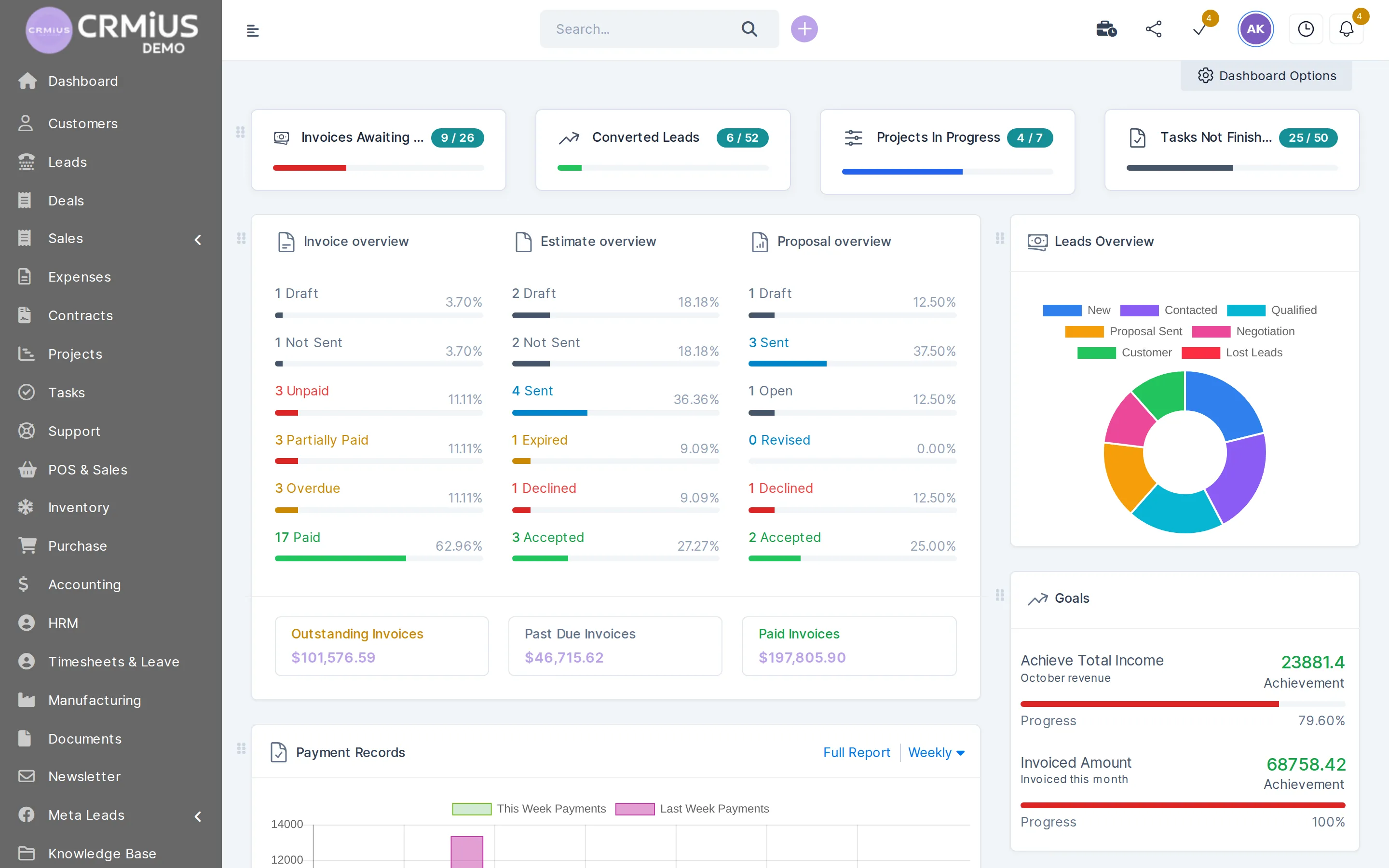
What are the key features of a CRM system?
The key features of a CRM system are contact and lead management, proposals and invoicing, tasks and projects, customer support, reports and access control. In CRMiUS they run as modules on one database, so a lead, its invoice, its project and its tickets sit on one customer card. Custom fields on most records, the customer portal and the REST API come with the platform.
- Contacts, leads, tasks and projects, Google Workspace and key reports: Basic plan, $100 a month
- Invoices and payments, time tracking, helpdesk, analytics and dashboards: Advanced (Pro), $150 a month
- Warehouse, purchasing, manufacturing, HR, accounting and documents: modules on the same database
- Role-based permissions per staff member, activity log, SSL and regular backups
- Web app in any browser, mobile app, interface in five languages
Price: Basic $100 a month, Advanced (Pro) $150, Corporate priced individually; 10% off with annual payment, individual terms from 10 users. 14-day free trial with full access, no bank card. Compare plans
CRM feature checklist: 12 points
Use it to compare CRM systems: each row names a feature, what you do with it in CRMiUS and the page with the details. For the product in one page see about CRMiUS; for what each team gets see the overview by department.
| Feature | What you do in CRMiUS |
|---|---|
| 01 Contact and customer management | Companies with several contacts each, customer groups, notes, files, reminders and a statement of invoices and payments. |
| 02 Lead management | Leads on a kanban board by status, with source, owner and reminders. Website forms and Facebook Lead Ads bring enquiries in; a won lead becomes a customer. |
| 03 Proposals, estimates and invoices | Proposals accepted online, an estimate turned into an invoice in one click, recurring invoices, credit notes, payment reminders, card payments through Stripe and PayPal. |
| 04 Projects | Milestones, Gantt chart, files and discussions; billing fixed, hourly or by task hours; the customer can follow the project. |
| 05 Tasks and time tracking | Kanban tasks with checklists, assignees and followers, timers, recurring tasks and timesheets. |
| 06 Customer support | Tickets by department, priority and status, predefined replies, mail to the support address turned into tickets, a knowledge base. |
| 07 Contracts with e-signature | The customer signs the contract online; renewals stay on the contract. |
| 08 Document management | Folders, versions, sharing and approvals for company documents. |
| 09 Warehouse and purchasing | Stock by warehouse, goods receipt and delivery notes, transfers, min/max alerts, serial numbers and expiry dates; purchase requests and purchase orders. |
| 10 Reports and dashboards | Sales, invoices, payments, expenses against income, lead conversion and timesheets; dashboards with widgets. |
| 11 Automation and AI | Rule-based workflows update the status, assignee and due date of tasks; the PilotAI voice assistant calls and follows up leads (AI functions). |
| 12 Roles and access rights | Permissions per staff member and module, activity log, SSL and regular backups. |
How the features work on one customer
A typical path from enquiry to report. Each step is a different feature, and every step writes to the same customer record.
Platform features every module shares
These work the same way in sales, finance, projects, support and the warehouse.
One database
Customers, products, staff and documents are shared by all modules, so nothing is exported between departments.
Roles, permissions and activity log
Access by staff member and module, a log of who changed what, SSL and regular backups. More in roles and access rights.
Custom fields
Add your own fields to most records: customers, leads, invoices, projects and others.
Customer portal
Clients log in to see invoices, estimates, proposals, projects, tickets and contracts, and pay online.
Multi-currency, taxes and branded PDFs
Each customer and document has its currency and tax rates; proposals, invoices and contracts come out as PDFs with your branding.
Calendar, mail templates and team chat
Staff calendar, email templates, announcements, internal chat with mentions and push notifications.
Five interface languages
English, Ukrainian, Russian, German and French; each user works in their own language.
Web, mobile and API
Any browser plus the mobile app; the REST API and webhooks connect your other systems (integrations).
Where the features meet: the customer card
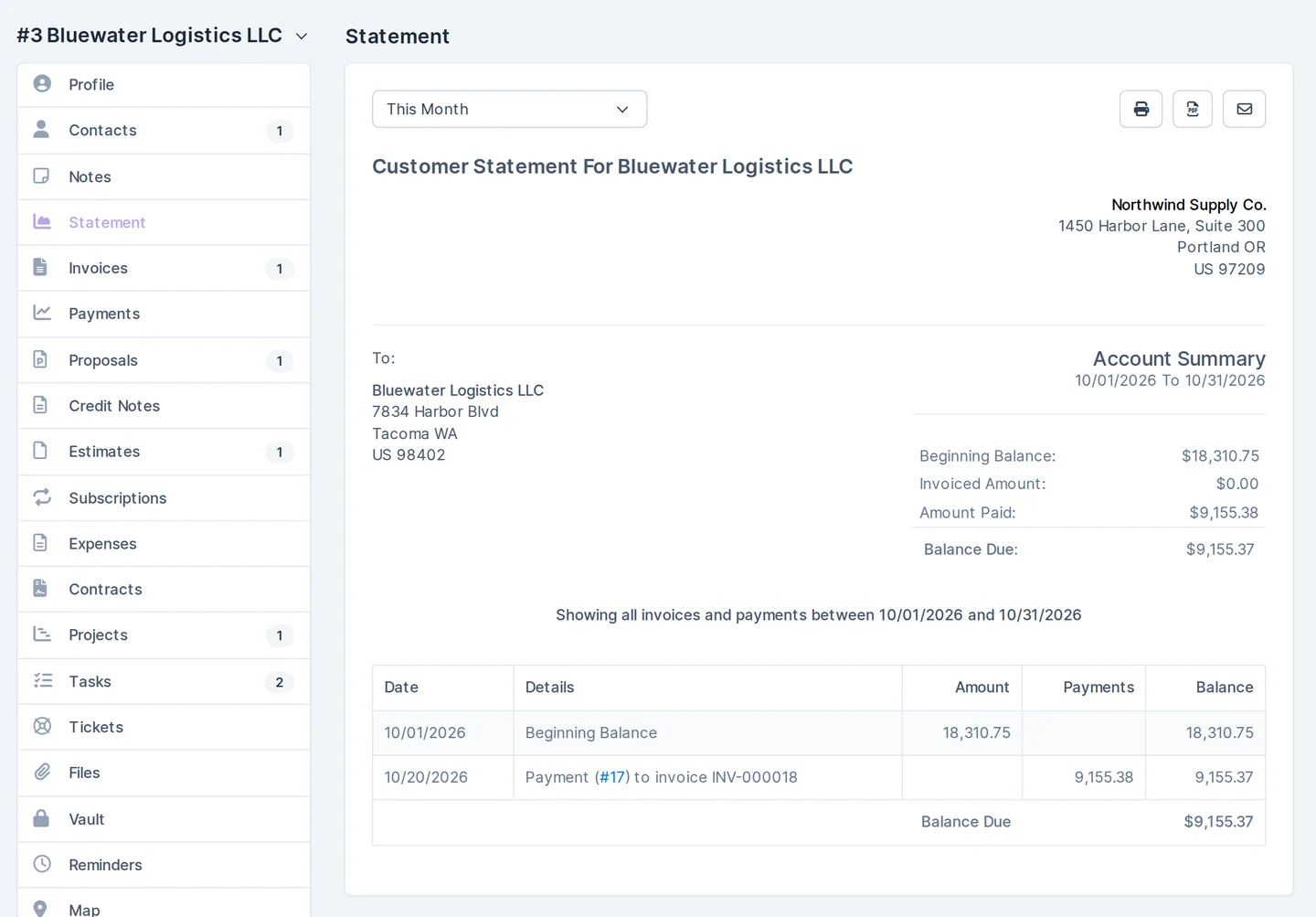
A screen from the live demo with fictional data. The statement collects one customer’s invoices and payments for the period; the tabs on the left hold the same customer’s contacts, notes, proposals, estimates, contracts, projects, tasks, tickets, files and reminders. More about the card in contact and customer management.
Which plan includes which features
Plans add features on top of each other. Prices in US dollars per month.
| Plan | Price | What it includes |
|---|---|---|
| Basic | $100 a month | Contact management, tasks and projects, Google Workspace integration, key reports, 24/7 technical support |
| Advanced (Pro) | $150 a month | Everything in Basic plus the finance module with invoices and payments, time tracking, helpdesk, analytics and dashboards |
| Corporate | On request | Everything in Advanced plus POS terminal support, a personal manager, module and interface customization, priority support |
Annual payment: $90 instead of $100 a month on Basic, $135 instead of $150 on Advanced. Individual terms from 10 users. Configuration of modules and interface and team training are available as additional services. Full price list: pricing.
Which features to check first
Start with the features your team will use on day one; the rest can be added later on the same database.
Small team starting a CRM
Contacts, leads, tasks and Google Workspace for mail and calendar: everything is in Basic. See CRM for small business.
Service company or agency
Proposals, invoices, projects, time tracking and the helpdesk: Advanced (Pro). See CRM for agencies and services.
Shop or trading company
Warehouse, purchasing and point of sale; POS terminal support comes with Corporate. See CRM for retail.
Company from 10 users
Roles and access rights, custom fields, module and interface customization, individual terms. See CRM for large companies.
How to check these features before you buy
- 01
Open the live demo
It signs you in as the admin of a fictional company, no sign-up. Settings are locked and the data resets every 6 hours.
- 02
Start the 14-day trial
Full access without a bank card: import contacts and leads from CSV, connect Gmail and Google Calendar, send a test invoice.
- 03
Let us configure it
As an additional service, our team sets up modules, fields and the interface for your processes and trains your staff.
- 04
Choose the plan
Basic, Advanced (Pro) or Corporate when the trial ends; 10% off with annual payment.
Modules behind the key features
Each feature from the checklist has its own page with screens and details.
- Contact and customer management (CRM)Customer card, contacts and statement.
- Sales and leads managementLead board, sources and web forms.
- Finance and invoicingProposals, invoices and online payments.
- Project managementMilestones, Gantt and project billing.
- Customer supportTickets, replies and knowledge base.
- Reports and dashboardsSales, payments and lead conversion.
Questions and answers
What are the key features of a CRM system?
Contact and lead management, proposals and invoicing, tasks and projects, customer support, reports and access control, plus custom fields, a customer portal, an API and mobile access. Background in our article 10 key CRM features.
Which CRM features does a small business need first?
Contacts, leads, tasks and a shared calendar and mail. In CRMiUS that is the Basic plan at $100 a month with Google Workspace and key reports; invoicing and the helpdesk can be added later with Advanced.
Which CRMiUS plan includes invoicing and the helpdesk?
Advanced (Pro), $150 a month: the finance module with invoices and payments, time tracking, the helpdesk, analytics and dashboards on top of everything in Basic.
Can I add my own fields?
Yes. Custom fields can be added to most records: customers, leads, invoices, projects and others.
Can my customers see their invoices and pay online?
Yes. In the customer portal they see invoices, estimates, proposals, projects, tickets and contracts and pay by card through Stripe or PayPal.
How is access to data controlled?
Each staff member gets role-based permissions per module, every change goes to the activity log, the connection uses SSL and backups run regularly. Details on roles and access rights.
Does CRMiUS work on a phone and with other software?
Yes. There is a mobile app, and the REST API with webhooks connects CRMiUS to other systems next to the ready integrations.
How can I test the features before buying?
Open the live demo without sign-up to look around a fictional company, then start the 14-day free trial on your own data. No bank card is needed.
Start 14-day free trial
- 14 days free, no card
- from $100 / month
- 30+ connected modules
- 5 interface languages