CRM for wholesale distribution, with inventory and purchasing
Business customers, the product catalogue, stock in several warehouses, purchasing and unpaid invoices in one system. Sales quotes against real stock, and the warehouse ships on the delivery note created from that invoice.
What is a wholesale distribution CRM?
A wholesale distribution CRM keeps business customers, the product catalogue, stock by warehouse, supplier purchasing and invoices in one database. In CRMiUS a customer invoice creates the delivery note that takes goods off stock, and a goods receipt against a purchase order adds them back. Sales, the warehouse, the buyer and accounting all work from the same numbers.
- Product catalogue with item code, SKU, group, barcode and stock in each warehouse
- Several warehouses, transfers between them, minimum and maximum stock with a reorder alert
- Purchase orders with approval, goods received against the order, partial deliveries
- Estimates and invoices with due dates, statuses unpaid, partially paid and overdue, payment reminders
- Wholesale customer card: several contacts, invoices, payments, statement and customer portal access
Price: plans from $100 a month (Basic), Advanced $150, Corporate priced individually; 10% off with annual payment, individual terms from 10 users. Which modules you need, warehouse and purchasing included, and which plan covers them, we clarify in the demo. 14-day free trial, full access, no bank card. Compare plans
What a distributor gets
Sales, stock and purchasing in one database
Eight jobs that otherwise sit in spreadsheets, chat apps and an accounting program.
Manage trade customers
Company record with several contacts, customer groups (dealers, chains, regions), notes, reminders and the full deal history in the customer card.
Keep one product catalogue
Item code, SKU, group and sub-group, barcode, units, price and tax. The catalogue and opening stock import from a file.
Quote against real stock
Stock per warehouse is visible in the catalogue, so the estimate or invoice is written for goods you actually have.
Ship on documents
The delivery note is created from the invoice and takes goods out of the chosen warehouse; transfers move stock between warehouses.
Reorder on time
A minimum stock level alerts the buyer; then come the request, vendor quotes and the purchase order in procurement.
Receive goods
Receipts are recorded against the purchase order, partial deliveries included; serial numbers and expiry dates are captured on receipt.
Control receivables
Due date on every invoice, payment statuses, reminders, batch payments and a customer statement in finance.
Report sales and purchasing
Sales by customer and item, payments, income and expenses, open purchase orders in reports and dashboards.
How a wholesale order moves through CRMiUS
Two chains of documents meet at warehouse stock. A sale takes goods off the shelf, a purchase puts them back, and every step is a record you can open.
- receipt
- shipment
- transfer
- stock count
Selling to a customer
- A1Request or repeat orderfrom the customer, your site or a sales rep
- A2Estimatethe rep sees stock by warehouse
- A3Invoice with due datethe customer sees it in the portal
- A4Delivery notegoods leave the warehouse− stock
- A5Paymentpartial, full, or an overdue reminder
Restocking
- B1Minimum stock reachedalert to the buyer
- B2Request and quotesprices from several vendors
- B3Purchase orderapproved, sent to the vendor as PDF
- B4Goods receiptagainst the order, partial deliveries+ stock
- B5Vendor billexpense goes to finance
Receivables from trade customers
Who owes what, and by when
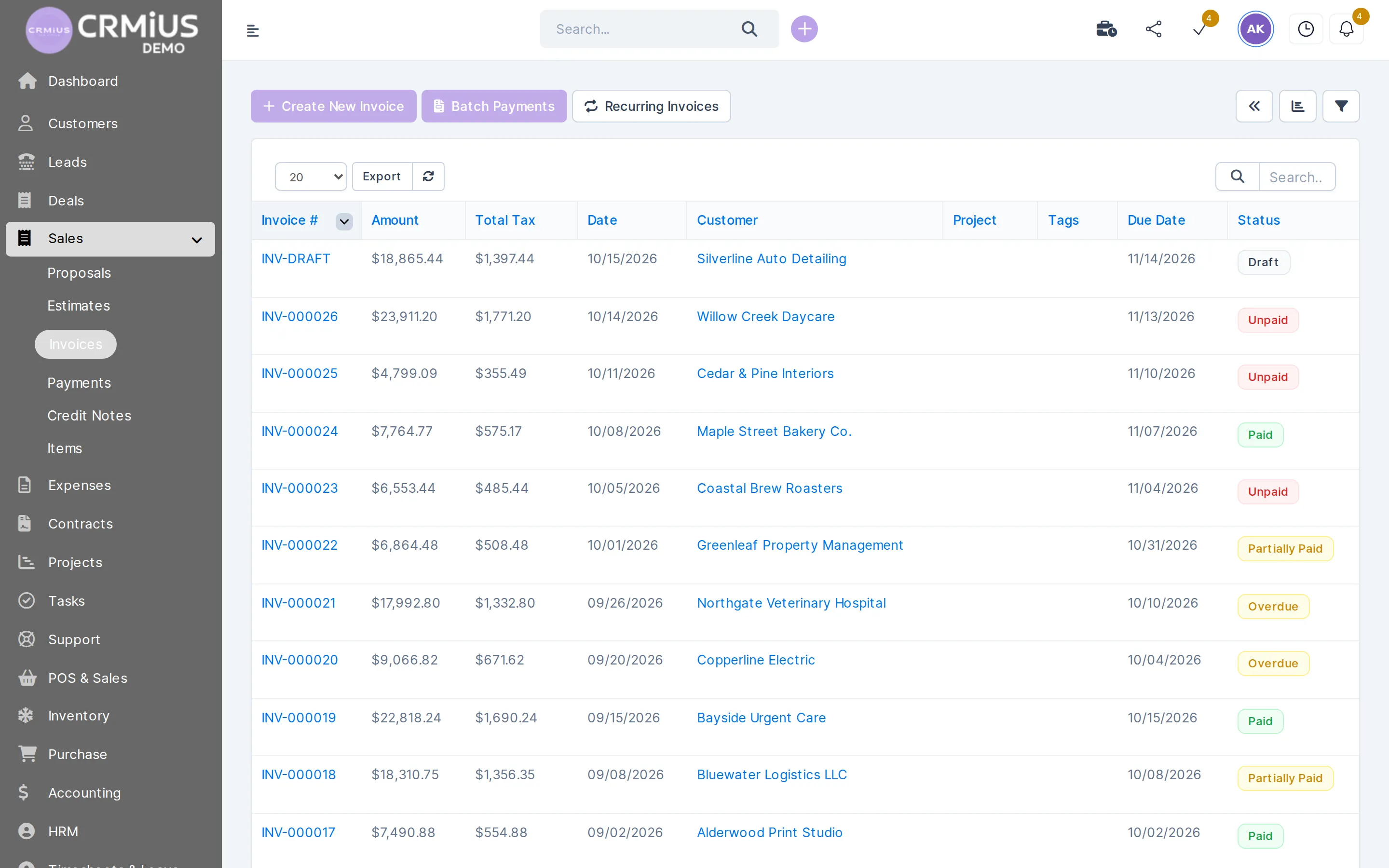
In wholesale the goods often leave before the money arrives. The invoice list shows amount, tax, customer, due date and the status of each invoice.
- Due date and status: draft, unpaid, partially paid, paid, overdue
- Reminders to customers about unpaid invoices
- Batch payments across several invoices
- Customer statement and online payment through Stripe or PayPal in the customer portal
One catalogue, stock in every warehouse

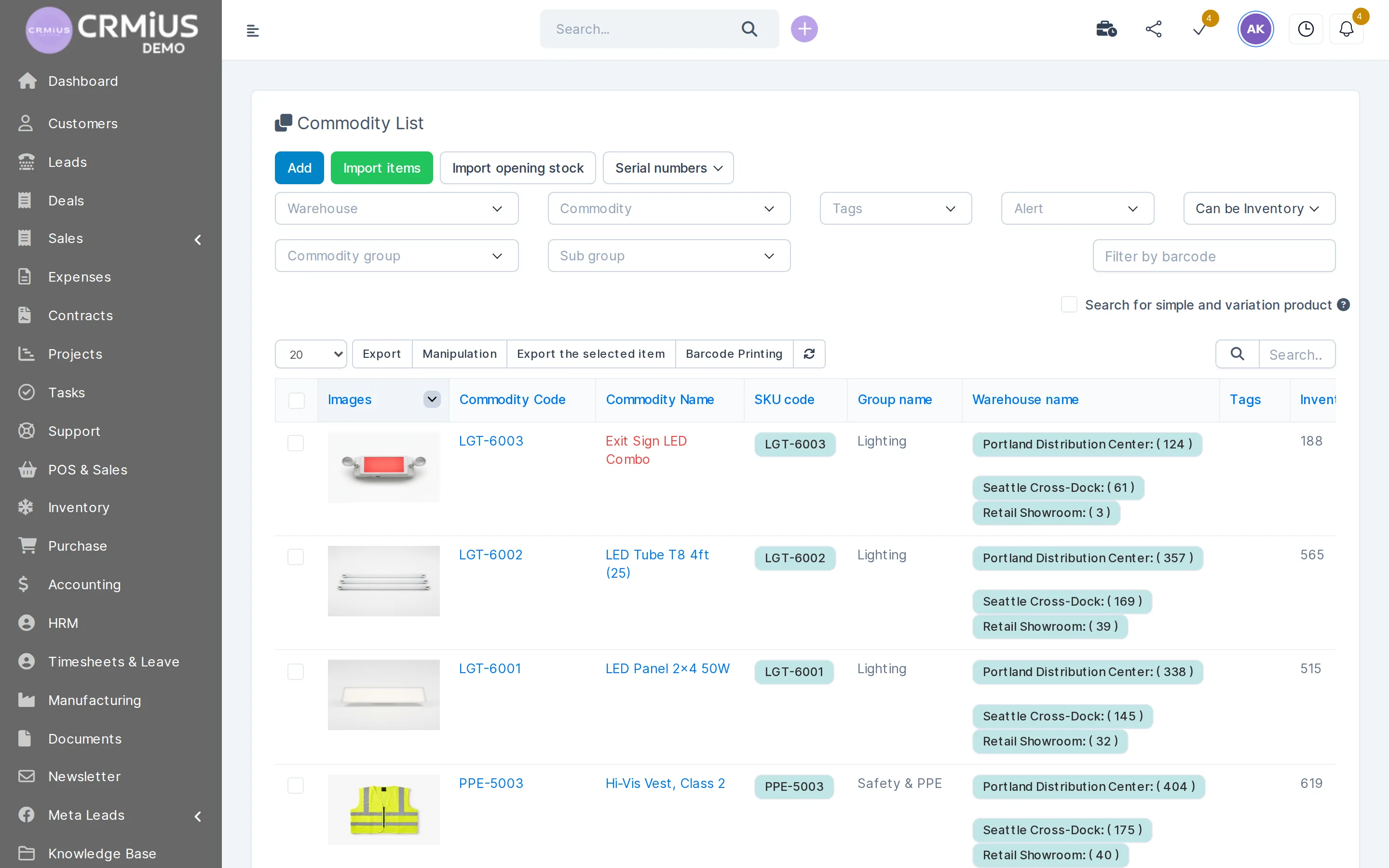
A distributor's catalogue quickly grows to hundreds or thousands of items. In CRMiUS every item has a code, SKU, group and sub-group, barcode, photo and a balance in each warehouse. In the demo company the same light fitting sits in the Portland distribution center, the Seattle cross-dock and the retail showroom, with stock shown for each location.
- Catalogue and opening stock imported from a CSV file at launch
- Filters by warehouse, group, tags, stock alerts and barcode; barcode printing
- Serial numbers and expiry dates on items that need them
- Stock counts compare the shelf with the system and post the difference as a document
If you run a large distribution center with bin locations and handheld scanners, that part is usually handled by a dedicated WMS. Show us your process in a demo and we will tell you plainly which part the CRMiUS warehouse module covers.
How we set up CRMiUS for a distributor
Timing depends on the size of the catalogue, the number of warehouses and how much history you bring over; we give you an estimate for your case in the demo.
- 01
Demo on your process
We walk through how an order goes from request to payment and how you buy from vendors, and show the same in CRMiUS. The live demo opens without sign-up if you want to look first.
- 02
Your data
Customer and contact list, item catalogue with SKUs, stock per warehouse, vendor list. CSV exports work.
- 03
Module setup
We switch on warehouse, purchasing, finance and sales, create your warehouses, deal stages, roles and permissions for sales, warehouse and accounting.
- 04
Team training
Sales reps, warehouse staff, the buyer and accounting each learn their part. Setup and training are additional CRMiUS services.
- 05
Go live with support
14-day free trial with full access, then the plan you choose; 24/7 technical support on every plan.
Spreadsheets, accounting program plus a separate CRM, or CRMiUS
| Spreadsheets and chat | Accounting program + separate CRM | CRMiUS | |
|---|---|---|---|
| Stock when invoicing | ask the warehouse | in the accounting program while sales work in the CRM | visible in the catalogue of the same system |
| Shipping | a list in a file | delivery note typed in again | delivery note created from the invoice |
| Receivables | manual reconciliation | report from the accounting program | due date and status on every invoice |
| Purchase order | email or phone | separate module or file | request, order and receipt linked |
| Customer history | in the rep's messages | partly in the CRM | deals, invoices, payments and tickets on one card |
Which wholesale businesses it fits
Distributor with several warehouses
Large catalogue, transfers between warehouses, regular purchasing from many vendors and customers on payment terms.
Wholesale plus retail or an online store
The same warehouse sells wholesale on invoices and at retail through POS; see CRM for retail and CRM for online stores.
Trading company with field sales reps
Each rep manages their own customers and deals, sees stock and issues invoices; who sees what is set in roles and access. CRMiUS runs in the browser and in the mobile app.
Wholesale with own production
The manufacturing module (bills of materials, work orders) runs on top of warehouse and purchasing: raw materials come in, finished goods go out to customers. See CRM for manufacturing.
Price and what you need to start
CRMiUS is a monthly subscription, priced in USD. For a distributor we usually switch on warehouse, purchasing, finance, sales and customers; the exact module set is agreed in the demo.
- Basic $100 a month, Advanced (Pro) $150 a month, Corporate priced individually
- 10% off for annual payment, individual terms from 10 users
- Configuration of modules and interface and team training as additional services
- Customers, items and vendors import from CSV or through the REST API
What each plan includes is on the CRMiUS pricing page. Other industry solutions are in CRM for business.
Modules a distributor runs on
- Warehouse and inventory managementStock by warehouse, receipts, shipments, transfers.
- Procurement managementRequests, vendor quotes, purchase orders and receipts.
- Finance and invoicingInvoices, payments, expenses and receivables.
- Contact and customer management (CRM)Customer companies and their contacts.
- Sales and leads managementLeads and deals of the sales team.
- Reports and dashboardsSales by customer and item, payments, purchasing.
Questions and answers
What is a wholesale distribution CRM?
A system that keeps business customers, the product catalogue, stock by warehouse, purchasing and invoices in one database. In CRMiUS the customer invoice creates the delivery note and a goods receipt restocks the warehouse, so sales and the warehouse see the same numbers.
Is there a CRM with inventory management built in?
Yes. In CRMiUS the warehouse module, procurement and finance are modules of the same CRM and work with the same customers and items, so no sync between separate systems is needed.
Can we run several warehouses?
Yes. Each warehouse has its own balance, transfers between warehouses are documents, and each item can have minimum and maximum stock levels.
Do sales reps see stock when they quote or invoice?
Yes. Stock in each warehouse is visible in the item catalogue, and the delivery note created from the invoice takes the goods out of the chosen warehouse.
How do we keep track of receivables from trade customers?
Every invoice has a due date and a status that changes to partially paid, paid or overdue. Customers get reminders, you can print a customer statement, and in the customer portal the customer sees their invoices and can pay online through Stripe or PayPal.
Can we import our catalogue and stock levels?
Yes. Items and opening stock import from CSV, and so do customers and vendors. The REST API and webhooks connect other systems.
How much does a wholesale CRM cost?
CRMiUS plans: Basic $100 a month, Advanced $150, Corporate priced individually. Annual payment gives 10% off; from 10 users terms are individual. Which modules you need, warehouse and purchasing included, and which plan covers them, we clarify in the demo. The first 14 days are free, no card.
Can I try it without signing up?
Open the live demo: Northwind Supply Co., a fictional distributor with warehouses, purchase orders, receipts and invoices; data resets every 6 hours. Or start the 14-day free trial with your own data.
Start 14-day free trial
- 14 days free, no card
- from $100 / month
- 30+ connected modules
- 5 interface languages