Finance CRM for invoicing, payments and expenses
Estimates become invoices in one click, customers pay online through Stripe or PayPal, and payments and expenses flow into reports and, with the accounting add-on, into profit and loss. Part of the Advanced plan at $150 a month, 14 days free.
What is a finance CRM?
A finance CRM keeps the money side of every customer in the same record as the sales history: estimates, invoices, payments, credit notes and expenses. In CRMiUS the finance module turns an accepted estimate into an invoice in one click, takes card payments through Stripe or PayPal, sends payment reminders for overdue invoices and feeds the reports and, with the accounting add-on, profit and loss.
- Estimates, proposals, invoices and credit notes as PDF in your branding, in several currencies and with your tax rates
- Recurring invoices for subscriptions and retainers, created and sent on schedule
- Partial payments against one invoice, customer statements, automatic payment reminders
- Expenses by category, recurring or billable to the customer
- Accounting add-on: chart of accounts, journal entries, bank reconciliation, profit and loss, balance sheet
Price: the finance module is part of Advanced (Pro) at $150 a month and of Corporate (priced individually). 10% off with annual payment. 14-day free trial with full access, no bank card. Compare plans
Banks, lenders and financial advisers looking for a client-and-application CRM: see CRM for banks and financial services.
How money moves through CRMiUS
Each step below is a document you can open later from the customer card. Payments and expenses reach the reports without exports or re-typing.
- 01Estimate or proposalBuilt from the items catalogue; the customer accepts it online.
- 02InvoiceOne click from the estimate, with the same items and taxes. recurringproject hours
- 03PaymentCard payment through Stripe or PayPal from the invoice or the customer portal, or a bank transfer you record. partial payments
- 04ReminderAn overdue invoice sends a payment reminder to the customer.
- 05Accounting and reportsJournal entries in the chart of accounts, bank reconciliation, profit and loss, balance sheet, income vs expenses.
Invoices
Who owes what, and since when
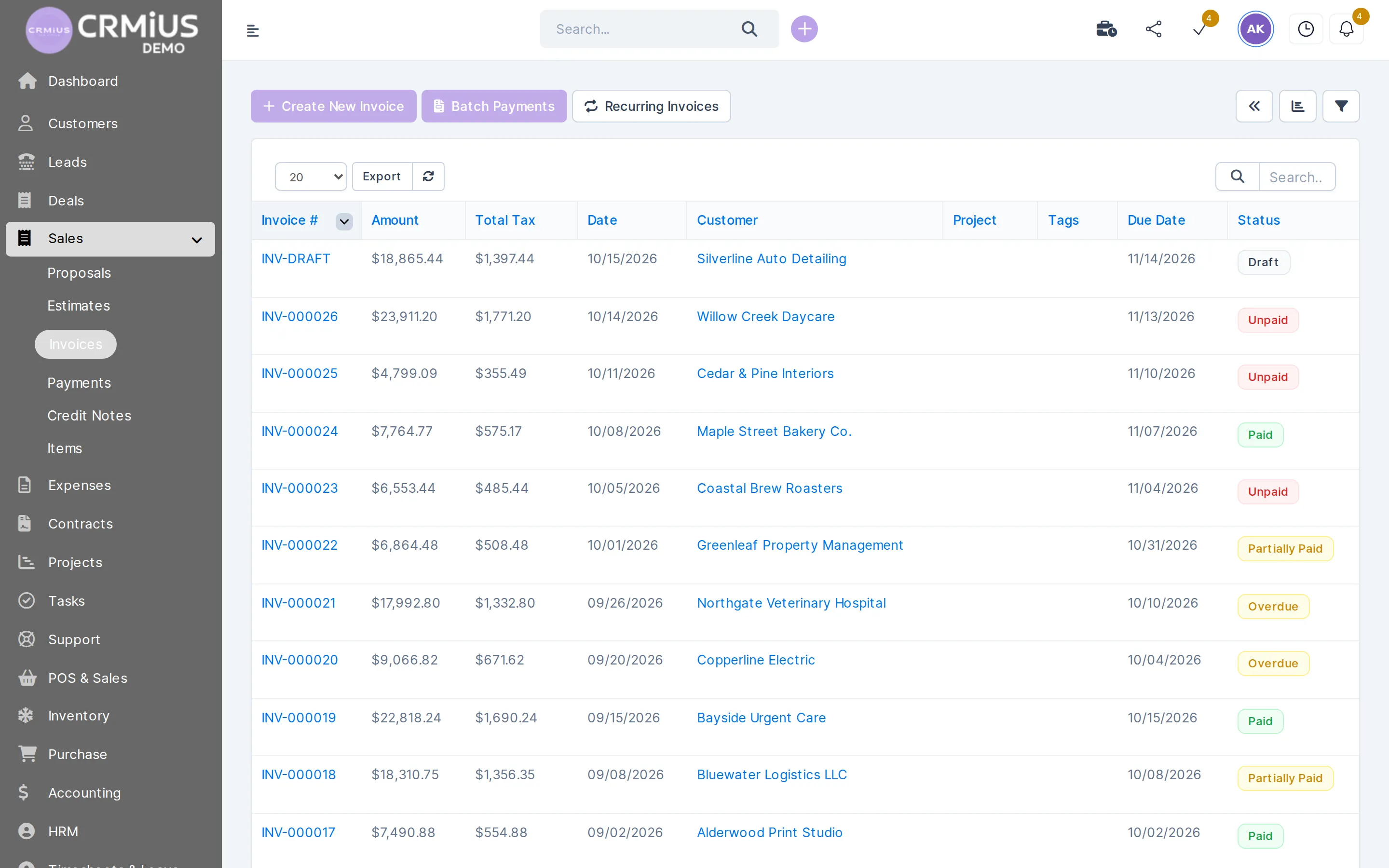
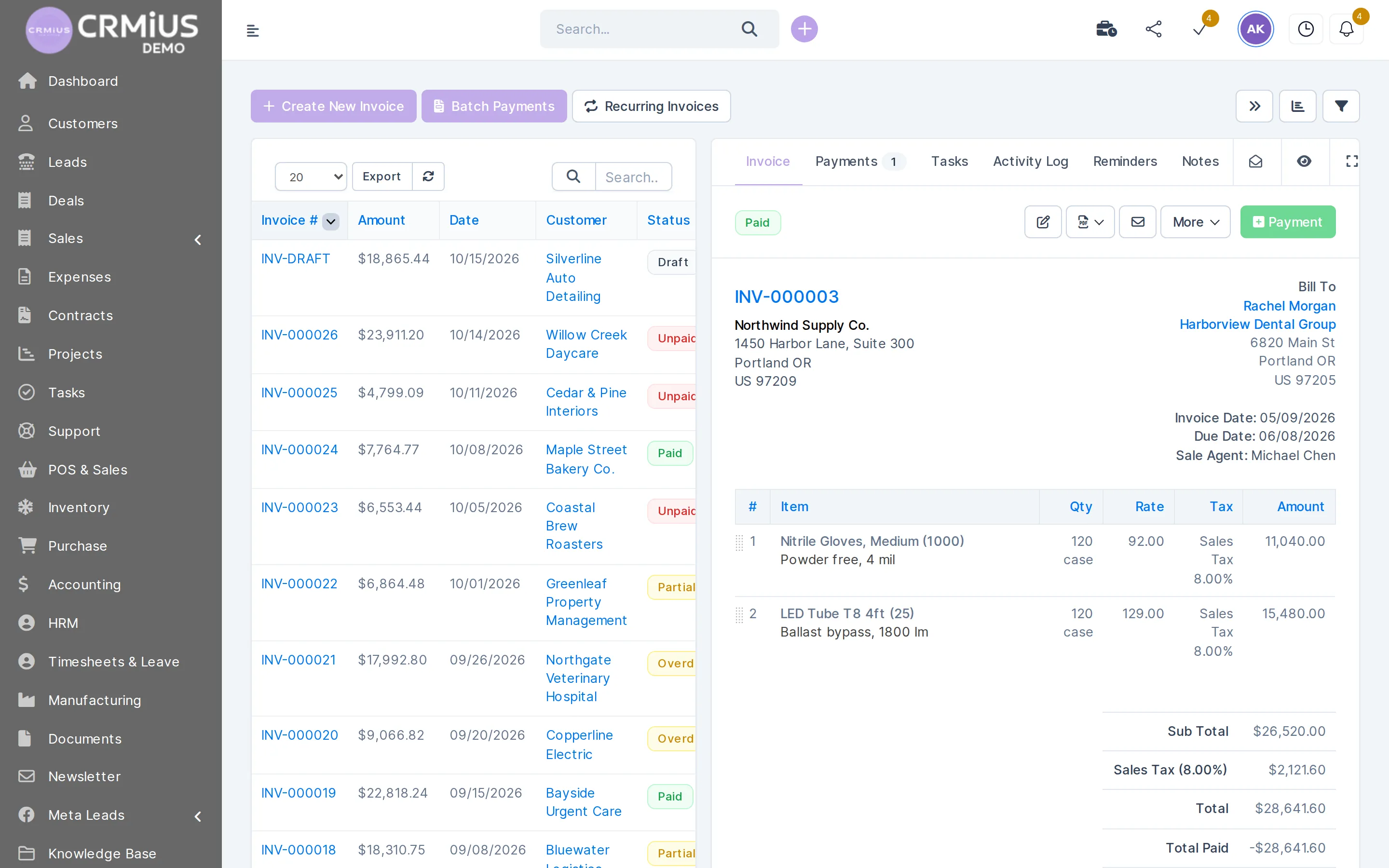
The invoice list shows draft, unpaid, partially paid, overdue and paid invoices. The open invoice keeps its payments, reminders, notes and activity log.
- New invoice and recurring invoices from the list toolbar
- Payments tab with every payment recorded against the invoice
- Reminders and notes on the invoice itself
- Customer statement in one click
What your team does in the finance module
Quote
Estimates and proposals from the items catalogue; the customer accepts a proposal online.
Invoice
An accepted estimate becomes an invoice in one click. Hours from project management (fixed fee, hourly or task hours) and billable expenses go onto invoices too.
Bill on a schedule
Recurring invoices for subscriptions, rent and retainers, created and sent on their own.
Get paid online
A Stripe or PayPal payment link on every invoice and in the customer portal; the payment marks the invoice paid.
Collect overdue debt
Partial payments, overdue status, automatic payment reminders and customer statements.
Correct an invoice
Credit notes against an invoice for returns and corrections.
Record expenses
Expenses by category with receipts, recurring expenses, and billable expenses passed on to the customer.
Keep the books
The accounting add-on keeps a chart of accounts and journal entries, reconciles bank transactions and builds profit and loss and the balance sheet.
Accounting
Profit and loss for any period
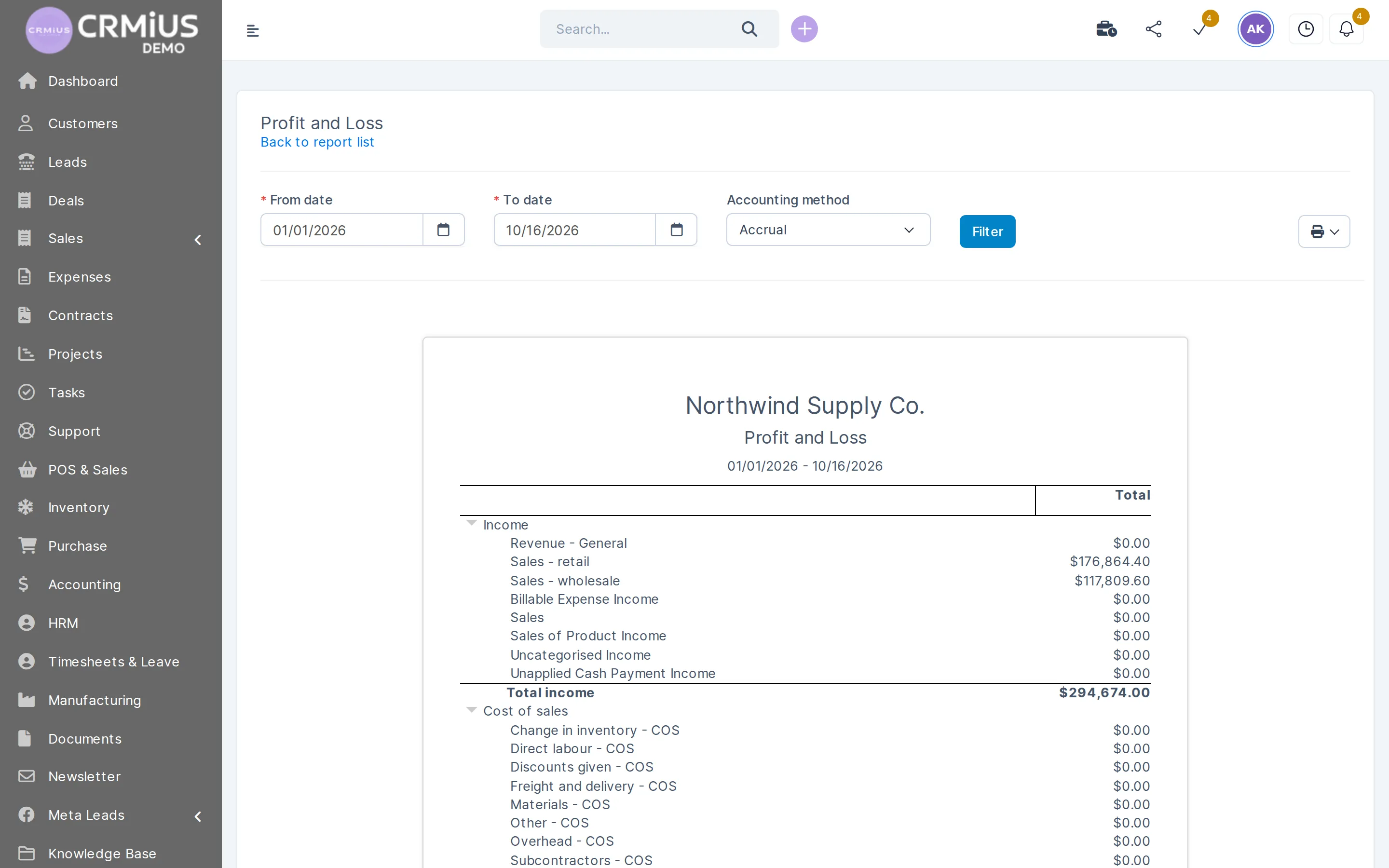
The accounting add-on builds the profit and loss report from your income and cost accounts for the dates you pick.
- Date range and accounting method above the report
- Income split by account, for example retail and wholesale sales
- Cost of sales and expenses below income
- Balance sheet next to it, income-vs-expense charts in reports and dashboards
Finance in the CRM or a separate billing app

When billing lives in one tool, payments in another and the books in a spreadsheet, every question about a customer means three lookups. The finance module puts billing, payments and expenses on the customer card, where sales already work:
- Sales see whether the customer has paid before offering the next deal.
- Finance sees which deal, project or delivery each invoice came from.
- The owner sees income against costs for any period in reports and dashboards, with no month-end exports.
If your accountant keeps the statutory books in another program, CRMiUS passes invoices, payments and expenses through the REST API and webhooks; the list of connections is on integrations.
How to test the finance module in 14 days
A short plan for the trial. The live demo has a ready-made company with invoices if you want to look first.
- 01
Start the trial
Full access for 14 days, no bank card.
- 02
Set up money
Company details for PDFs, currencies, tax rates, Stripe or PayPal for online payments.
- 03
Load customers and items
Import customers and the product catalogue from CSV.
- 04
Send the first invoices
Estimate → invoice for one customer, a recurring invoice for a regular one.
- 05
Read the numbers
Record the month’s expenses and open profit and loss.
Works together with
- Sales and leads managementWon deals become estimates and invoices.
- Project managementProject hours and fixed fees billed to the customer.
- Warehouse and inventory managementInvoices create delivery notes from stock.
- Procurement managementPurchase orders and vendor invoices for what you buy.
- E-signature for contractsContracts signed online before the first invoice.
- Reports and dashboardsIncome, payments and expenses on dashboards.
Who uses the finance module
Agencies and consultancies
Project hours, fixed fees and monthly retainers billed straight from the project. Full set-up: CRM for agencies and service businesses.
Distributors and wholesalers
Invoices from orders, delivery notes from stock, payment status per customer.
Subscription and service businesses
Recurring invoices with card payment and automatic reminders.
Small businesses
Invoices, expenses and profit and loss in one place, without a separate billing app.
Finance CRM price
The finance module comes with Advanced (Pro) and Corporate. Prices are per month in USD; annual payment saves 10%, and from 10 users the terms are individual.
Basic
$100
- Contacts and customers
- Tasks and projects
- Google Workspace
- Key reports
Advanced (Pro)
$150
- Everything in Basic
- Finance module
- Time tracking
- Helpdesk
- Analytics and dashboards
Corporate
Individually
- Everything in Pro
- POS terminal support
- Personal manager
- Module and interface customization
- Priority support
Questions and answers
What is a finance CRM?
A CRM where estimates, invoices, payments and expenses sit on the customer card next to deals and contacts. In CRMiUS this is the finance module, with an accounting add-on for the chart of accounts, profit and loss and balance sheet.
Can customers pay invoices online?
Yes. Every invoice carries a payment link for Stripe or PayPal, and customers can also pay from the customer portal. The payment is recorded against the invoice automatically; bank transfers are recorded by hand.
Does CRMiUS support recurring invoices?
Yes. Set the interval once and CRMiUS creates and sends the invoice on schedule, for subscriptions, rent or monthly retainers. Expenses can be recurring too.
How are partial payments and overdue invoices handled?
Several payments can be recorded against one invoice; the status shows partially paid until the total is covered. Overdue invoices are marked and the customer gets an automatic payment reminder.
Can expenses be billed to the customer?
Yes. Mark an expense as billable and choose the customer: it goes onto their next invoice. Expenses keep their category and receipt.
Is there accounting with profit and loss and a balance sheet?
Yes, through the accounting add-on: chart of accounts, journal entries, bank reconciliation, profit and loss and balance sheet. Sales, payment and expense reports work in the finance module itself.
How much does the finance module cost?
It is part of Advanced (Pro) at $150 per month and of Corporate, which is priced individually. Annual payment saves 10%, and every plan starts with a 14-day free trial without a bank card. All plans.
Is this a CRM for financial services companies?
This page is about money inside any business: invoices, payments and expenses. For banks, lenders and advisers who need client cards, applications and access roles, see CRM for banks and financial services.
Modules
- Contact and customer management (CRM)→
- Warehouse and inventory management→
- Project management→
- Marketing and newsletters→
- Reports and dashboards→
- Roles and access rights→
- Task management→
- Customer support→
- IP telephony→
- E-signature for contracts→
- Sales and leads management→
- Logistics and inventory→
- Document management→
- Procurement management→
- HR management→
Start 14-day free trial
- 14 days free, no card
- from $100 / month
- 30+ connected modules
- 5 interface languages