Project management in your CRM: milestones, hours and invoices
Each project sits on the client card: plan milestones on a Gantt chart, log hours with task timers and invoice the project by fixed fee or hours. From $100 a month, 14 days free.
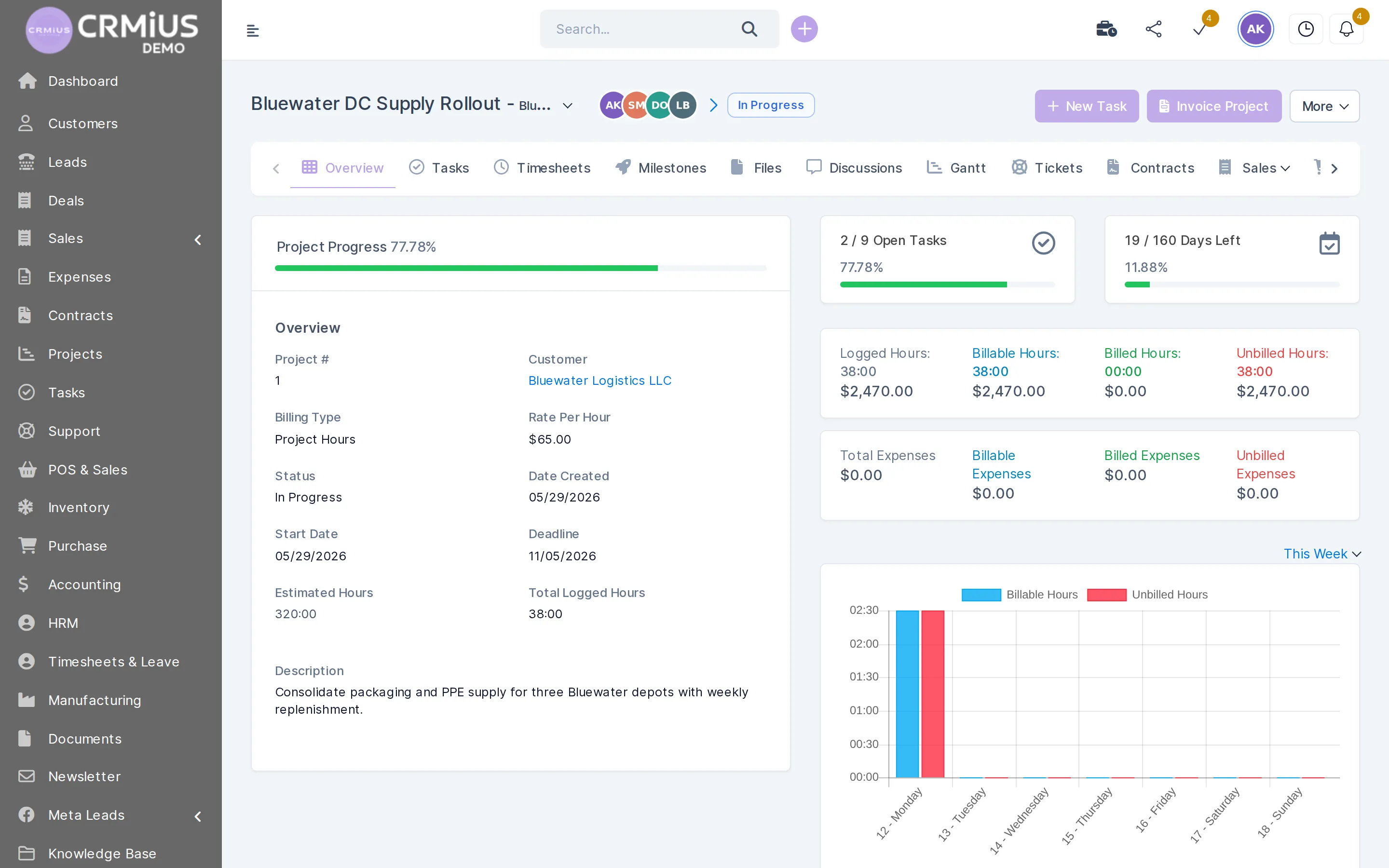
What CRM project management means in CRMiUS
CRM project management means running client projects inside the CRM itself: each project belongs to a client card, and its milestones, tasks, logged hours, files and invoices stay linked to that client. In CRMiUS you plan on a Gantt chart, log time with task timers and invoice the project by a fixed fee or by hours.
- Milestones and tasks on a Gantt chart
- Timesheets from task timers, billable and non-billable
- Project billing: fixed fee, project hours or task hours
- Files, discussions and support tickets inside the project
- Customer portal: progress, invoices and online payment
Price: projects, milestones, the Gantt chart and tasks are in Basic at $100 a month. Time tracking and the finance module (project invoices) come with Advanced at $150. 10% off with annual payment, individual terms from 10 users. 14-day free trial, no bank card. Compare plans
How a client project runs, from plan to paid invoice
The project opens on the client card, next to the deal, the contract and the estimate. From there every step leaves a record: a task, a timesheet line, an invoice.
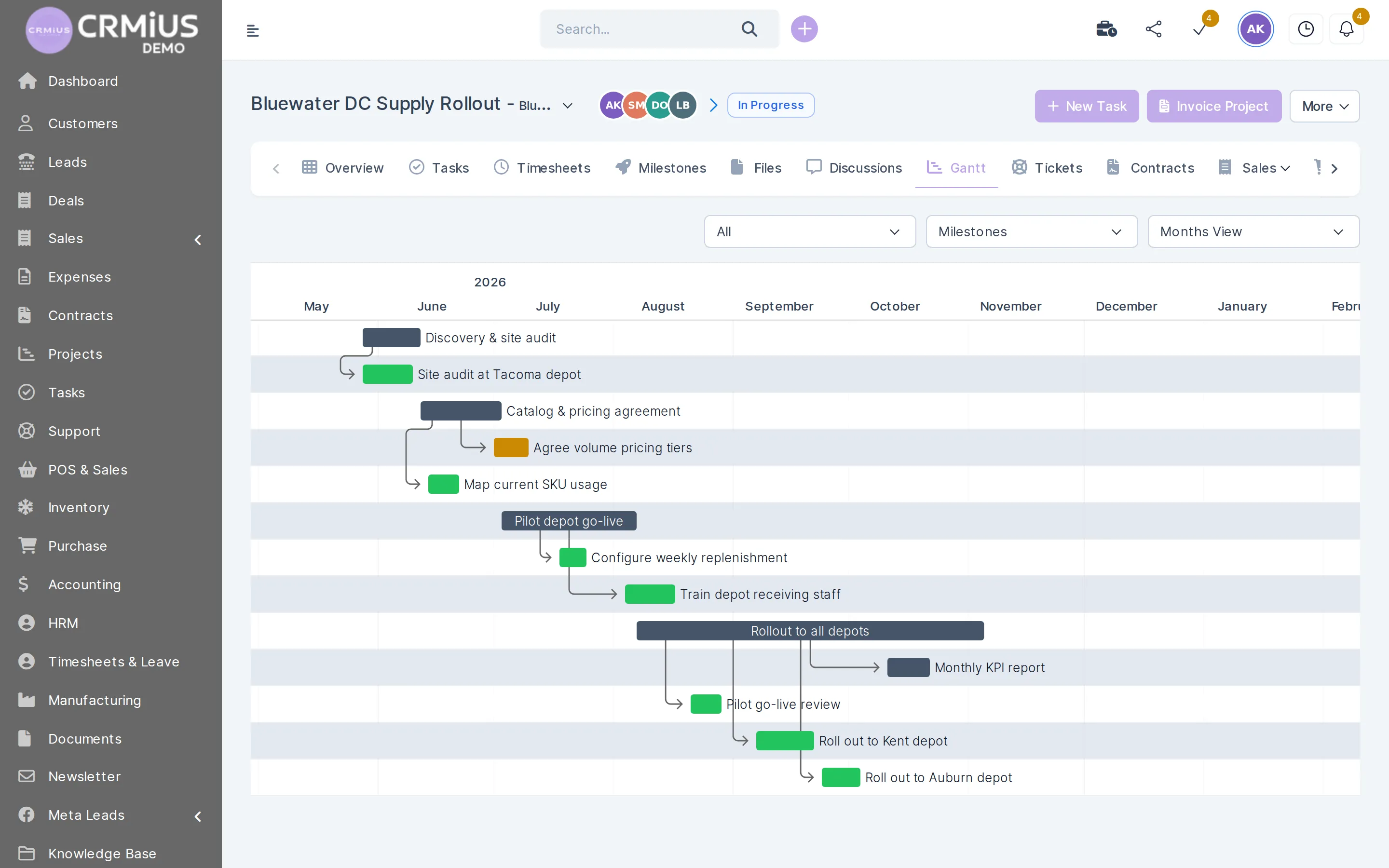
Gantt chart
Milestones and tasks on one timeline
Switch the Gantt chart between milestones and tasks and see the whole project by months.
- Tasks grouped under their milestone
- Filter by milestone, view by months
- Assignees and followers on each task
- Same data in the task list and the kanban board
What a project manager does in CRMiUS
Plan by milestones
Split the project into milestones with dates and attach the tasks to each one.
Assign tasks
Assignees, followers, checklists, priorities and deadlines on every task; the board shows who is on what.
Log time
Team members start a timer on a task; each timesheet line keeps the person, start, end and a note.
Watch the budget
Estimated hours against logged hours, and billable, billed and unbilled amounts on the overview.
Bill the project
Fixed fee, project hours or task hours; billable expenses go on the same invoice.
Keep files and discussions
Documents and conversations stay in the project; you choose what the client sees.
Handle tickets and contracts
Support tickets and contracts of the project open from its own tabs.
Report on time
Timesheet reports by person and project in the reports module.
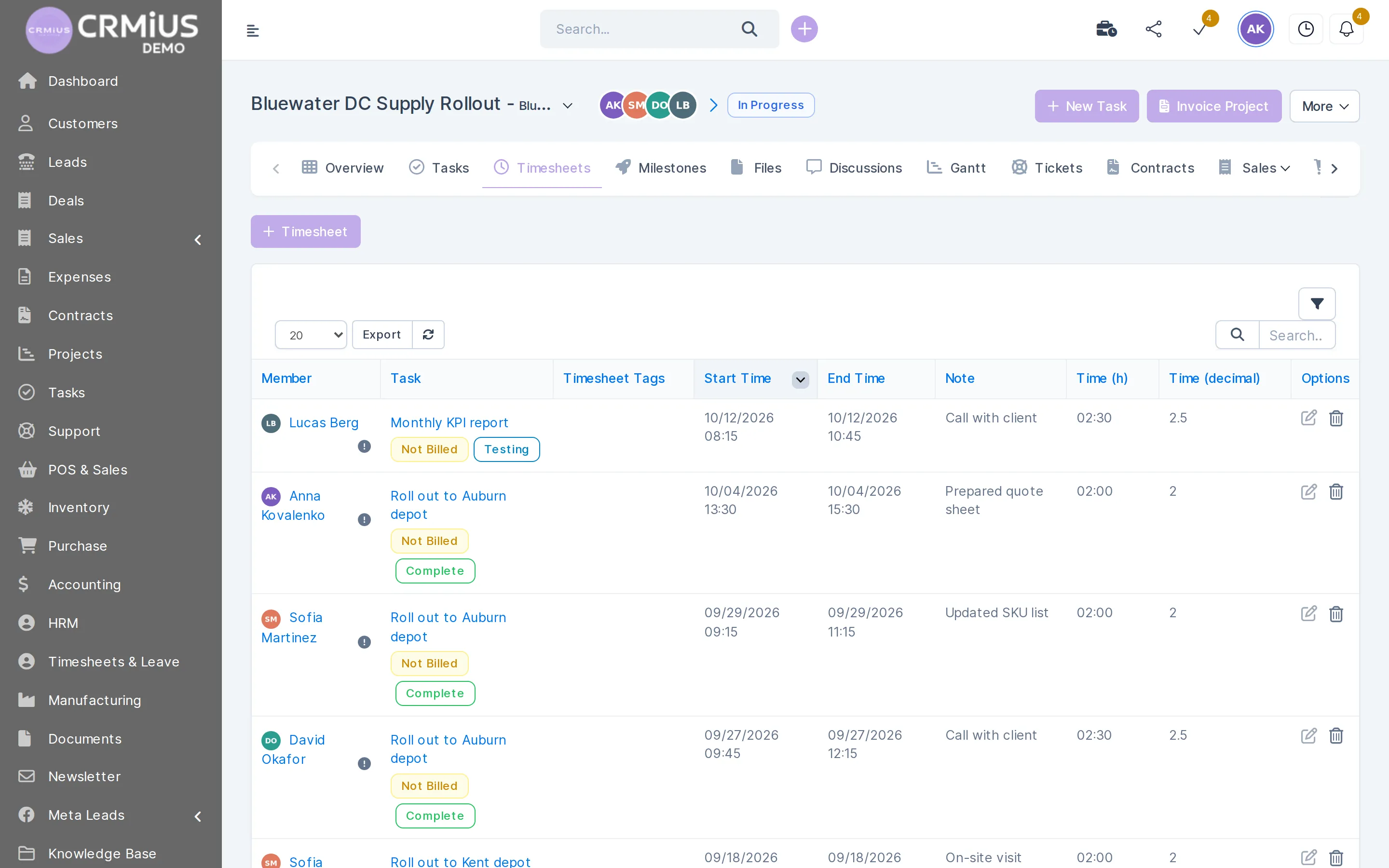
Timesheets
Every hour has a person, a task and a note
Timers in tasks fill the project timesheet, so the invoice is built from records the team made while working.
- Team member and task on every line
- Start, end, duration and a note
- Billed or not billed status per line
- Filter, search and export the list
CRM plus a separate project tool, or one CRMiUS
| CRM + separate project tool | CRMiUS | |
|---|---|---|
| Client data | copied into the project tool | the project sits on the client card |
| Hand-over from sales | by email or chat | deal, contract and estimate on the same card |
| Hours | exported from the time tracker | task timers fill the timesheet |
| Invoice | hours retyped into the invoice | one click from unbilled hours or a fixed fee |
| Client updates | status emails | customer portal: progress, files, invoices |
Projects or tasks: which part you need
Tasks exist in two places in CRMiUS. Inside a project they belong to a milestone and their hours go to the project invoice. Outside projects they cover calls, follow-ups and recurring work linked to a client, a lead or a deal. This page is about projects: work with a client, a deadline and a budget. The task board, checklists and recurring tasks are described on the page task management in the CRM.
A “CRM project” in the other sense: introducing the CRM
When the project is the CRM itself, clients and data are imported from CSV; module and interface setup and team training are additional services, and technical support works 24/7 on every plan. A practical order of steps is in the article CRM implementation: where to start.
Works together with
Project data flows into these modules without exports.
- Task managementTask board, checklists, timers and recurring tasks.
- Finance and invoicingUnbilled hours and project expenses become an invoice.
- Contact and customer management (CRM)The project lives on the client card with deals and contracts.
- E-signature for contractsThe client signs the project contract online.
- Reports and dashboardsTimesheet and income vs. expense reports.
- Document managementProject documents with folders and versions.
Who runs projects in CRMiUS
Agencies and studios
Client projects billed by project hours, with the unbilled total visible before each invoice. Full set-up: CRM for agencies and service businesses.
IT and software teams
Milestones, tasks and support tickets of one client in one project.
Installation and construction
Stages per site, crew hours on tasks and materials bought for the job billed as expenses.
Consultancies
Fixed-fee engagements with progress the client follows in the portal.
See a live project before you decide
Open the live demo without sign-up: a fictional company with client projects, milestones on the Gantt chart, tasks and timesheets. The demo resets every 6 hours. Or start the 14-day free trial with full access and no bank card.
Questions and answers
What is CRM project management?
It is project planning built into the CRM. Each project belongs to a client, and its milestones, tasks, hours, files and invoices are linked to that client. In CRMiUS the sales history and the project live on the same client card.
Does CRMiUS have a Gantt chart?
Yes. Every project has a Gantt view that shows milestones and their tasks on a monthly scale.
How are project hours billed?
Each project has a billing type: fixed fee, project hours or task hours. Team members log time with task timers; the overview shows unbilled hours, and “Invoice project” turns them into an invoice the client can pay online by card through Stripe or PayPal.
Can the client see the project?
Yes, in the customer portal. You decide what the client sees: progress, tasks, files, discussions and invoices.
What is the difference between projects and tasks in CRMiUS?
A project has a client, milestones, a deadline and a budget; tasks inside it roll up into the project hours and invoice. Stand-alone tasks cover calls and follow-ups. See task management.
Which plan includes project management and how much does it cost?
Projects and tasks are in Basic at $100 a month. Time tracking and the finance module for project invoices are in Advanced at $150. Annual payment gives 10% off; every plan starts with a 14-day free trial without a bank card. See plans.
Modules
- Contact and customer management (CRM)→
- Finance and invoicing→
- Warehouse and inventory management→
- Marketing and newsletters→
- Reports and dashboards→
- Roles and access rights→
- Task management→
- Customer support→
- IP telephony→
- E-signature for contracts→
- Sales and leads management→
- Logistics and inventory→
- Document management→
- Procurement management→
- HR management→
Start 14-day free trial
- 14 days free, no card
- from $100 / month
- 30+ connected modules
- 5 interface languages