Lead management system: every inquiry in one sales pipeline
Website forms, Facebook Lead Ads and imported lists arrive as leads with their source. Your team works them on a kanban board, sends proposals and converts buyers into customers. From $100 a month, 14 days free.
What a lead management system does in CRMiUS
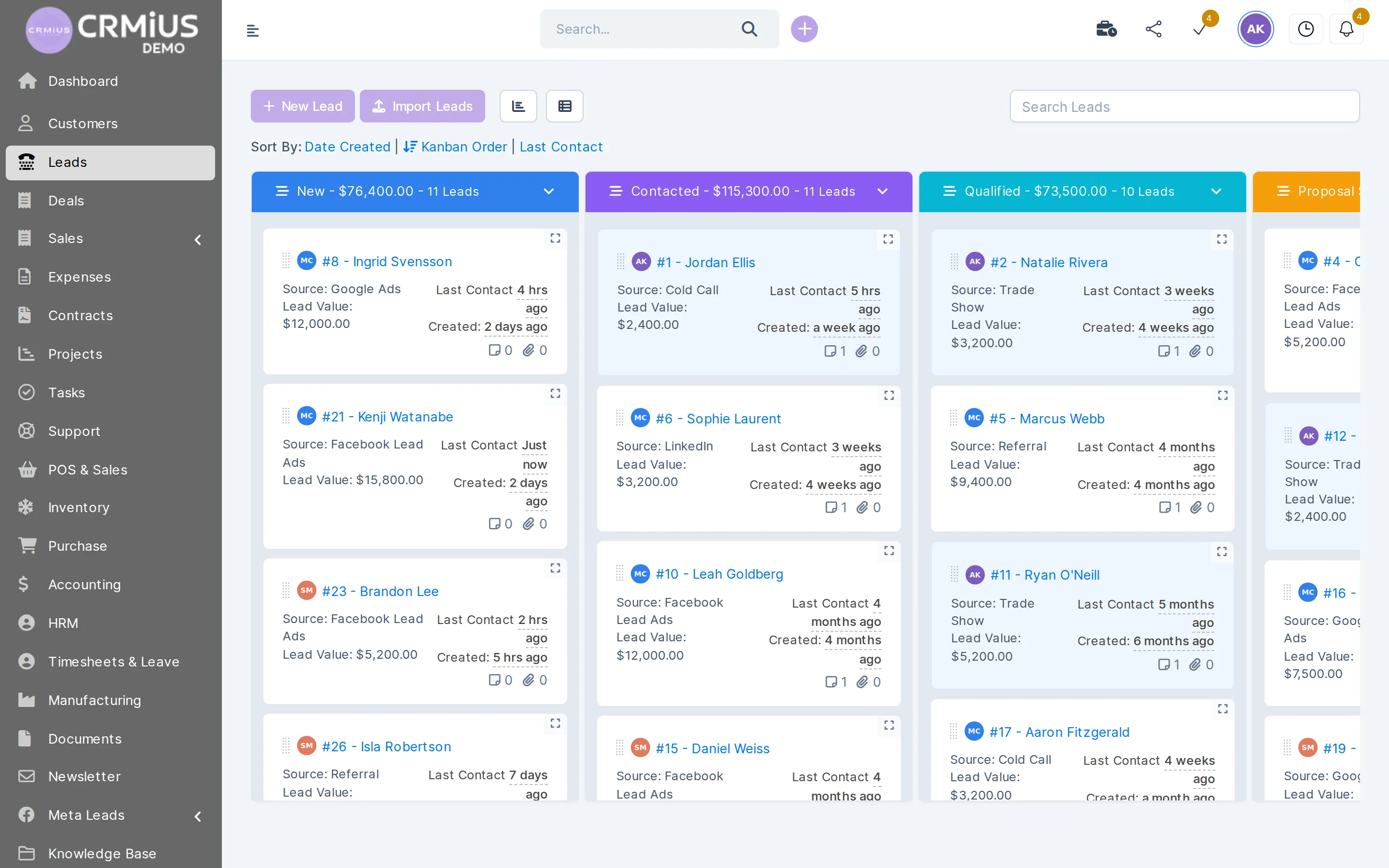
A lead management system collects every sales inquiry in one place, gives it an owner and tracks it stage by stage until the lead buys or drops out. In CRMiUS leads arrive from web forms, Facebook Lead Ads and imports with their source, move across a kanban board and convert into customers with a proposal and an invoice.
- Web-to-lead forms, Facebook Lead Ads, CSV import and GMB Importer
- Kanban pipeline with your own statuses, lead count and total value per stage
- Assignee, reminders, tasks, notes and an activity log on every lead
- Proposals the client accepts online, then conversion to customer in one click
- Sources conversion report: which channel brings buyers
Price: CRMiUS plans start at $100 a month (Basic, contact management included). Advanced at $150 adds the finance module for invoices, plus analytics and dashboards. 10% off with annual payment, individual terms from 10 users. 14-day free trial with full access, no bank card. Compare plans
How a lead moves from first inquiry to paying customer
Every lead follows the same path, and each step leaves a record on the card. A colleague can pick up any lead without asking what happened before.
Where leads come from
Leads reach the pipeline through five doors. Each one sets the source, so the sources conversion report later shows which channel brings buyers.
- Web-to-lead forms. Build a form in CRMiUS and place it on your site. In the form settings you choose the source, the starting status and the responsible salesperson, add a lead title prefix, and set the branding, the message after submission and the notifications.
- Facebook Lead Ads. The Meta Leads integration brings ad form leads into CRMiUS. Field mapping decides which answer lands in which field; the sync history lists every import.
- Import. Upload a CSV of leads from a trade show, an old CRM or a purchased list and set the source for the whole file.
- GMB Importer. Find businesses on Google by category and location and import them as leads and contacts for outbound sales.
- Calls and walk-ins. The New Lead button adds them by hand; the IP telephony connection logs calls on the card.
Buying leads from several vendors
Give each lead vendor its own source and import their files into the same pipeline. Your purchased leads then sit in one system, get an assignee and reminders like any other inquiry, and the sources conversion report compares vendors by how many leads became customers.
What a sales team does with leads in CRMiUS
Capture without copying
Web forms, Facebook Lead Ads, CSV import and GMB Importer create leads with their source.
Give every lead an owner
Each form sets a responsible salesperson; a manager reassigns leads from the card.
See the pipeline in money
Each kanban column shows how many leads it holds and their total value. Sort by date created, kanban order or last contact.
Follow up on time
Reminders, tasks and notes on the lead; the card shows when the last contact happened.
Call leads with AI
CRMiUS PilotAI is an AI voice assistant that calls and follows up leads; the AI lead manager add-on helps score them. See AI functions.
Automate routine steps
Rule-based process automation updates the status, assignee and due date of the tasks that follow a lead.
Send proposals
Proposals from the item catalogue go to the lead, and the client accepts them online.
Measure what sells
The leads report shows this week's conversions, conversion by source and a monthly chart; the staff view compares salespeople. More in CRM reports.
Everything about a lead on one card
Open a lead and its tabs hold the whole story: Profile, Proposals, Tasks, Attachments, Reminders, Notes and Activity Log. Status, source, assignee, tags, lead value and the date of the last contact sit next to the contact details. When the lead buys, Convert to customer moves the history to a customer card, where estimates and invoices follow.

Lead, deal and customer
A lead is a person or company that has asked about your offer and has not bought yet. A deal is a sale in progress, often with a customer who already buys from you. A customer is anyone you invoice. In CRMiUS all three share one database: the lead converts into a customer, and the next order opens as a deal on that customer.
Background reading: how a CRM system helps a business sell more.
Deals
Repeat sales run as deals in their own pipelines
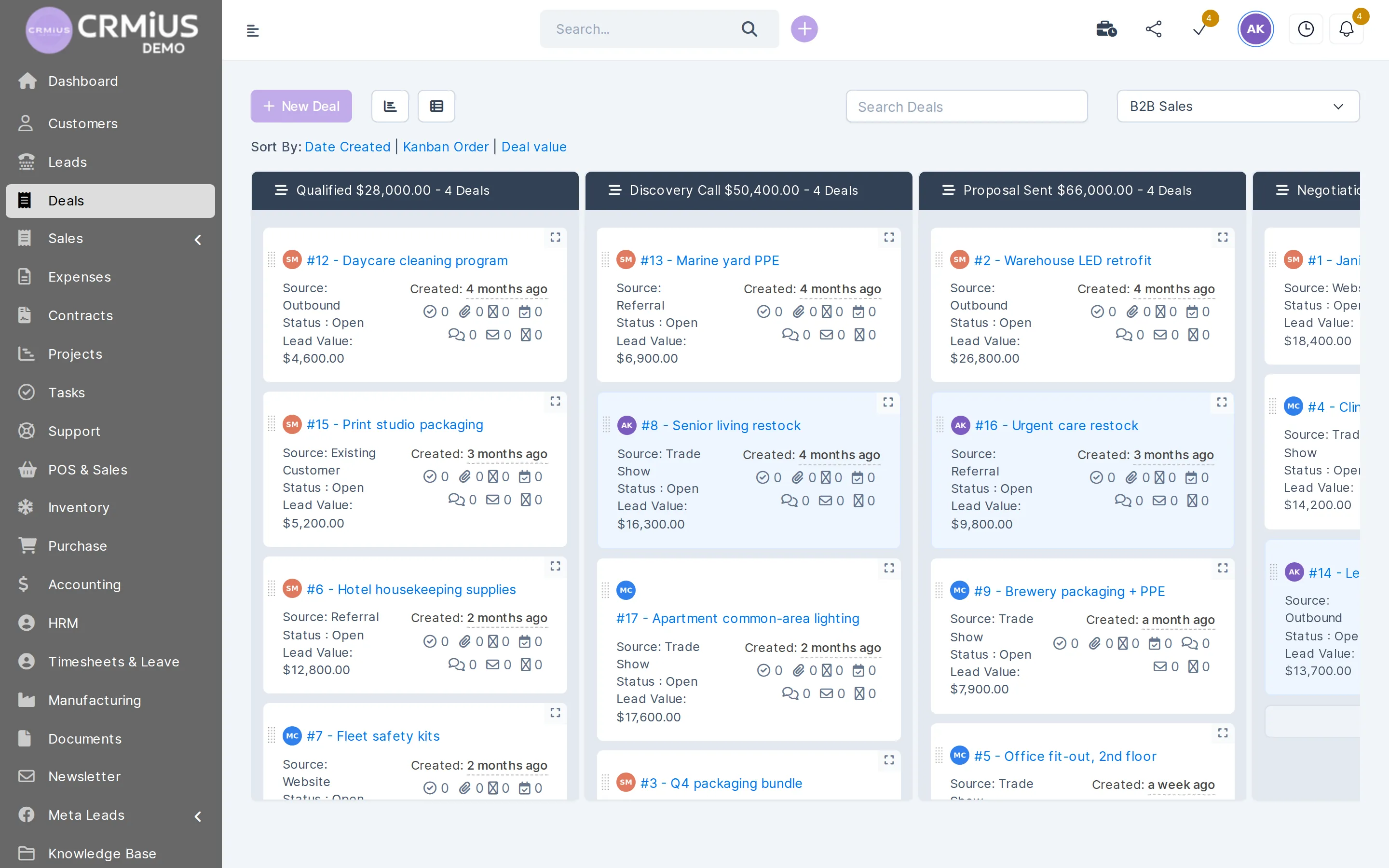
Leads are first inquiries. Orders from existing customers go to the Deals board, where each pipeline has its own stages.
- Several pipelines, for example B2B sales
- Number of deals and total value per stage
- Sort by date created, kanban order or deal value
- Source, status and value on every deal card
Spreadsheet and inbox, or one CRMiUS pipeline
Where inquiries land
Spreadsheet and inboxseveral inboxes and a sheet
CRMiUSone pipeline, source on every lead
Who answers
Spreadsheet and inboxagreed in a chat
CRMiUSthe form sets the assignee
Follow-ups
Spreadsheet and inboxmemory and calendar notes
CRMiUSreminders and tasks on the lead
Proposal
Spreadsheet and inboxa file sent by email
CRMiUSa proposal accepted online
After the sale
Spreadsheet and inboxdata retyped into accounting
CRMiUSconvert to customer, then estimate and invoice
Which channel sells
Spreadsheet and inboxcounted by hand
CRMiUSsources conversion report
Works together with
Lead data flows into these modules without exports.
- Contact and customer management (CRM)Converted leads become customers with their full history.
- Finance and invoicingAccepted proposals turn into estimates and invoices.
- AI functionsPilotAI voice calls and AI lead scoring.
- IP telephonyCalls logged on the lead card.
- Reports and dashboardsConversion by source and by salesperson.
- Marketing and newslettersCampaigns and newsletters to leads.
Who runs sales on CRMiUS
Wholesale and distribution
New trade accounts from trade shows and referrals go through one pipeline to the first invoice.
Service businesses
Website requests become leads with an assignee, then an estimate and a booked job.
Agencies
Facebook Lead Ads leads tracked to an accepted proposal and a signed contract.
Teams that buy leads
Each vendor is a source; the conversion report shows whose leads become customers.
Open the pipeline in the live demo
Open the live demo without sign-up: a fictional distributor with leads on the kanban board, deals, proposals and the leads report. Data resets every 6 hours. Or start the 14-day free trial with full access and no bank card.
Questions and answers
What is a lead management system?
Software that collects inquiries from all channels, gives each one an owner and tracks it through sales stages until it becomes a customer or drops out. In CRMiUS it is part of the CRM, so the lead, the proposal, the customer and the invoice share one database.
Can leads come in from our website and Facebook automatically?
Yes. Web-to-lead forms on your site and the Meta Leads integration for Facebook Lead Ads create leads with their source. For Facebook you map the form fields once and see every import in the sync history.
What is the difference between a lead and a deal?
A lead is a first inquiry from someone who has not bought yet. A deal is a sale in progress, usually with an existing customer, on the Deals board with its own pipelines. A lead becomes a customer when you convert it.
Can we keep leads bought from several vendors in one system?
Yes. Create a source for each vendor and import their CSV files into the same pipeline. The sources conversion report then shows how many leads from each vendor became customers.
Can an AI assistant call our leads?
Yes, with the CRMiUS PilotAI add-on: an AI voice assistant that calls and follows up leads. The AI lead manager add-on helps score them. Details on the AI functions page; ask about both when you book a demo.
Can we change the sales stages?
Yes. Lead statuses are set to match your process, and each kanban column shows the number of leads and their total value.
How much does it cost?
Plans start at $100 a month (Basic, contact management included). Advanced at $150 adds the finance module for invoices and analytics dashboards; Corporate is priced individually. Annual payment gives 10% off, and every plan starts with a 14-day free trial without a bank card. See plans.
Modules
- Contact and customer management (CRM)→
- Finance and invoicing→
- Warehouse and inventory management→
- Project management→
- Marketing and newsletters→
- Reports and dashboards→
- Roles and access rights→
- Task management→
- Customer support→
- IP telephony→
- E-signature for contracts→
- Logistics and inventory→
- Document management→
- Procurement management→
- HR management→
Start 14-day free trial
- 14 days free, no card
- from $100 / month
- 30+ connected modules
- 5 interface languages