E-signature in your CRM for contracts and proposals
Send a contract from the customer card, the client signs it on a phone or computer, and CRMiUS keeps the signer, date, time and IP address with the contract. Plans from $100 a month, 14 days free.
What is e-signature in a CRM?
E-signature in a CRM means the contract is prepared, sent and signed in the same system that holds the customer. In CRMiUS the client opens a link, enters name and email, draws a signature on a phone or computer and clicks Sign. The CRM saves the signer, email, date, time and IP address on the contract and marks it signed.
- Contracts from templates with merge fields, value, type, start and end dates
- Signing in the browser from a link, nothing to install for the client
- The same signature form when a client accepts a proposal or an estimate
- A signed contract is locked for editing until the signature is removed
- Active, about-to-expire and expired contracts in one list, with renewal history
Price: CRMiUS plans start at $100 a month (Basic); Advanced (Pro) is $150, Corporate is priced individually, 10% off with annual payment. The 14-day trial opens full access, contracts and e-signature included, without a bank card. Compare plans
CRMiUS records a hand-drawn electronic signature with the signer’s identity details. Where the law or your counterparty asks for a qualified electronic signature (QES under eIDAS, for example), sign that document the required way and attach the signed file to the contract.
How a contract gets signed in CRMiUS
Six steps from draft to signed contract. Each one leaves a trace on the contract, so anyone in the team can see where it stands.
- 01Contract from a templateCustomer, contract type, value, start and end dates; merge fields fill in the customer’s details. merge fieldsyour branding
- 02Send the linkAn email with a link to the contract goes from the contract itself; contacts with portal access also find it in the customer portal.
- 03The client reads and asksThe client opens the contract, downloads the PDF and asks questions in the Discussion tab; your team answers in Comments.
- 04The client signsFirst name, last name, email and a signature drawn with a finger or mouse. consent textphone or computer
- 05CRMiUS records the signatureSigner, email, date, time and IP address on the contract; status Signed; the contract text is locked.
- 06Invoice, project, renewalThe next step starts from the same customer: an invoice, a project, a reminder before the end date.
What your client sees
The link opens a clean contract page with your company name, the contract value, number, dates and type. Two buttons: Download for the PDF and Sign.
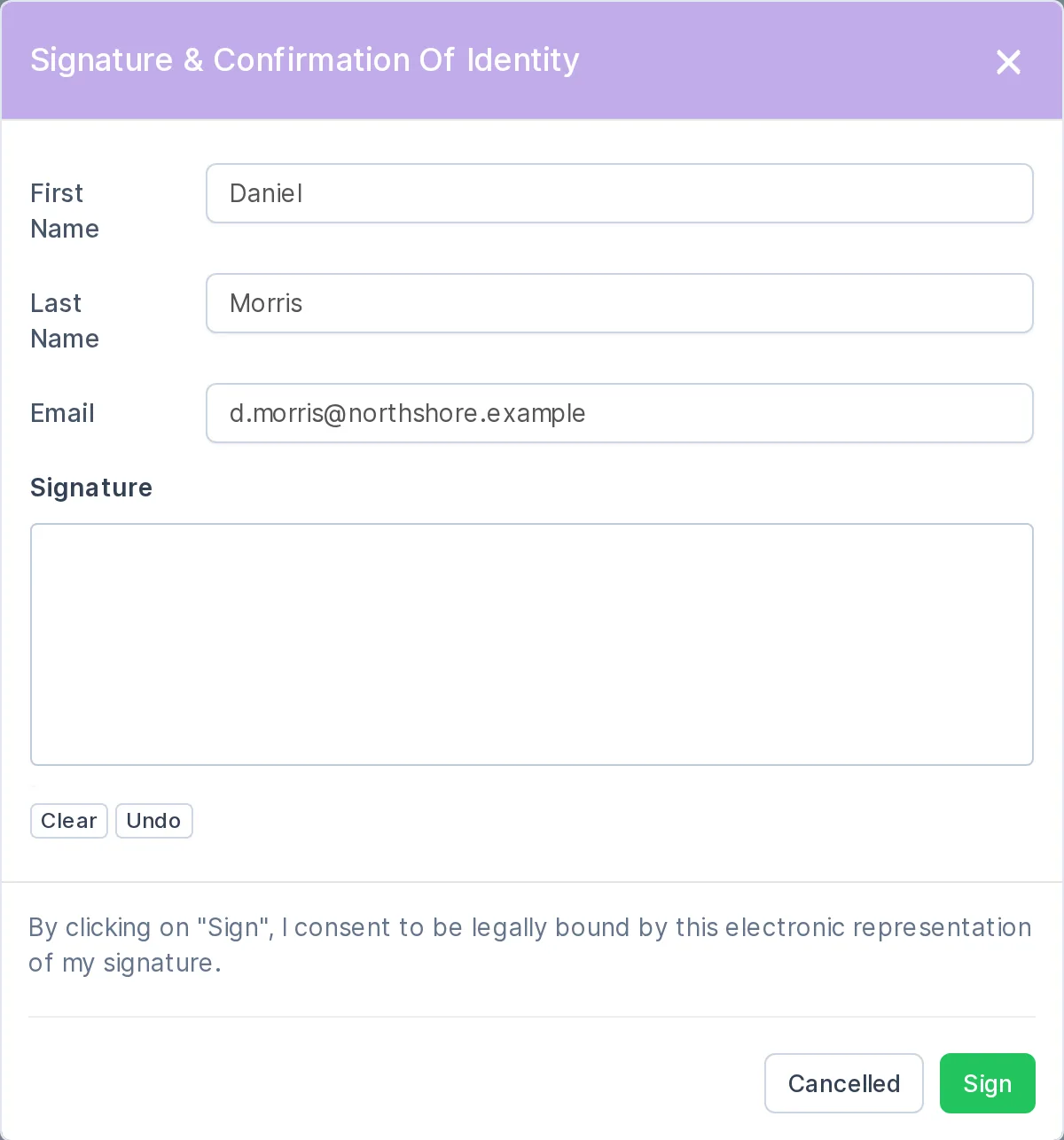
Sign opens the form “Signature & Confirmation of Identity”: first name, last name, email and a field for the signature with Clear and Undo. Above the button the client reads the consent text: by clicking Sign they agree to be bound by this electronic representation of their signature.
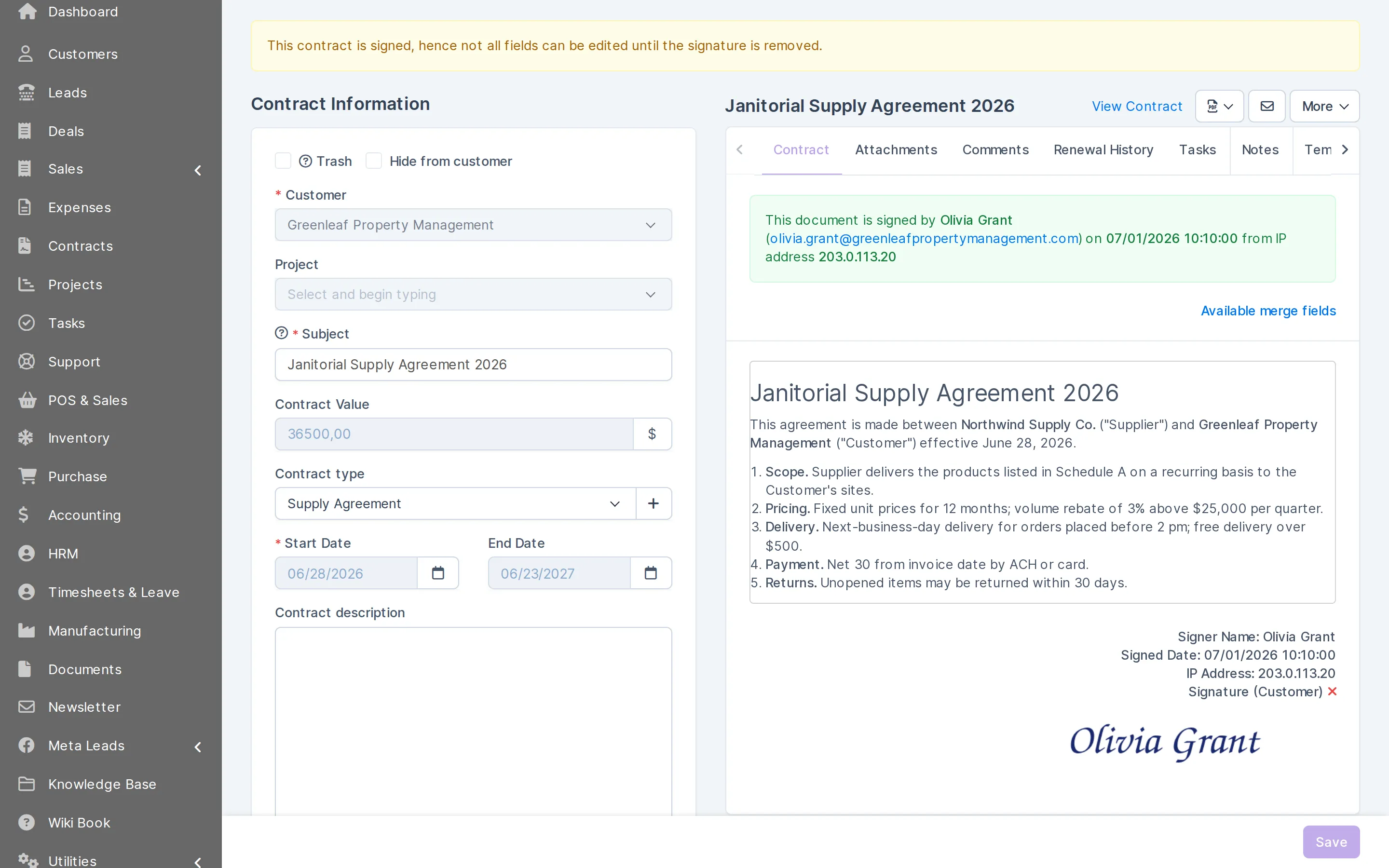
When the client signs, the contract in CRMiUS shows who signed and when. This is what the record holds:
- Signerfirst and last name as entered by the client
- Emailthe address the client confirmed in the form
- Date and timethe moment the client clicked Sign
- IP addressthe address the signature came from
- Signaturethe drawn signature, shown on the contract
Contracts
Which contracts are signed and which are about to expire
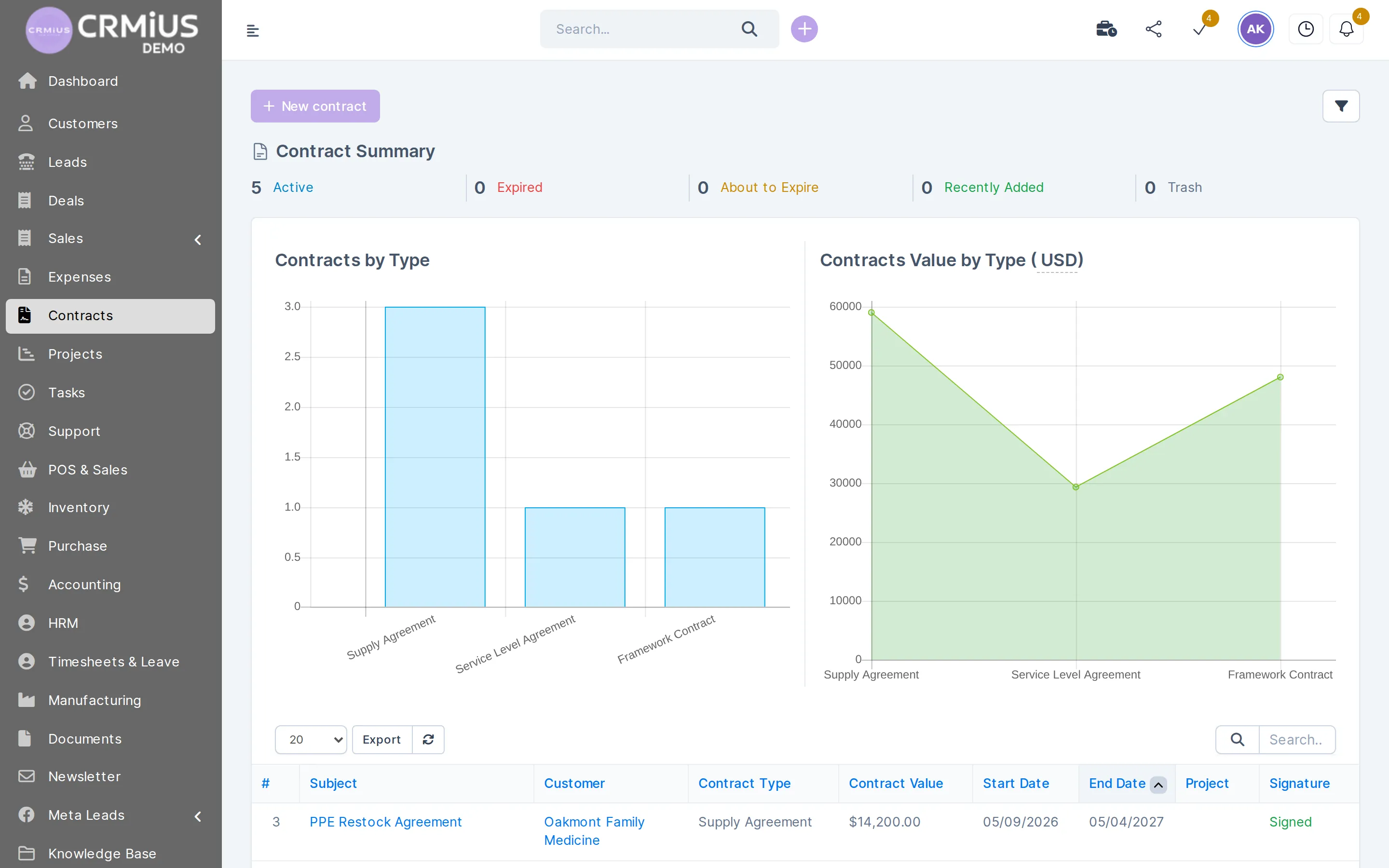
The contracts list counts active, about-to-expire, expired and recently added contracts. The Signature column shows signed and not signed at a glance.
- Contracts by type and their total value by type
- Customer, value, start and end dates in every row
- Signed or not signed for each contract
- Search, filters and export of the list
What your team does with contracts and e-signature
Prepare from a template
Contract types, value, start and end dates; merge fields pull the customer’s details into the text.
Send for signature
An email with the contract link from the contract card. Contacts with portal access see the contract in the customer portal.
Answer questions before signing
The client writes in Discussion, the team replies in Comments; internal notes and tasks stay inside the team.
Collect the signature
Name, email and a hand-drawn signature on a phone or computer, with the consent text above the Sign button.
Keep the proof
Signer, email, date, time and IP address on the contract; the list shows Signed for it.
Protect the signed text
After signing, most fields of the contract are locked until the signature is removed.
Register paper contracts
“Mark as signed” for a contract signed on paper, with the scan on the Attachments tab.
Renew on time
About-to-expire and expired counters, a reminder before the end date, renewal history and a copy of the contract for the next term.
Proposals and estimates signed the same way
A proposal from sales and leads or an estimate goes out with a link as well. The client clicks Accept and fills in the same signature form, and the status in the list changes to Accepted.
- An accepted estimate becomes an invoice in one click in the finance module.
- A proposal with the signed acceptance stays on the customer card next to the deal.
- After the contract is signed, the work can start as a project in project management.
E-signature in the CRM or a separate signing service
Both ways work. The difference is where the contract lives and how many tools the team has to keep in sync.
| E-signature in CRMiUS | Separate signing service | |
|---|---|---|
| Where the contract is prepared | On the customer card, from a template with merge fields | In the service, or from the CRM through an integration |
| Where the signed copy is kept | On the contract in the CRM, with signer, date, time and IP | In the service; in the CRM once an integration copies it |
| Proposals and estimates | Accepted with the same signature form | Depends on the integration |
| Qualified signature (QES) | The QES-signed file is attached to the contract | Offered by services that provide QES |
| Cost | Part of the CRMiUS subscription | Priced by the service |
How to test e-signature in 14 days
A short plan for the trial. If you want to look first, the live demo has signed contracts ready.
- 01
Open the live demo
The demo company has signed and unsigned contracts: open one and see the signature record. Data resets every 6 hours.
- 02
Start the trial
Full access for 14 days, no bank card.
- 03
Set up a template
Company details for the PDF, contract types and a template with merge fields.
- 04
Sign one yourself
Send a contract to your own email, open the link on your phone and sign it.
- 05
Check the record
Signer, date, time and IP on the contract, locked fields, the end date in the list.
Works together with
- Contact and customer management (CRM)Contracts on the customer card next to deals and invoices.
- Sales and leads managementProposals the client accepts online.
- Finance and invoicingInvoice after the contract or estimate is signed.
- Project managementA project starts from the signed contract.
- Document managementInternal documents approved and signed by staff.
- Roles and access rightsWho may create, send and see contracts.
Who uses e-signature in CRMiUS
Suppliers and distributors
Supply agreements and service level agreements with value and term, renewed before the end date.
Agencies and consultancies
Proposal accepted online, then a contract and a project for the same customer.
Service companies
Annual service contracts tracked in the about-to-expire counter.
Sales teams
An estimate accepted with a signature becomes an invoice in one click.
E-signature price
Contracts with e-signature are part of CRMiUS. Prices are per month in USD; annual payment saves 10%, and from 10 users the terms are individual. Which plan fits your team is easier to see in the demo call or on the pricing page.
Basic
$100
- Contacts and customers
- Tasks and projects
- Google Workspace
- Key reports
Advanced (Pro)
$150
- Everything in Basic
- Finance module
- Time tracking
- Helpdesk
- Analytics and dashboards
Corporate
Individually
- Everything in Pro
- POS terminal support
- Personal manager
- Module and interface customization
- Priority support
Questions and answers
What is electronic signature in a CRM?
A way to send a contract, proposal or estimate from the CRM and get the client’s signature online. In CRMiUS the signature, signer, email, date, time and IP address are saved on the contract next to the customer’s deals and invoices.
Does the client need an account or an app?
The client signs in the browser from the link in the email, on a phone or computer. Contacts with access to the customer portal also see their contracts there.
What does CRMiUS record when a client signs?
First and last name, email, the date and time of signing, the IP address and the drawn signature. The contract gets the status Signed in the list.
Is an e-signature in CRMiUS legally binding?
The client confirms the consent text before signing, and CRMiUS keeps the identity details and the time of signing. Whether this is enough for a given document depends on the law of your country and the type of contract, so check it with your lawyer. Where a qualified electronic signature is required, sign the document that way and attach the file to the contract.
Can clients sign proposals and estimates?
Yes. The client clicks Accept and fills in the same signature form; the status changes to Accepted. An accepted estimate becomes an invoice in one click. More on sales and proposals.
Can a signed contract be changed?
After signing, most fields are locked. To change the text, remove the signature, edit the contract and send it for signature again.
What about contracts signed on paper?
Use “Mark as signed” and attach the scan on the Attachments tab. The contract then counts as signed in the list, with its dates and renewal reminders.
How much does e-signature cost?
Contracts with e-signature are part of CRMiUS; plans start at $100 a month, Advanced (Pro) is $150 and Corporate is priced individually. Every plan starts with a 14-day free trial without a bank card. All plans.
Modules
- Contact and customer management (CRM)→
- Finance and invoicing→
- Warehouse and inventory management→
- Project management→
- Marketing and newsletters→
- Reports and dashboards→
- Roles and access rights→
- Task management→
- Customer support→
- IP telephony→
- Sales and leads management→
- Logistics and inventory→
- Document management→
- Procurement management→
- HR management→
Start 14-day free trial
- 14 days free, no card
- from $100 / month
- 30+ connected modules
- 5 interface languages