10 key CRM features that simplify customer management
Which features a CRM really needs for everyday work with customers, what each one changes for the team and how to check it before you pay.

Vendor feature lists run long. This article keeps the ten features that carry the daily work with customers: from the first inquiry to the repeat order. For each one you get what it does, how it works in CRMiUS and one thing to check in a demo before you choose.
Which CRM features matter most?
The key CRM features are a customer database with the full history, a lead pipeline, tasks and reminders, email and calls next to the customer, reports, proposals and invoices, email campaigns, support tickets, mobile access and integrations. Together they keep every inquiry on record and show the manager where sales stall.
How the 10 features work together
Each feature covers one part of the customer path. What makes them a system is the shared customer card: everything the team does lands in the same record.
Before the sale
10 key CRM features, one by one
The order follows a typical customer: first contact, deal, payment, support and repeat sales.
01Contact and customer management
The base of every CRM. A company card holds several contact persons, groups, files, notes and reminders, and every new deal, email or invoice is added to the same card. When a manager is on holiday, a colleague opens the card and sees the whole story.
In CRMiUSCompanies with several contacts, groups, files, notes, reminders and customer statements; customers can log in to the customer portal. Included in the Basic plan. Customer management in CRM
Check in a demoOpen one customer and count how many clicks it takes to see their last email, open invoice and next task.
02Leads and sales pipeline
Inquiries from the website, ads and email go into one pipeline. Each lead has a source, an owner and a stage, and the board shows how many leads sit in each stage. A lead that turns into a buyer becomes a customer without retyping.
In CRMiUSKanban board by status, sources, assignment, reminders, web-to-lead forms on your site, Facebook Lead Ads, CSV import, conversion of a lead into a customer. Lead management
Check in a demoSend a test inquiry from a web form and see where it lands, who gets it and what source it shows.
03Tasks, reminders and calendar
A task with a deadline in the customer card replaces personal notes, and the manager sees overdue work of the whole team on one board.
In CRMiUSTasks on a kanban board with checklists, assignees and followers, timers, recurring tasks, comments; staff calendar and Google Calendar. Tasks and projects are in the Basic plan. Task management, projects
Check in a demoCreate a call-back task for tomorrow and check how the reminder reaches the manager.
04Email, messengers and calls next to the customer
Correspondence that lives only in personal inboxes leaves with the employee. A CRM keeps the conversation next to the customer and lets the team reply from one place.
In CRMiUSMailbox inside the CRM, Gmail mailboxes over IMAP, email templates, Telegram chat module, IP telephony connection with call logging on the customer card. CRM telephony
Check in a demoAsk which channels you already use can be connected, and how an incoming email is matched to a customer.
05Reports and dashboards
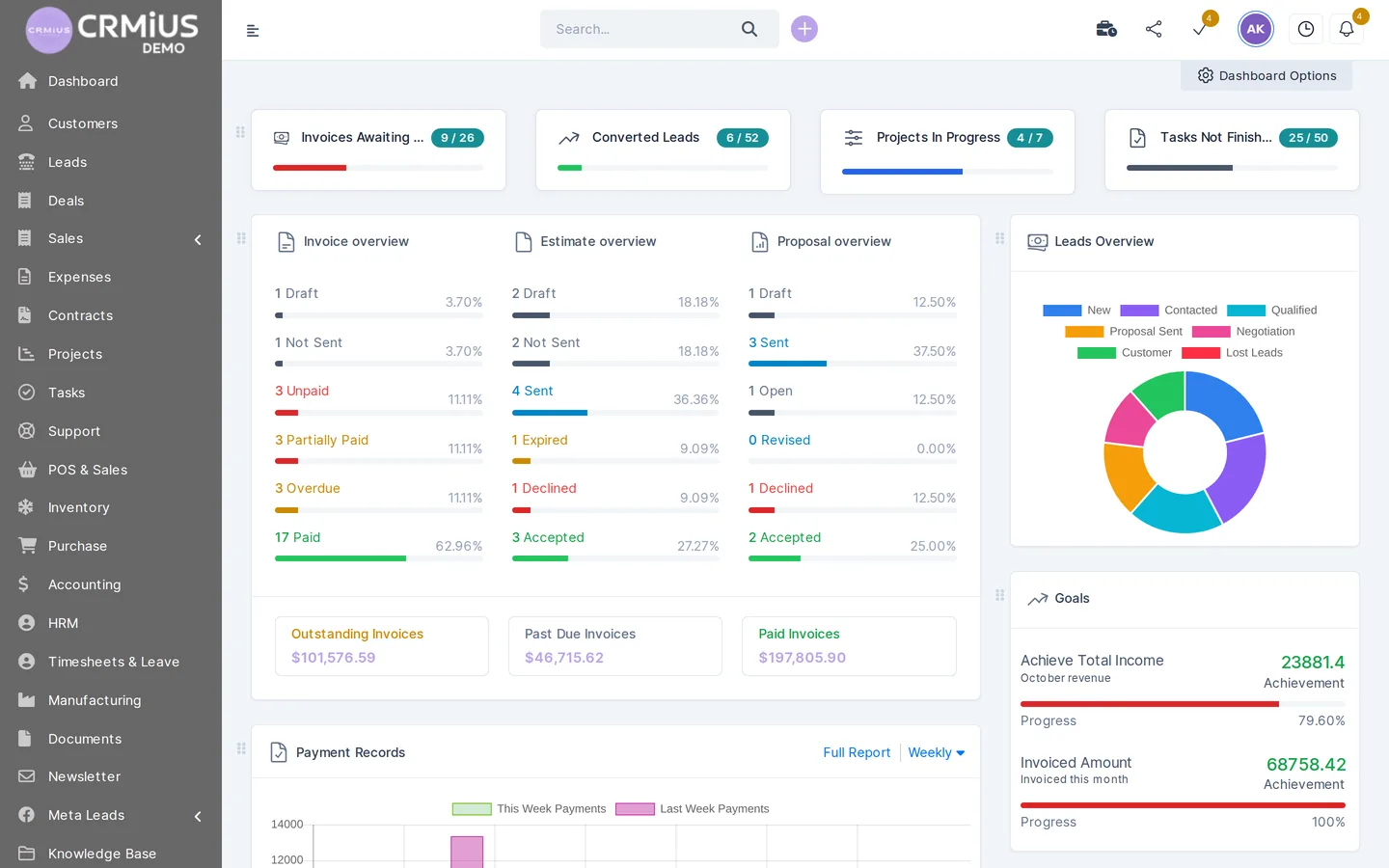
Reports answer the questions a manager asks every week: how many inquiries came, which channel turns them into sales, where the team's hours go and which invoices are unpaid.
In CRMiUSReports on sales, invoices, payments, expenses vs income, lead conversion, timesheets and customers; dashboards with widgets. Key reports are in Basic, analytics and dashboards in Advanced. CRM reports
Check in a demoAsk for lead conversion by source for last month and see whether it is a ready report or an export to a spreadsheet.
06Documents: proposals, invoices and contracts
A proposal typed in a text editor takes time and gets lost in email. In a CRM the document is built from the customer card and the product catalogue, and its status is visible to the whole team.
In CRMiUSProposals accepted online, estimates turned into invoices in one click, recurring invoices, credit notes, payment reminders, online payment via Stripe and PayPal; contracts with e-signature; document management with folders, versions and approvals. The finance module is in Advanced. Finance and invoicing, e-signature, document management
Check in a demoTurn an estimate into an invoice and send it with a payment link; count the steps.
07Marketing: segments and email campaigns
The customer history is the best list for the next offer. Groups and lead sources split the base into segments, and a campaign reaches the right people without exporting contacts to another service.
In CRMiUSCRMiUS MailFlow for newsletters to customers and leads, customer groups, lead sources, surveys. CRM marketing
Check in a demoBuild a segment, for example customers of one group, and send a test campaign to yourself.
08Customer support and tickets
After the sale, questions and complaints come in. Tickets give each request an owner, a priority and a status, so nothing waits in a shared inbox, and the answer stays in the customer history.
In CRMiUSTickets with departments, priorities and statuses, predefined replies, email piping into tickets, knowledge base; customers see their tickets in the portal. The help desk is in Advanced. CRM help desk, CRM for support teams
Check in a demoSend an email to the support address and see the ticket it creates.
09Mobile access to the CRM
Managers who meet customers or work on site need the customer card, tasks and invoices on the phone, and they need to log the result of a meeting right after it.
In CRMiUSCRMiUS works in any browser and as a mobile app: customer cards, leads, tasks and invoices on the phone, push notifications. Mobile CRM app
Check in a demoOpen the CRM on your phone, find a customer and add a note in under a minute.
10Integrations, API and automation
A CRM should take data from the tools you already use and pass it on, and routine steps should run by rules instead of reminders in someone’s head.
In CRMiUSGoogle Workspace (Google Calendar, Gmail over IMAP), Telegram, Stripe, PayPal, Facebook Lead Ads, Slack; REST API and webhooks for anything else; CRMiUS Automation runs rules on tasks. Integrations, process automation
Check in a demoName the two systems you cannot live without and ask how data gets from them into the CRM.
Beyond the top 10: what else to check
These points decide whether the CRM fits a company with several people and departments.
- Roles and access rights — which staff member sees and edits what; roles and permissions
- Customer portal — customers log in to see invoices, estimates, proposals, projects, tickets and contracts and pay online
- AI assistant — CRMiUS PilotAI calls and follows up leads with an AI voice assistant; AI functions
- Modules beyond sales — warehouse, purchasing, accounting, HR and manufacturing in the same database; all CRMiUS modules
- Interface language — CRMiUS works in English, Ukrainian, Russian, German and French
Checklist: 10 CRM features and one question for each
Take this table into a demo call. A clear answer to each question tells you more than a long feature list.
| Feature | Question to ask | CRMiUS |
|---|---|---|
| Contacts and customers | Does one card show emails, deals, invoices and tickets of a customer? | Yes, customer card and customer portal |
| Leads and pipeline | Can I set my own stages and see where each inquiry came from? | Kanban by status, sources, web forms, Facebook Lead Ads |
| Tasks and reminders | How does a manager learn about an overdue call-back? | Tasks, reminders, calendar, recurring tasks |
| Email and calls | Which mailboxes and channels connect, and where do calls appear? | Mailbox, Gmail over IMAP, Telegram, IP telephony |
| Reports | Is conversion by source and by manager a ready report? | Lead conversion report, dashboards |
| Documents and payments | Can an estimate become an invoice that the customer pays online? | One click; Stripe and PayPal |
| Marketing | Can I send a campaign to a segment without exporting contacts? | MailFlow, groups, surveys |
| Support | Does an email to support become a ticket with an owner? | Email piping, departments, knowledge base |
| Mobile | What can a manager do on the phone? | Browser and mobile app, push notifications |
| Integrations | How do my other systems exchange data with the CRM? | Listed integrations, REST API, webhooks |
How to test these features in 14 days
Run your real inquiries through the system: the 14-day trial with full access is enough for that.
- Day 1: open the live demo. Walk through customers, leads, invoices and reports of a sample company without signing up
- Days 2–3: set up your pipeline. Enter your deal stages, put a web form on the site, import customers from a spreadsheet as CSV
- Days 4–10: work real inquiries. Tasks, emails, proposals and invoices go through the CRM only
- Days 11–13: look at the reports. Conversion by source and by manager, unpaid invoices, overdue tasks
- Day 14: decide on the plan. Keep the modules the team actually used and choose Basic or Advanced
Price of CRMiUS: Basic $100 a month (contact management, tasks and projects, Google Workspace integration, key reports), Advanced $150 (adds finance, time tracking, help desk, analytics and dashboards), Corporate priced individually. 10% off for annual payment, individual terms from 10 users. All plans
Module and interface setup and team training are additional services; 24/7 technical support is included in every plan. The full picture of costs: how much does a CRM cost.
Further reading: what is CRM and how it boosts sales, how to choose a CRM system, CRM implementation: where to start, all key features of CRMiUS on one page.
Questions about CRM features
What are the main features of a CRM?
Contact and customer management, a lead pipeline, tasks and reminders, email and calls next to the customer, reports, proposals and invoices, email campaigns, support tickets, mobile access and integrations. The first four carry the daily sales work; the rest depend on your process.
Which CRM features does a small business need first?
A customer database, a pipeline with your stages, tasks with reminders and a basic report on inquiries and sales. These are enough to stop losing inquiries; invoices, support and campaigns can be added later. See CRM for small business.
What is the difference between CRM features and CRM modules?
A feature is something you can do, for example send an invoice. A module is the part of the system that contains a group of features, for example finance. In CRMiUS you switch on the modules your company needs.
Can a CRM work with my email and messengers?
CRMiUS has a mailbox inside the CRM, connects Gmail mailboxes over IMAP and Google Calendar, and has a Telegram chat module. Other services connect through the REST API and webhooks.
Can I use a CRM on my phone?
Yes. CRMiUS works in a mobile browser and as a mobile app: customer cards, leads, tasks and invoices, with push notifications.
Which CRMiUS plan includes these features?
Basic ($100 a month) includes contact management, tasks and projects, Google Workspace integration and key reports. Advanced ($150) adds finance, time tracking, help desk, analytics and dashboards. Corporate is priced individually.
How can I check CRM features before buying?
Open the CRMiUS live demo: a fictional company with customers, leads and invoices, no registration, data resets every 6 hours. Then take the 14-day trial with full access and no bank card.
The quickest check is your own process: one real inquiry from the first email to the paid invoice. Start the trial or book a demo, and we will walk through these ten features on your data.